
![Cover image for [Claude Code #17] /remote-control·--cloud Remote Extensions](/assets/images/posts/4d5ec6b0-bb40-4a21-bb6f-af5fa9ebcb6c/claude-code-remote-control.jpg)
On the way home, a thought suddenly crosses my mind: How far did that refactoring I started earlier get?
With Claude Code Remote Control, you can continue a session from your desktop on your phone or another browser exactly where you left off. This final installment covers these remote and integration features.
It’s time to take the local usage techniques we built up through Claude Code #16 beyond the device itself.
Remote Control: Your Session on Your Phone
According to Official documentation, getting started is simple. Enter /remote-control in an active session, or launch it in server mode from the terminal.
claude remote-control --name "Payment refactoring"A session URL appears, and pressing the spacebar displays a QR code. Scan it with the Claude app on your phone to connect directly to that session.
You can also find the session by name in the session list on claude.ai/code or in the mobile app.
Execution Stays on Your Computer
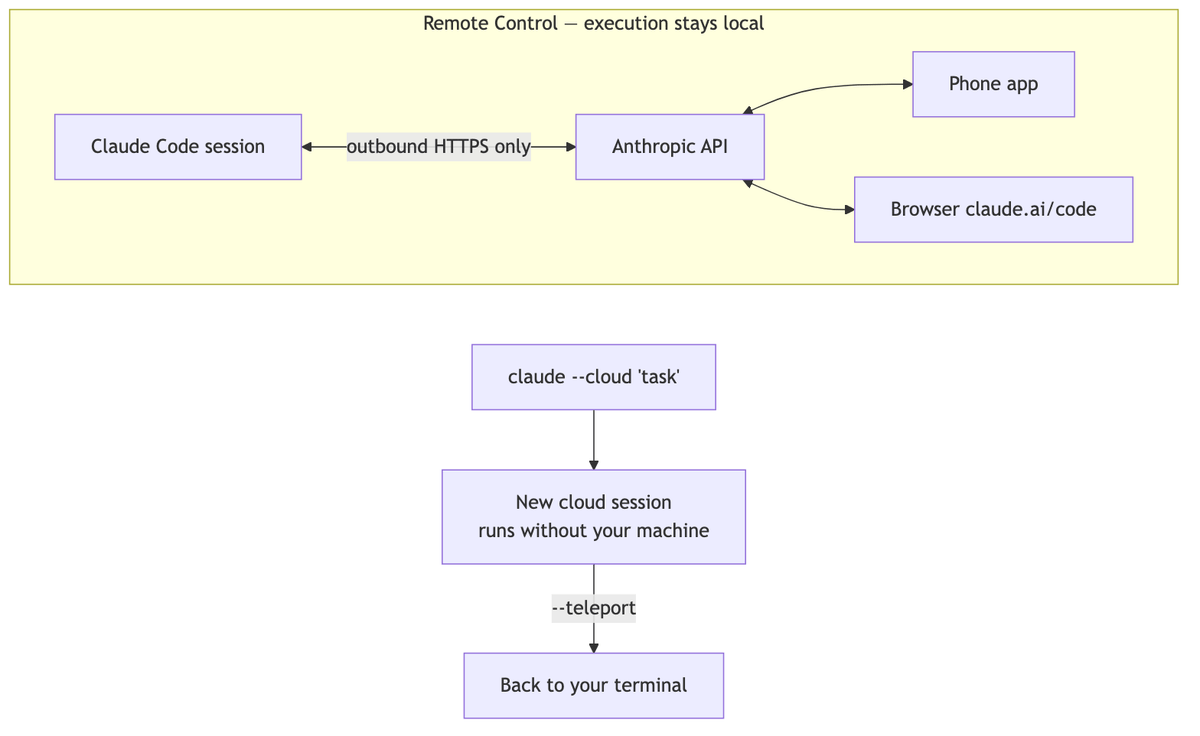
There is one important design detail: even when connected remotely, execution continues on the local machine.
That means your filesystem, local MCP servers, and project settings all remain available from your phone. Type @ and even local file paths are automatically completed.
Communication uses outbound HTTPS only and does not open an inbound port on your computer. However, while connected, conversation history is stored on Anthropic’s servers to synchronize the devices. Keep this in mind.
Remote Control is a research preview available on Pro, Max, Team, and Enterprise plans (API key authentication is not supported). Team and Enterprise require an Owner to enable it first.
–cloud and –teleport: Running in the Cloud
If Remote Control means “local execution + remote control,” there is also the opposite combination.
According to Official CLI reference, claude --cloud "작업 설명" creates a new web session in the claude.ai cloud. It keeps running even when your computer is off, making it suitable for work in repositories you have not cloned or for parallel tasks.
To bring a session from the web into the terminal, use claude --teleport.
The use cases split like this: Remote Control for ongoing work that requires your local environment; the cloud for new tasks launched without setting up an environment.
Embedding It in GitHub and Slack
There are also two integrations outside the session.
/install-github-app installs the Claude GitHub app in a repository and prepares the GitHub Actions workflow file and secrets. After merging that workflow PR, you can mention @claude in PRs and issues to assign work.
/install-slack-app installs Claude in a Slack workspace through OAuth authentication in the browser. It lets you invoke Claude directly from team channels.

Wrapping Up the Series
Across 17 installments, we explored Claude Code’s commands. The progression was as follows.
- Fundamentals: Start with
/init, then add/plan, permissions, session management, and/rewindas safeguards - Operations:
/goal,/background, performance tuning,/code-review, and diagnostics - Automation and Extensions: hooks,
/loop, workflows, headless mode, shortcuts, and today’s remote features
The command set continues to grow. Use /release-notes to keep up with changes, and return to this series whenever you need it.
Sources and Verification Criteria
- Claude Code official documentation — Continue local sessions with Remote Control (Anthropic, checked 2026-08-15)
- Claude Code official documentation — CLI reference (Anthropic, checked 2026-08-15)
Continue Reading
Claude Code Series
- Previous installment: [Claude Code #2] /plan plan mode: agree on the design before making changes
- Previous installment: [Claude Code #1] /init, getting started with automatic CLAUDE.md generation