
![Cover image for [Claude Code #3] Permissions in Review: /permissions and Mode Cycling](/assets/images/posts/b17b8c27-14dd-4d96-bc74-34a249a2ae3b/claude-code-permission-rules.jpg)
AI coding tools create a dilemma: asking for permission every time is tedious, but granting everything makes git push and rm -rf feel risky.
Claude Code resolves this balance with permission rules. Some commands pass silently, some always require confirmation, and others are blocked outright.
The plan mode covered in the previous Claude Code, Part 2 also runs on this permission system. This installment puts the whole picture together.
Basic behavior: What requires confirmation?
According to Official permissions documentation, each tool type has different default rules.
Read-only tools such as file reading and search run without approval inside the working directory.
Shell commands generally require approval. The built-in set of read-only commands is an exception.
File modifications always prompt for confirmation. Even if you choose “Don’t ask again,” the setting resets when the session ends. By contrast, “Don’t ask again” for shell commands is saved as a repository-specific rule and persists into later sessions.
Viewing rules with /permissions
Enter /permissions in a session to open the list of rules currently in effect. It also shows which settings.json each rule came from.
There are three types of rules.
- allow: allow execution without prompting
- ask: require confirmation every time it is attempted
- deny: block execution entirely
The evaluation order is everything
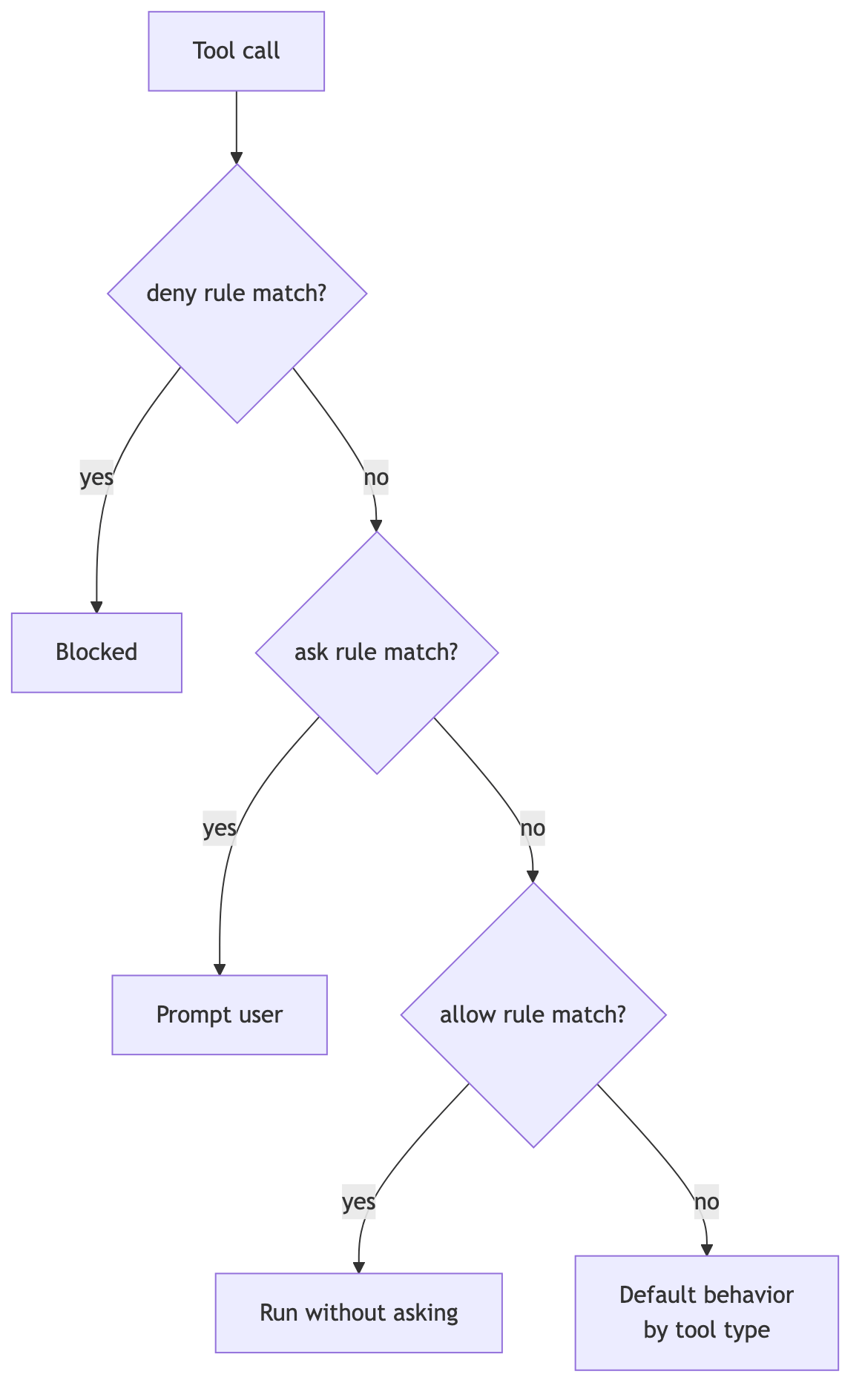
What happens when rules overlap? The order is deny → ask → allow, and the first matching rule wins.
The key point is that specificity cannot change the order. If you put Bash(aws *) in deny, execution is blocked no matter how specifically you write Bash(aws s3 ls) under allow.
Deny rules do not allow exceptions. A configuration such as “block all aws commands but allow only s3 queries” is impossible, so split the rules into narrower patterns.
One more detail: if you put only a tool name in deny without parentheses, such as Bash, that tool disappears entirely from Claude’s context. A narrower rule such as Bash(rm *) keeps the tool available while blocking only the specified call.
A quick tour of rule syntax
Rules take the form 도구 or 도구(지정자). Bash rules support the * wildcard, which can appear anywhere.
{
  "permissions": {
    "allow": [
      "Bash(npm run *)",
      "Bash(git commit *)",
      "Bash(* --version)"
    ],
    "deny": [
      "Bash(git push *)",
      "Read(./.env)"
    ]
  }
}
A space before an asterisk at the end of a command, as in Bash(ls *), preserves word boundaries. ls -la matches, but lsof does not. Without the space, Bash(ls*) also matches lsof.
For compound commands such as git status && npm test, every subcommand must match a rule to pass. Allowing Bash(safe-cmd *) does not let safe-cmd && other-cmd through.
File-path rules check only Read(경로) and Edit(경로). They use gitignore pattern syntax. Writing Write(docs/**) causes it to be ignored, so write Edit(docs/**) instead.
Also, Read deny blocks editing and writing to the same path as well. The single Read(./.env) rule in the example blocks both reading and modification.
Permission modes: Shift+Tab cycling
If rules provide precise targeting, permission modes define the session-wide operating stance.
Each press of Shift+Tab cycles through default (manual approval) → acceptEdits (automatic edit approval) → plan (plan mode). Plan mode was covered in the previous installment.
According to Official permission modes documentation, auto mode also joins the cycle when the account and plan requirements are met. A classifier model filters only risky actions and lets the rest proceed without prompting. Explicit ask rules still force a prompt.
For reference, Official announcement says that new sessions on Pro, Max, and Team plans use auto mode by default starting August 14, 2026.
Precedence among settings files
Rules can be distributed across multiple layers of settings.json: personal global settings (~/.claude/), project settings (.claude/settings.json), local-only settings, and organization-managed settings.
The principle stated by Official settings precedence documentation is simple: once deny matches at any layer, an allow rule from another layer cannot override it.
A project-level allow can be blocked by a personal deny, and vice versa. An organization-managed deny cannot be bypassed even with command-line flags.
Rules are enforced by the tool, not the model
Finally, here is one easy point to misunderstand.
Writing “Don’t run git push” in CLAUDE.md is a request, not enforcement. If the model forgets or misjudges the instruction, it can be bypassed.
Permission rules are different. The Claude Code client enforces them mechanically, regardless of the model’s judgment. Put anything that must be blocked in a deny rule, not just in CLAUDE.md.

Summary
The permission system has three foundations: allow, ask, and deny rules; the deny → ask → allow evaluation order; and permission modes that define the session stance.
A basic strategy is to allow frequently used safe commands to reduce prompt fatigue and lock down risky commands with deny.
The next installment covers a three-part set for continuing and branching conversations: /resume, /branch, and /fork.
Sources and verification criteria
- Claude Code official documentation — Configure permissions (Anthropic, checked 2026-08-13)
- Claude Code official documentation — Choose a permission mode (Anthropic, checked 2026-08-13)
Continue reading
Claude Code series
- Previous installment: [Claude Code #2] /plan plan mode: agree on the design before making changes
- Previous installment: [Claude Code #1] /init: get started by automatically generating CLAUDE.md