
![Cover image for [Claude Code #13] /deep-research, Multi-Agent Research](/assets/images/posts/ac59c3d2-dab7-4344-b081-cb7bb542af21/claude-code-deep-research-agents.jpg)
When researching a technical topic, it is easy to end up with dozens of browser tabs open. Since each source says things slightly differently, cross-checking what is correct can consume all your time.
Claude Code’s /deep-research takes over this entire process. Give it one question, and multiple agents search along different paths, verify one another’s findings, and return a single report with citations.
/deep-research Node.js How did the authorization model change between v20and v22 ?If Claude Code Part 12’s /loop was about how to divide up your time, this time it is about how to divide up your agents.
What makes it different: cross-validation
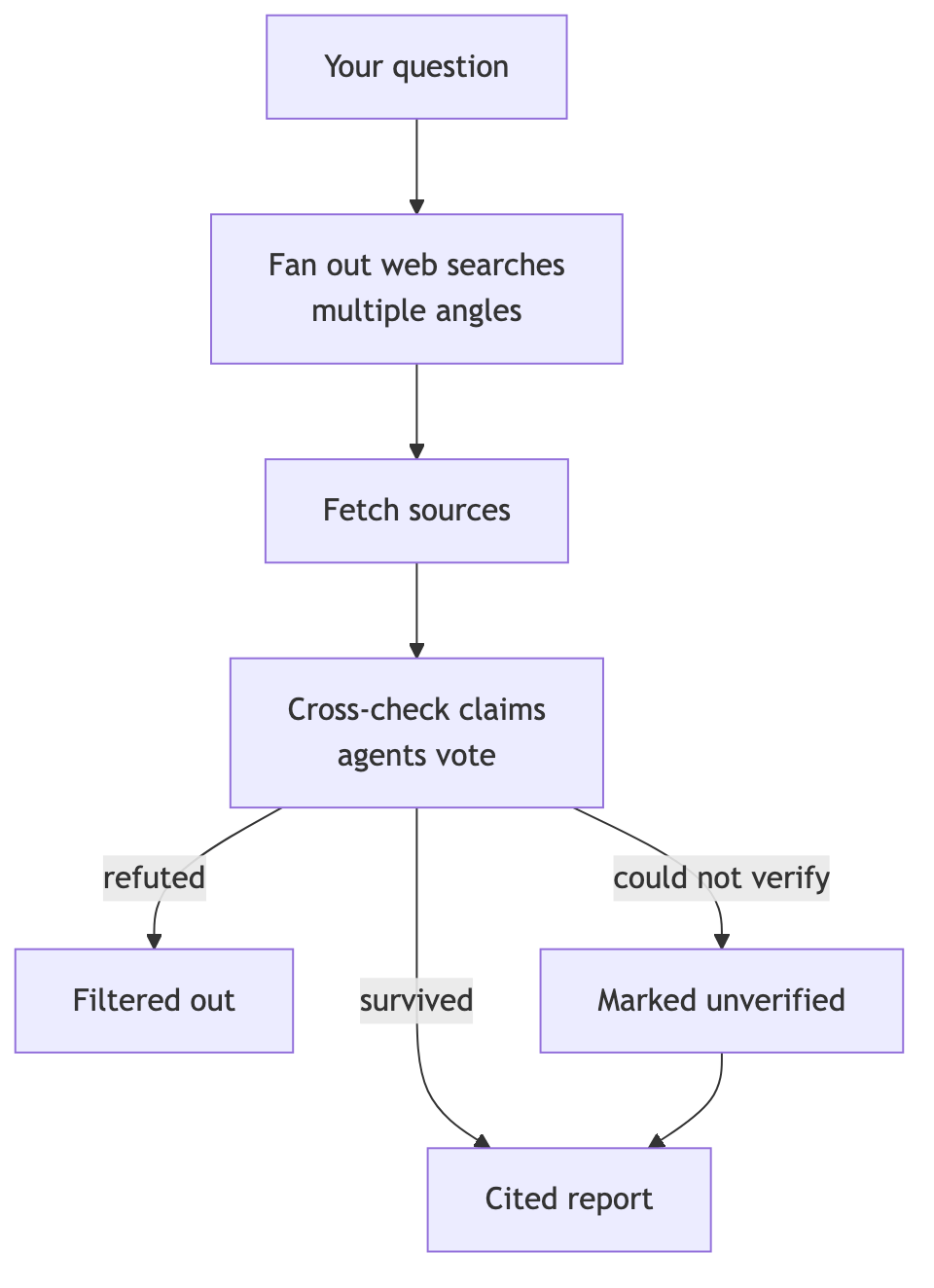
Official workflow documentation describes the process as follows: fan out a question into web searches from multiple angles, cross-check the sources found, and put each claim through a vote.
That makes the result different. Claims that do not survive cross-validation are filtered out, and only a report with supporting sources arrives.
Claims that a validation agent could not verify because of a rate limit or API error are not treated as false; they are marked separately as “unverified.”
What happens when you run it
In the default permission mode, it first asks whether to allow the workflow. Once you review the planned steps and approve them, execution begins.
Execution runs in the background. Your session remains available, and when it finishes, only the report arrives in the conversation.
To check the intermediate progress, enter /workflows. You will see the number of agents per step, token usage, and elapsed time. Opening a step also lets you see what each individual agent found.
What it really is: a workflow
/deep-research is a dynamic workflow built into Claude Code.
The workflow is a JavaScript script that orchestrates dozens of subagents. Repetition, branching, and intermediate results all stay inside the script, leaving only the final answer in your conversation context.
You can use the same structure for your own tasks. Write “do it as a workflow” in the prompt or include the ultracode keyword, and Claude will write and run a workflow script for that task.
ultracode: src/routes/ Audit all endpoints below for missing authenticationSave a workflow you like by pressing s in the /workflows view, then reuse it with the /이름 command.
Cost considerations
Because workflows launch many agents, they also use many tokens. They can be substantially more expensive than solving the problem through conversation.
So before running a large task, start by trying it on a small piece. Use one directory instead of the entire repository, and a narrow question instead of a broad one.
A Large workflow warning appears when there are more than 25 agents or the estimated token usage exceeds 1.5 million. It is informational and does not block execution. You can stop it at any time with /workflows, and results from completed agents are generally preserved.
Requirements
- Claude Code v2.1.154 or later, paid plan
- The Pro plan must be enabled under
/config’s Dynamic workflows section /deep-researchrequires an environment where the WebSearch tool is available

Summary
/deep-research is a built-in workflow that runs “search → cross-validation → cited report” with background multi-agents.
It is especially useful for questions where sources disagree, such as changes between versions, library comparisons, and investigating the cause of an outage. Check progress with /workflows. Try extending the same structure to your own tasks as a workflow.
The next installment covers claude -p headless mode, which inserts Claude into a terminal pipeline.
Sources and verification criteria
- Official Claude Code documentation — Orchestrate subagents at scale with dynamic workflows (Anthropic, checked 2026-08-14)
Continue reading
Claude Code series
- Previous installment: [Claude Code #2] /plan planning mode: agree on the design before making changes
- Previous installment: [Claude Code #1] /init: getting started with automatic CLAUDE.md generation