
![Cover image for [Claude Code #12] How to use /loop to delegate recurring tasks to a session](/assets/images/posts/0ee49424-49d0-464f-8934-05d00a97edb2/claude-code-loop-scheduled-prompts.jpg)
Tasks like “Check the deployment status every five minutes” are boring for people and easy to forget.
Claude Code’s /loop command delegates this kind of repetition to a session. It reruns the specified prompt at each interval.
If Claude Code — Part 11 hooks automate events, /loop automates time.
Three usage patterns
With Official scheduling documentation, the behavior depends on what you pass to it.
/loop 5m Check whether the deployment is complete and report the result   ← fixed interval
/loop Check whether the deployment is complete                  ← ClaudeClaude chooses the interval
/loop                                        ← built-in maintenance prompt
Intervals support s, m, h, and d units. Because cron works in one-minute increments, seconds are rounded up to minutes. Intervals that do not divide cleanly, such as 7m, are rounded to the nearest value.
You can provide only an interval, as in /loop 15m. In that case, the built-in maintenance prompt runs at a fixed interval. To avoid sessions piling up, the actual invocation may be delayed by up to half the interval.
When Claude chooses the interval
If you provide only a prompt without an interval, Claude chooses the next wait time after each repetition finishes—between one minute and one hour.
It waits briefly as a build nears completion and longer when a PR goes quiet. It also outputs the chosen interval and the reason after each repetition.
When it determines that the task is complete, it may terminate the loop on its own.
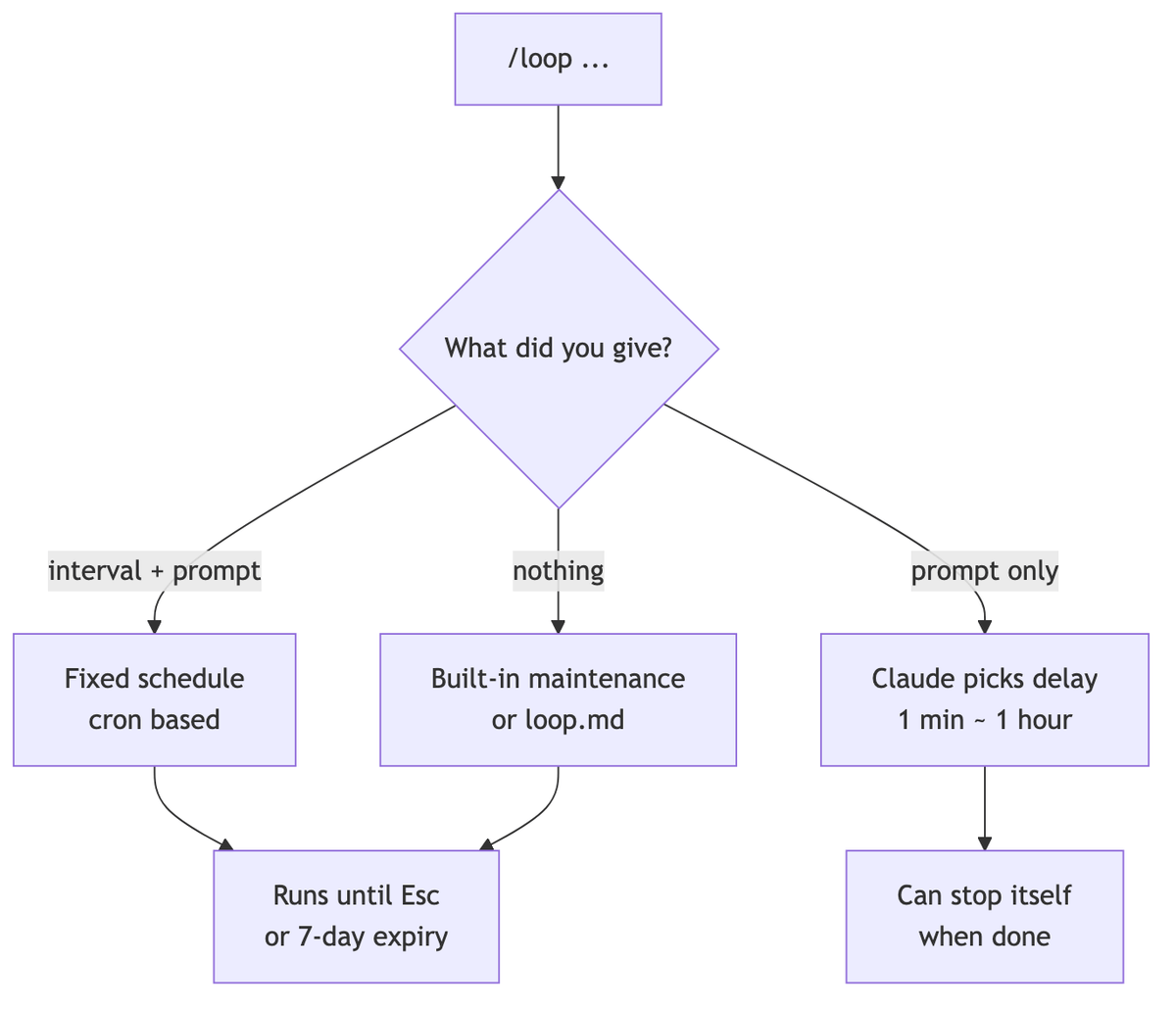
What happens when you enter only /loop
If you omit the prompt, the built-in maintenance prompt runs. The sequence is as follows.
- Continue unfinished work left in the conversation
- Look after PRs on the current branch: review comments, failed CI, and conflicts
- If there is nothing to do, perform cleanup such as bug hunting and simplification
Once you finish your work and leave only /loop running, it is like delegating the cleanup.
You can replace the default prompt with the .claude/loop.md file. Add team-specific recurring routines, such as release-branch management.
How to stop it and how long it lasts
Press Esc to stop a loop waiting for its next repetition. However, scheduled tasks created through natural language are not affected by Esc. You must ask Claude to delete them.
If left alone, a recurring task expires automatically seven days after it is created. This prevents forgotten loops from running forever.
Loops are tied to a session, so closing the terminal stops them. To keep them running, pass the session to the background with /bg. The loop moves with it. Resume the session with --resume to restore loops that have not yet expired.
For one-time tasks, just ask
For a one-time reminder, ask in natural language without /loop.
3Remind me to check the release branch pushat that time
45Check whether the integration tests passed after that many minutes
This creates a scheduled task that runs once and deletes itself.

If it needs to run even when your computer is off
/loopworks only while the session is alive. For tasks that must run independently of the machine, there are other options.
- cloud routine: Runs in Anthropic’s cloud and works even when your computer is off
- desktop scheduled task: Runs on your machine without a session and can access local files
- /loop: For fast polling within a session
Use /loop for lightweight cases, and move to the two options above for serious recurring workloads.
Summary
/loopis the command that tells a session, “Ask again at each interval.” You can specify the interval or let Claude choose based on the situation.
As long as you remember the seven-day expiration and Esc to stop it, you can schedule tasks without worry.
The next part covers /deep-research, which branches web searches in multiple directions to produce a report.
Sources and verification criteria
- Official Claude Code documentation — Run prompts on a schedule (Anthropic, checked 2026-08-14)
Continue reading
Claude Code series
- Previous part: [Claude Code #2] /plan planning mode: agree on the design before making changes
- Previous part: [Claude Code #1] /init: Get started by automatically generating CLAUDE.md