
![Cover image for [AI User Guide #3] Change the question, change the answer: 4 prompt basics](/assets/images/posts/5d7a8139-5a5f-4c8d-996b-c17bfe21e951/prompt-basics-1.jpg)
When people say, “I tried AI, but it wasn’t great,” many stopped at one-line requests like “Write an email” or “Summarize this report.” Yet even a small refinement to the request sent to AI—the prompt—can make the output feel as if someone else wrote it. There is a grand name for this technique, prompt engineering, but ordinary users really need only four basics.
Why does the answer change with the question?
Recall the principle from Part 1. AI generates the most natural text to follow what you gave it. If the input is only “Write an email,” AI knows nothing about who is sending it, who will receive it, or why, so it can only produce the most average email in the world. A bland result does not mean AI is incapable; it means it lacks ingredients.
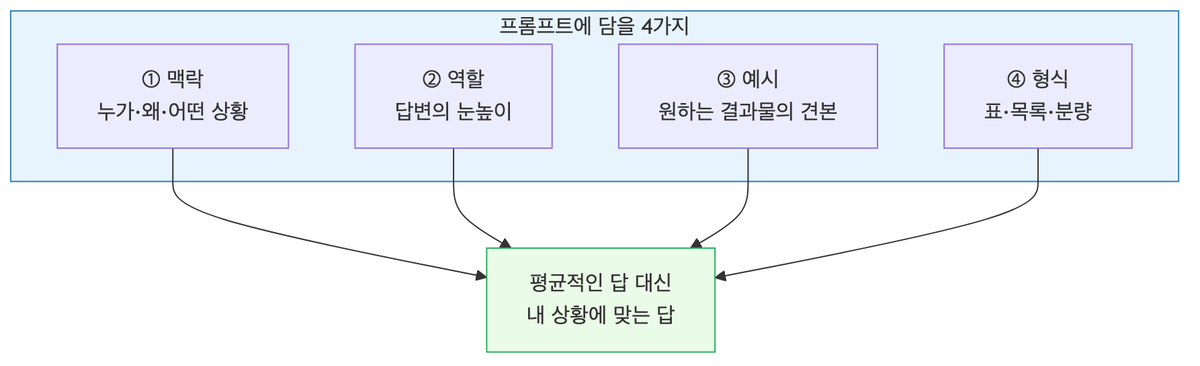
One sentence is enough for prompt basics. Think of it as assigning work to a new hire and make your request accordingly. If you tell a smart new employee who knows nothing about your company only “Write an email,” the result is predictable. The four points below are exactly the explanations that new hire needs.
Basic 1: Provide context
Simply explaining the background and purpose determines half the quality of the output.
- Bad example: “Write an email”
- Good example: “Write an email asking a client to postpone the delivery schedule. The recipient is a department manager we’ve worked with for 10 years, and our production issue will cause a one-week delay. Keep it polite without harming the relationship, but don’t make it sound like an excuse.”
Who will read it, why are you writing it, and what is the situation? Once these three elements are included, AI produces writing for that situation instead of average prose.
One point to note. Providing context does not mean pasting in company secrets or customers’ real names. You can anonymize them as “Client A” or “Customer Kim OO” with almost no impact on quality. Part 7 covers this issue separately.
Basic 2: Define a role
When you assign a role—“You’re a marketer with 10 years of experience” or “You’re a science teacher who explains things so even elementary school students can understand”—the answer’s perspective, vocabulary, and depth adapt to it.
The real value of role assignment is adjusting the answer to the right level. “Explain retirement pensions” gets plain-language terminology from a bank clerk speaking to a financial beginner, but a “financial expert” may also calculate tax benefits. Specify the desired level through the role.
Let’s clear up one misconception. Giving AI a role does not make it smarter or more accurate. What changes is the way it explains things.
Basic 3: Show examples
If you have a specific output shape in mind, showing one example is faster than explaining it in words.
Instead of endlessly explaining “Write it in our team’s weekly report format,” paste in last week’s report and say, “Use this exact format and tone, but write about this week’s content.” AI picks up the title style, sentence length, and level of politeness from the example.
The reason this works follows the same principle. AI continues the pattern of the text before it, and no instruction specifies a pattern more clearly than an example.
Basic 4: Specify the format
First consider where you will use the output, then request that shape in advance.
- “Organize it in a table. Use item, cost, and pros and cons as the columns.”
- “In no more than three paragraphs, with no more than three sentences per paragraph.”
- “State the conclusion first and number the supporting reasons.”
Specifying the format is less a quality issue than a post-processing time issue. If the content will become a table anyway, it is better to receive a table from the start; for an executive briefing, a conclusion-first structure is better.
And don’t try to finish in one go
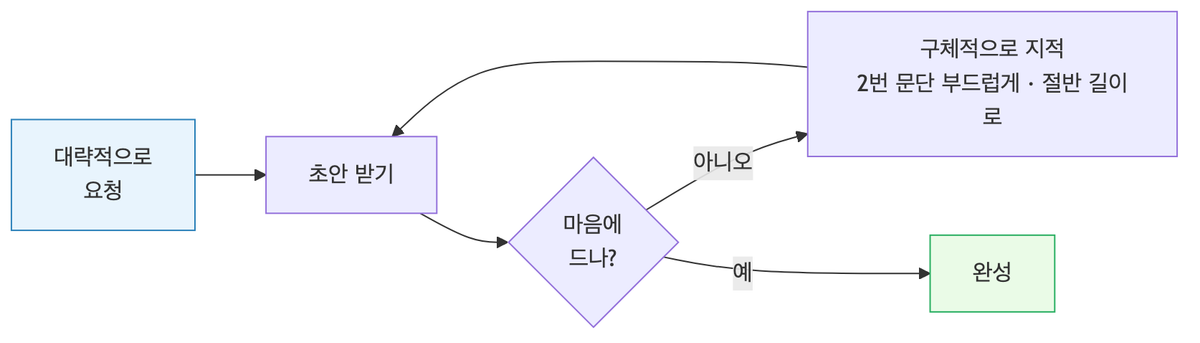
There is a habit more important than the four basics. Treat the first answer as a draft, not a finished product.
A conversation with AI is not a vending machine; it is ping-pong. Revising it with requests like “The second paragraph is too stiff—make it warmer,” “Explain the evidence here in more detail,” or “Cut the whole thing to half the length” is normal usage. In most cases, starting roughly and revising three times is faster than trying to write the perfect prompt.
Summary
- A bland result does not mean AI is incapable; it means it lacks ingredients
- Cover four points: context (who, why, and the situation), role (level), examples (form), and format (shape)
- Explain the task as if you were assigning it to a new hire, and most problems are solved
- The first answer is a draft. Improve it through ping-pong
Even a well-written prompt cannot handle everything. Some tasks require information AI does not know, such as your company’s documents or news published today. In those cases, you need to provide the material itself rather than refine the question. The next part covers how to feed AI source material through file attachments, web search, and NotebookLM.