
![Cover image for [Open Source #1] Automating Threads with AutoThreads](/assets/images/posts/1bb2249f-cd85-4efe-b1b6-37f5dad8bb16/autothreads-open-source-1.jpg)
GitHub is full of useful projects nobody knows about. Some lie buried with only a few stars before suddenly becoming popular. This series opens such repositories one by one to see what they do, how they were built, and whether they are actually useful.
The first entry is AutoThreads, a desktop app that hands Threads account management to AI. It was released in early July 2026, making it a project less than a month old. Its MIT license lets you inspect or modify it freely.
Where SNS management becomes labor
Whether it is Threads or X, growing an account means repeating similar tasks every day: finding what people are discussing, choosing something useful, rewriting it in your voice, adding an image, posting at the right time, and replying to responses. Each takes five minutes, but together they consume the day.
AutoThreads removes this entire repetitive stretch. The approach, however, comes in two forms. That distinction defines the project’s character.
- Assistant mode — AI writes the draft, and a person decides whether to publish it. This is the default.
- Fully automatic mode — The agent finds news, writes posts, and replies on its own. It must be enabled.
The repository contains a sentence that sums up the project’s attitude: “Automagical, not autopilot.” Automate the work, but do not hand over the controls.
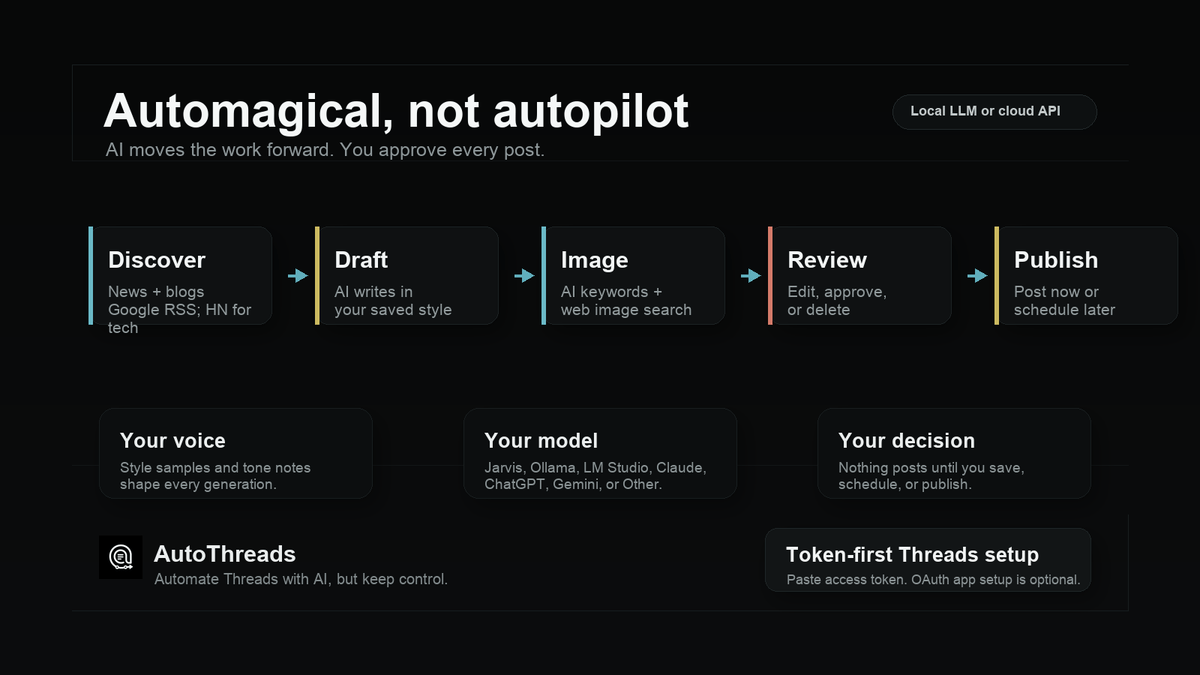
Five stages from discovery to publishing
Assistant mode is organized into five steps: Discover → Draft → Image → Review → Publish. Looking at what each stage does makes it clear how much the app handles for you.
Discover fetches news. By default, it enables Google News RSS (Really Simple Syndication, a standard format for subscribing to new site content) and Hacker News. Hacker News is added selectively for technology topics. Yahoo News, Naver News, and user-added RSS or Atom feeds can be enabled in settings. Presets include science, fashion, and finance, and you can also enter topics yourself.
Draft turns a selected headline into a post suitable for Threads. The important part is “my voice.” Add a style note or sample posts, and it writes in that tone. It can also import existing Threads posts as training material.
Image searches Wikimedia Commons using AI-generated keywords and shows candidate images. Choosing one is up to you.
This part needs caution. Wikimedia Commons is often treated as a free-for-all library, but it is not limited to public-domain works. Many items use CC BY or CC BY-SA and require attribution and source information. The app retrieves only the file URL and format during search; it does not retrieve license data at all. The license is neither shown onscreen nor added automatically to posts. The person publishing must verify the selected image’s terms.
Review and Publish need no explanation: edit, publish now, or schedule.
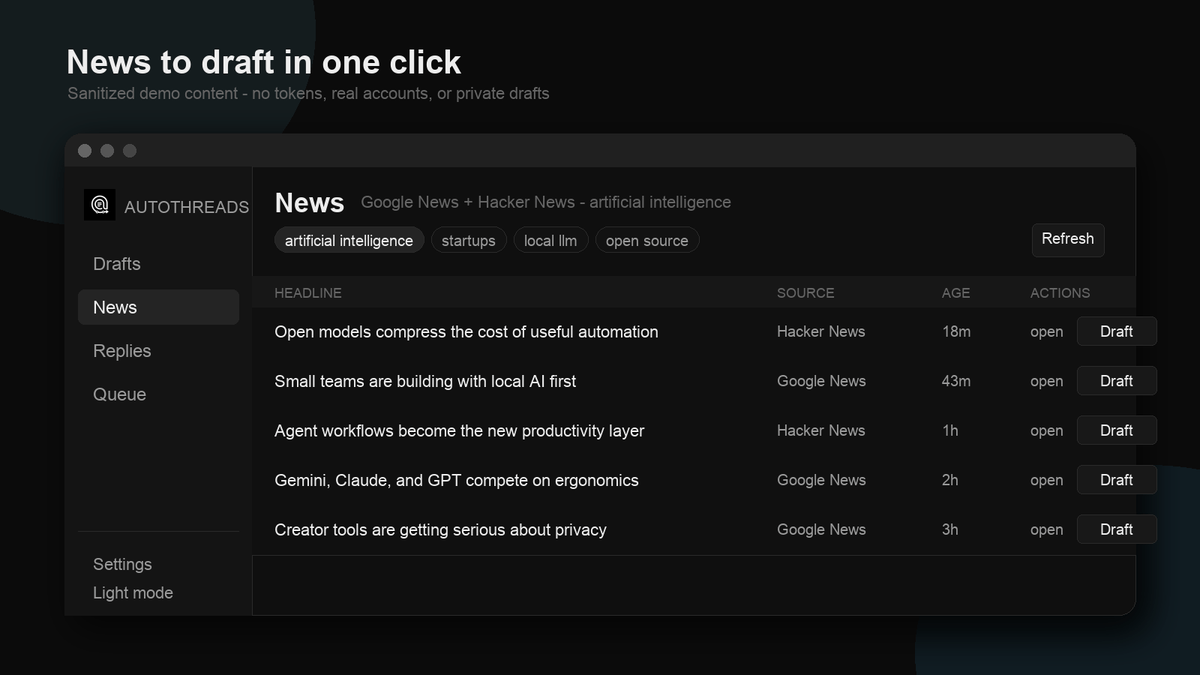
The news screen looks like this. Click a topic pill to switch fields. One Draft button beside a headline starts generation. Since the source and article age are visible, you are less likely to select outdated news by mistake.
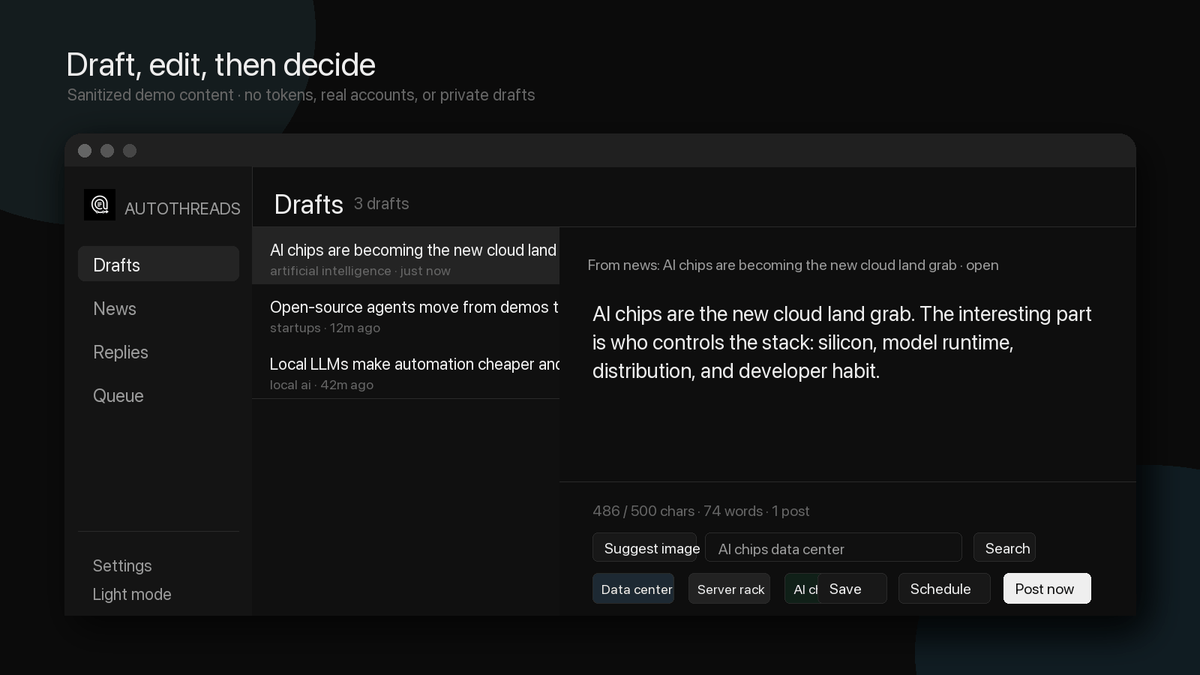
The draft screen counts characters (Threads has a 500-character limit), suggests image-search keywords, and lets you save, schedule, or publish immediately from one place.
One point to remember: scheduled posts are published only when the app is running. The app on your computer keeps time and publishes them; a server does not. If you close your laptop, the scheduled time simply passes. Failed posts are retried about a minute later.
Why API costs can be zero
This is the project’s most notable choice: users choose the model that writes the posts.
For cloud services, you can connect Claude, ChatGPT, or Gemini, and any OpenAI-compatible endpoint can be connected as “Other.” Alternatively, connecting a local LLM (Large Language Model) running on your computer brings cloud API costs down to zero. Any OpenAI-compatible local server such as Ollama, LM Studio, llama.cpp, or Jarvis works by entering its address.
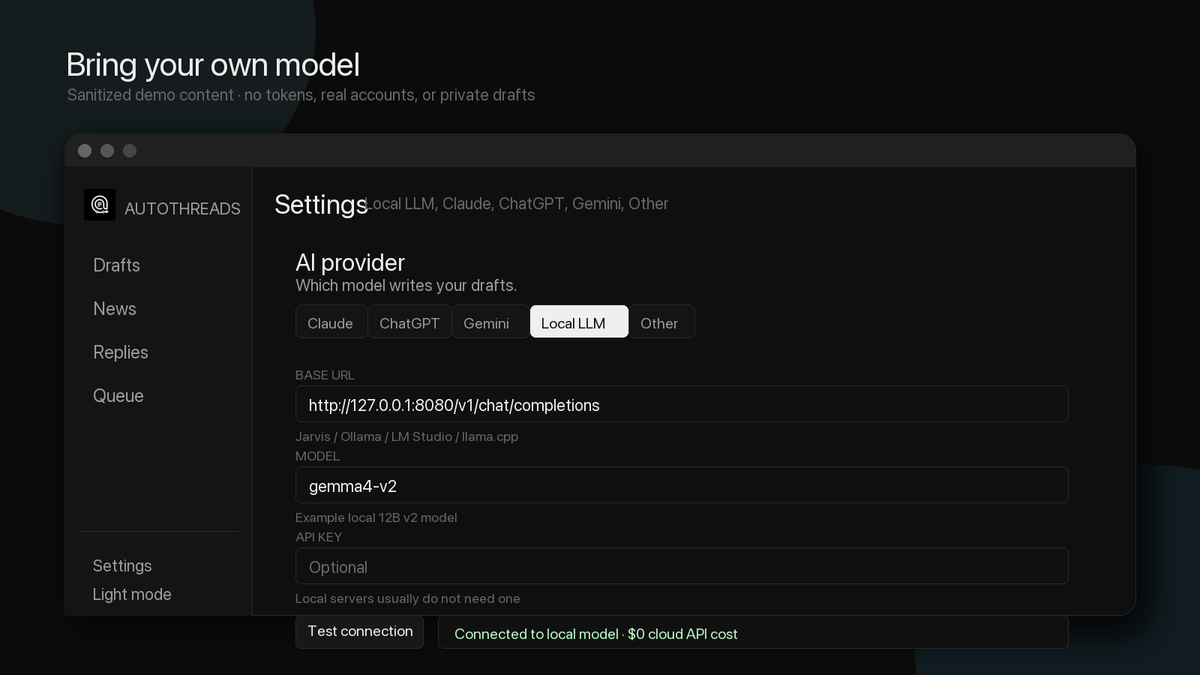
That is exactly what the settings screen shows. The value in http://127.0.0.1:8080/v1/chat/completions is the app default. With Ollama, replace it with your own server address, http://localhost:11434/v1. Enter the model name and run the connection test. The API key can remain blank because local servers generally do not require one.
This choice matters in an SNS automation tool because such apps generate a lot of posts. Calls accumulate quickly, several per day and more when replies are included. Cloud APIs increase the bill in real time, while a local model costs only electricity. Quality naturally depends on the model, so the design leaves you to weigh draft quality against cost.
The real hurdle is connecting Threads
Installation is easy. macOS and Windows installers are available on the releases page, and running from source takes three lines.
git clone https://github.com/eisenjimmy/autoTHREADS.git
cd autoTHREADS
npm install
npm run dev
The problem comes next. To post to Threads, you must create an app in a Meta developer account and issue an access token. This is where most people get stuck.
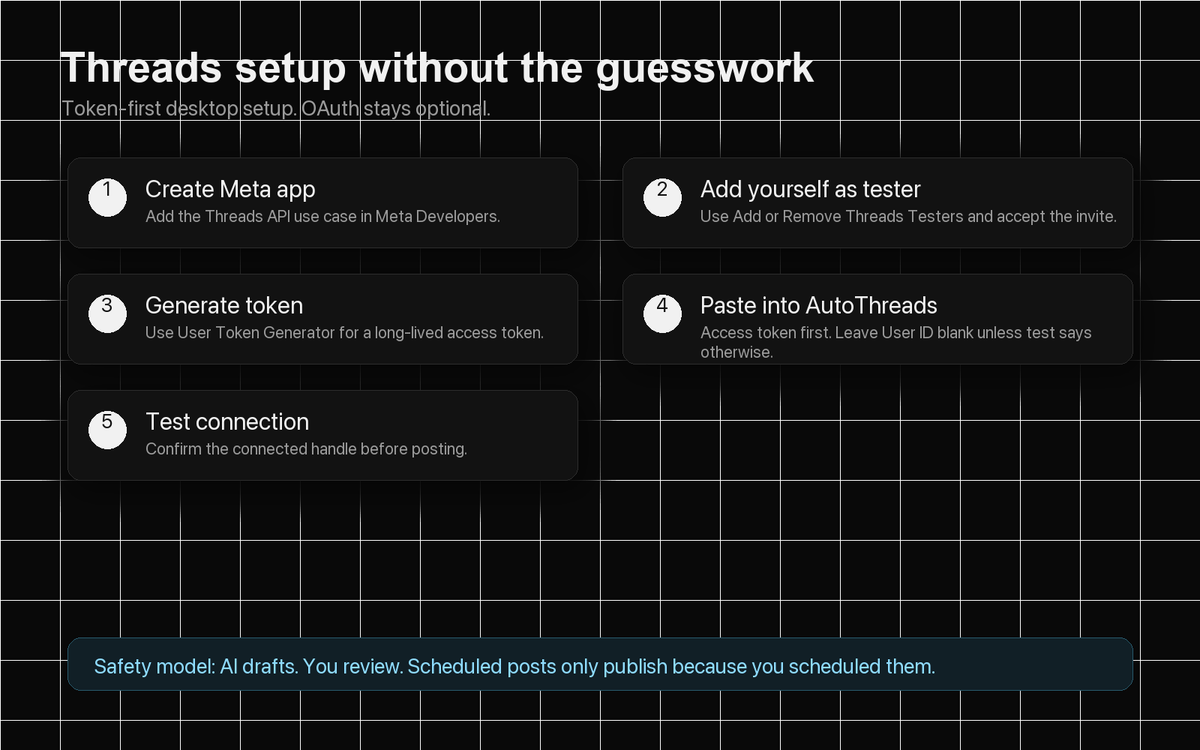
The repository’s friendly touch is laying out the process in a five-step illustration: create an app on the Meta developer site → register your Threads account as a tester → issue a token → paste it into the app settings → click the connection test.
The illustration omits one trap that the README calls out separately. Tokens issued before enabling a permission do not include it. If you add a permission, issue the token again. Posting, replying, and mention permissions are required; keyword-search permission must also be enabled for public-post search.
OAuth (Open Authorization, a standard for delegated account authorization) using an app ID and secret is also supported, but it is usually unnecessary on desktop. One token is enough.
Fully automatic mode—and the brakes
This is where the project’s ambition appears. Configure goals, interests, and a persona in the Auto tab, press Start, and the agent runs by itself.
There are two timers. The posting timer (60 minutes by default) fetches news, plans what to post, checks for overlap with recent posts, and writes the post. The reply timer (five minutes by default) checks unanswered replies to your posts and @mentions of you, then responds. Since they run independently, you can post once an hour and reply every five minutes.
In a system that runs alone, the brakes matter most. This part is quite thorough.
- It is off by default. It does nothing until you press Start and stops immediately when you press Stop.
- Draft-only mode is available. It accumulates drafts instead of publishing them so you can review the results. The documentation explicitly requires using this mode for the first run.
- Daily limits can be set separately for posts and replies.
- There is a fixed limit of 20 unanswered replies per post. Even if a post receives hundreds of replies, it answers only the latest 20. Users cannot change this value.
- It remembers recent posts to prevent repetition, avoiding repeated topics and previously used headlines.
- The irregular posting option deliberately skips about 18% of scheduled posting times. An account posting exactly on the hour every hour obviously looks like a bot. It never skips twice in a row.
The agent is also instructed not to leak system prompts, API keys, or tokens in replies. That reflects awareness of where automated response bots actually fail.
What the code looks like
This is the part worth examining from a developer’s perspective.
It uses React 19 and TypeScript in strict mode on Electron, Zustand for state management, Vite for builds, and electron-builder for packaging. Data is stored in local JSON files without a separate database.
The architectural point to notice is process separation. The main process handles every side effect: fetching news, calling the LLM, searching images, calling the Threads API, saving drafts, scheduling, the fully automatic engine, and encrypting secrets. The renderer uses only the narrow bridge exposed through contextBridge. It does not directly touch the file system or external network.
In an Electron app, this is close to a security requirement rather than a preference. Giving the renderer Node permissions would let any web page opened inside the app access user files. External links open in the system browser, and navigation is blocked so arbitrary pages cannot inherit the preload bridge.
Tokens and API keys are encrypted and stored using Electron’s safeStorage. macOS uses Keychain, and Windows uses DPAPI (Data Protection API, the built-in Windows encryption service). Compared with the common personal project that stores tokens in plain JSON, this shows care.
Things to know before writing
The good parts are not enough, so here are the caveats.
It is still 0.2.x. Released in early July, it is receiving releases quickly, which also means frequent changes. Take the documentation’s advice seriously and test it thoroughly in draft-only mode before connecting a real account.
The installers are not notarized. On macOS, you must right-click and choose Open the first time, or allow it in Privacy & Security settings.
Responding to @mentions has a condition. Without Meta’s Advanced Access approval, the API shows only mentions from accounts registered as testers for your app. Mentions from ordinary users are invisible. Public-post keyword search works the same way.
There is no Linux build yet. Only macOS and Windows are supported. Linux packaging is on the roadmap.
This project is not affiliated with Meta. It is a third-party app made by an individual, and Threads is a Meta trademark. Account-policy compliance is the user’s responsibility.
There is also the broader question of how to view automation itself. The tool cannot answer whether an account benefits from having more posts created without human involvement. That is probably why fully automatic mode is an option rather than the default.
Summary
- AutoThreads is an Electron desktop app that automates Threads account management with AI. It uses the MIT license and supports macOS and Windows.
- The default is “AI drafts, humans decide.” It runs through five stages: news discovery → draft → image → review → publish.
- You choose the model. Claude, ChatGPT, and Gemini are supported, and connecting a local LLM makes cloud API costs zero.
- Fully automatic mode is optional. Separate posting and reply timers run independently, while daily limits, 20 unanswered replies per post, repetition prevention, and draft-only mode act as brakes.
- The real hurdle is creating a Threads token on the Meta developer site. It is easy to miss that the token must be issued after enabling permissions.
- It is still 0.2.x, and the installers are not notarized. Testing in draft-only mode before connecting a real account is the safer approach.
The repository is https://github.com/eisenjimmy/autoTHREADS. In the next entry, I will open another overlooked repository and ask the same questions.