
![Cover image for [Claude Code #9] /code-review, from low to ultra](/assets/images/posts/3a3c5139-78d7-4952-be11-c771eeb272d4/claude-code-review-effort-levels.jpg)
Sometimes it feels risky to commit AI-generated code as-is. You need a gate to run once before bringing in a human reviewer.
Claude Code’s /code-review serves that purpose. It inspects the changes in your current branch and finds bugs and cleanup opportunities.
This article walks through the levels step by step, from adjustable local intensity to the cloud’s thorough ultra inspection.
The effort levels covered in Claude Code Part 8 are used for review intensity as well.
By default, it inspects changes in your branch
Enter /code-review in a session to start a review.
According to Official documentation, the default target is commits ahead of upstream plus uncommitted changes. It reports correctness bugs and opportunities for reuse, simplification, and efficiency improvements.
You can specify other targets too: file paths, PR numbers, branch names, and ranges such as main...my-feature.
By default, the review runs as a background subagent in its own context. It does not occupy your conversation, and only the results return when it finishes.
Levels: confidence or coverage
Adding an effort level such as /code-review high changes the review intensity.
- low·medium: reports only the most confident findings. Fewer false positives
- high·xhigh·max: broadens coverage. Less-certain findings may also be included
If you omit the level, the last level you entered manually is reused. The interface also displays a notice such as “Reusing the high level entered last time.”
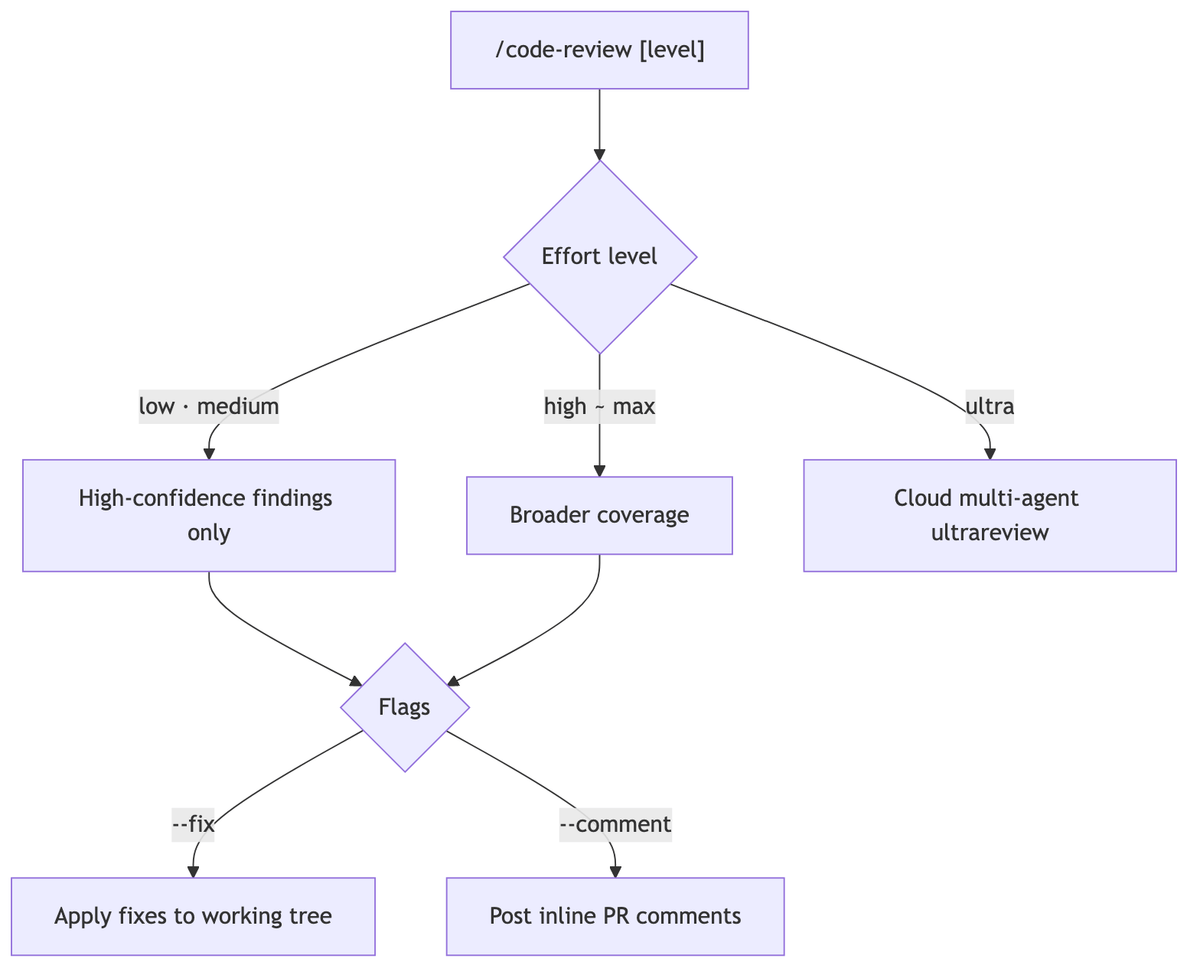
Should it only find issues, or fix them too?
--fix: applies the findings directly to the working tree when the review finishes--comment: posts the findings as inline PR comments
--fix comes with one caveat. Background review changes happen outside the session checkpoint, so they cannot be reverted with /rewind. If you dislike them, you must revert them with git.
ultra: cloud multi-agent review
/code-review ultra operates at a different scale. It is an ultrareview in which multiple cloud agents investigate in parallel.
The scope differs too. It compares the current branch with the repository’s default branch and includes uncommitted changes. You can also change the comparison base branch, as in /code-review ultra develop.
Official ultrareview documentation requires authentication with a claude.ai account. Pro·Max users can run it free three times, after which roughly $5–$25 per review is deducted from usage credits.
When the target is a github.com PR, a choice to post the result as a comment on your account appears in the pre-run dialog. Adding --post preselects that option, but you are still asked once more whether to post it (v2.1.227 or later).
Local levels are enough for everyday commits, while ultra fits weightier moments such as a final pre-release check. In environments where ultra is unavailable, such as Bedrock, this command quietly falls back to a local review.
How it differs from sibling commands
There are two other similarly named commands.
/simplify: a cleanup-only command that applies fixes, focusing on cleanup and simplification without hunting for bugs/security-review: focuses exclusively on security vulnerabilities in the changes
Use /code-review when you want to find bugs, and /simplify when you want to polish the code.

Tuning the review criteria
Local reviews follow the project rules in CLAUDE.md, like any other session. If you document team conventions in CLAUDE.md, reviews reflect them too.
For reference, there is also managed Code Review for automatically reviewing GitHub PRs, available only to Team·Enterprise. It uses a dedicated REVIEW.md file to configure criteria, but local /code-review does not read that file.
Summary
As a pre-commit habit, /code-review is enough. Use low·medium for confidence-focused reviews and high or above for a broader sweep.
To delegate fixes as well, use --fix; for a thorough pre-release review, move up to ultra.
The next article covers a set of diagnostic commands for inspecting session state, including /doctor, /context, and /usage.
Sources and verification criteria
- Claude Code official documentation — Code Review (Anthropic, checked 2026-08-14)
- Claude Code official documentation — Ultrareview (Anthropic, checked 2026-08-14)
Continue reading
Claude Code series
- Previous article: [Claude Code #2] /plan planning mode: agree on the design before making changes
- Previous article: [Claude Code #1] /init: getting started by automatically generating CLAUDE.md