
![Cover image for [Claude Code #11] Hooks: Automate with mechanisms, not requests](/assets/images/posts/76a987e0-498d-44b4-88a8-e737861f7f2a/claude-code-hooks-automation.jpg)
Even if you write “Always run the formatter after editing” in CLAUDE.md, AI may forget sometimes. Instructions are requests, after all.
Anything that must happen should be built as a mechanism, not left as a request. In Claude Code, that mechanism is a hook.
A hook is a shell command you define. It runs automatically at specific points while Claude Code operates, and triggers deterministically regardless of what the model chooses.
If commands up to Claude Code #10 were something you triggered manually, hooks are automatic mechanisms that trigger themselves.
Build Your First Hook in 5 Minutes
Hooks are defined in the hooks block of settings.json. Here is an example that displays a macOS notification while Claude waits for input.
{
  "hooks": {
    "Notification": [
      {
        "matcher": "",
        "hooks": [
          {
            "type": "command",
            "command": "osascript -e 'display notification \"Input required\" with title \"Claude Code\"'"
          }
        ]
      }
    ]
  }
}
Save it and enter /hooks to see the list of registered hooks. This screen is read-only, so edit settings.json directly or ask Claude to do it.
When Can Hooks Trigger?
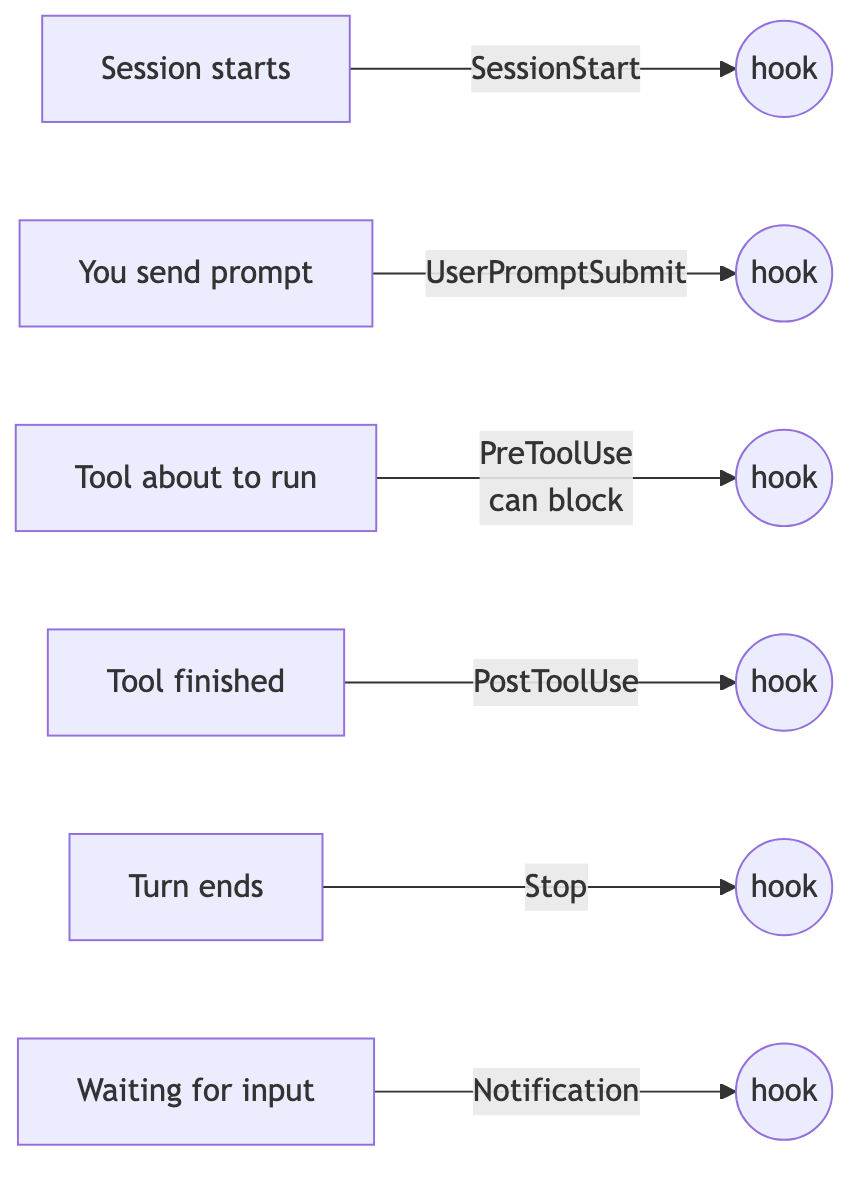
Based on Official Hooks Guide, these are the events used most often.
SessionStart: When a session starts or resumesUserPromptSubmit: Immediately after sending a prompt, before Claude processes itPreToolUse: Immediately before a tool call; can block the callPostToolUse: Immediately after a successful tool callStop: When Claude’s turn endsNotification: When Claude is waiting for input
Use a matcher to narrow the target. If you write "matcher": "Edit|Write", the hook runs only when a file-editing tool is used.
Three Representative Use Cases
Automatic formatting after edits. Attach the Edit|Write matcher to PostToolUse and run prettier. Formatting is enforced regardless of which file AI edits.
Blocking protected files. A PreToolUse hook checks specific paths, and When It Ends with Exit Code 2 blocks the edit. It must be 2, not just any failure code. Unlike a CLAUDE.md instruction, this cannot be bypassed even if the model forgets.
Notifications when finished. As in the earlier Notification example, you do not need to keep watching the terminal.
When Judgment Is Needed: Prompt Hooks
Some conditions are difficult to determine with a shell script, such as “Is the requested work completely finished?”
In that case, use a type: "prompt" hook. Instead of a shell command, specify the evaluation criteria, and the default Haiku model judges with yes/no.
Attaching a prompt hook to the Stop event turns it into “Keep working if it is not finished.” In fact, /goal covered in Part 6 is a session-scoped wrapper built around this structure.
Hooks Execute Shell Commands As-Is
Their power comes with risk. They automatically execute arbitrary shell commands with your permissions.
Hooks in a project’s settings.json require confirmation that you trust the repository. Do not dismiss this confirmation lightly when opening someone else’s repository.
Inside hook commands, quote variables and follow the same basic practice of never executing external input without validation.

Summary
Hooks are mechanisms that remove “things that must happen” from the model’s memory and entrust them to the system.
Start with enforced formatting, protected-file blocking, and completion notifications. Extend to prompt hooks when conditions require judgment.
The next installment covers /loop, which repeatedly runs prompts at fixed intervals. If hooks automate events, /loop automates time.
Sources and Verification Criteria
- Claude Code official documentation — Automate actions with hooks (Anthropic, verified 2026-08-14)
- Claude Code official documentation — Hooks reference (Anthropic, verified 2026-08-14)
Continue reading
Claude Code Series
- Previous installment: [Claude Code #2] /plan plan mode: agree on the design before making changes
- Previous installment: [Claude Code #1] /init: Get started by automatically generating CLAUDE.md