
![Cover image for [Claude Code #1] Getting started with /init and automatic CLAUDE.md generation](/assets/images/posts/29f64ad2-15d8-41ec-84be-686abdce13e9/claude-code-init-1.jpg)
When you add an AI coding tool to a new project, you keep repeating the same explanations: What is the build command? How do you run tests? What coding rules should be followed?
Claude Code stores these explanations in a file called CLAUDE.md and reads it automatically every session. The problem is that writing this file from scratch can feel surprisingly daunting.
/init is the command that gets you over that first hurdle. It analyzes the codebase and creates a CLAUDE.md draft for you.
This is the first article in a series that examines Claude Code commands one by one. We’ll start with the command you’re most likely to run first.
What /init does
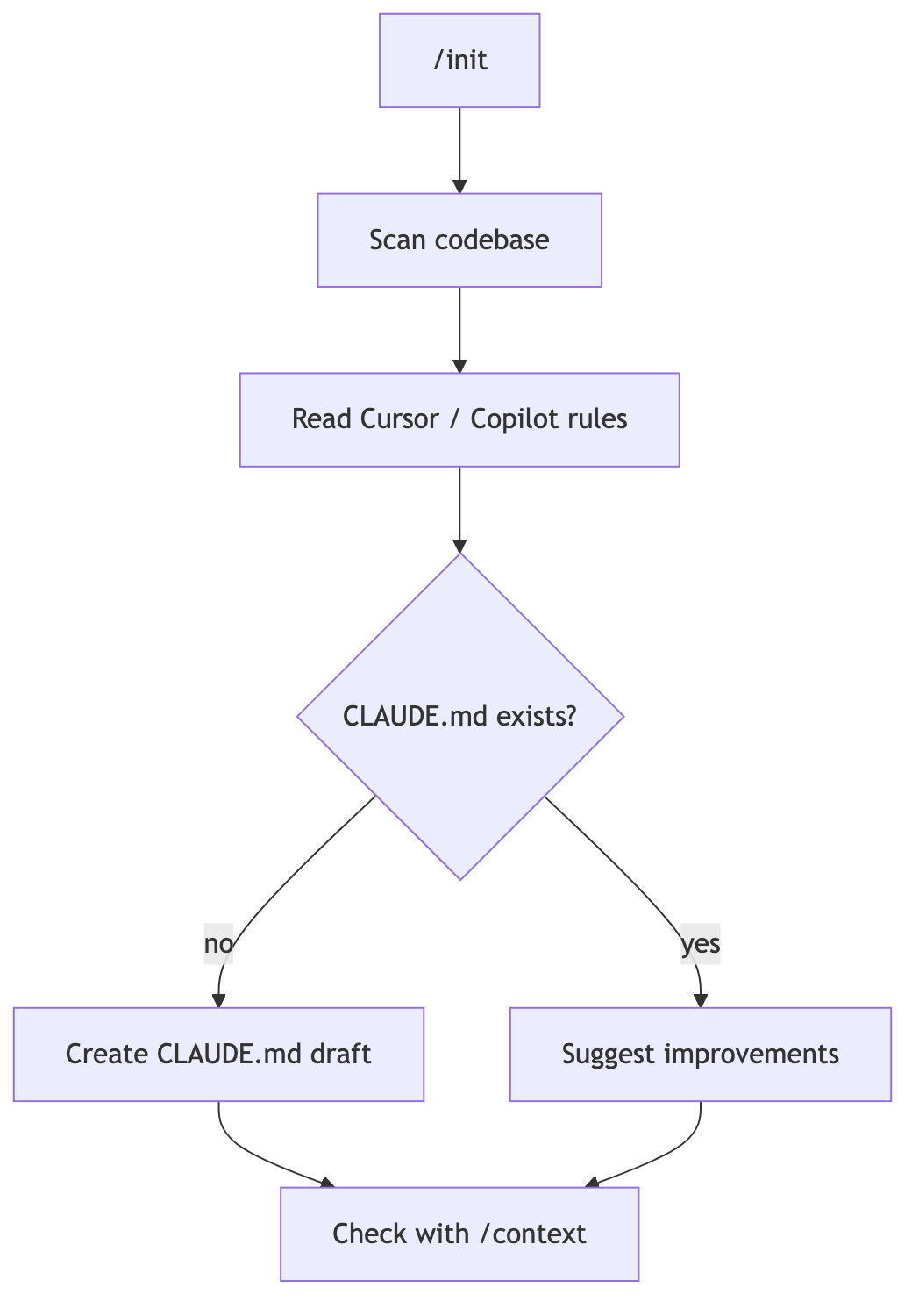
Type /init into the session input, and Claude starts scanning the project.
Official memory documentation describes the process like this: it analyzes the codebase, identifies build commands, testing methods, and project conventions, then generates CLAUDE.md from that information.
The result looks roughly like this.
# CLAUDE.md

## Build and test
- Development server: pnpm dev
- Tests: pnpm test (Required before committing)

## Structure
- API Keep handlers in src/api/handlers/
- Put shared types in src/lib/types.ts
Information readable from package.json or a Makefile provides the skeleton. A draft that would take 30 minutes to write from scratch can appear in a few minutes.
If you’re wondering what CLAUDE.md is and why it’s needed, start with Claude Code rules and memory explained.
If CLAUDE.md already exists
Running /init again does not overwrite the existing file.
According to the official documentation, when the file already exists, Claude suggests improvements instead of overwriting it. That makes it safe to run even after a project is well underway.
It’s worth running periodically when reviewing an outdated CLAUDE.md. It can suggest improvements that incorporate build and test procedures changed since the file was written.
Migrating from other AI tools
/init also reads rule files from other coding agents.
It supports Cursor’s .cursor/rules/ and .cursorrules, as well as GitHub Copilot’s .github/copilot-instructions.md. Relevant content is selected and incorporated into the new CLAUDE.md.
If the repository already uses AGENTS.md, there’s a separate approach. Add one line, @AGENTS.md, to CLAUDE.md to load that file in full.
@AGENTS.md

## Claude Code Dedicated instructions
- src/billing/ Use plan mode first when changing the following
Both tools will read the same rules, so there’s no need to duplicate the content.
For repositories that used Codex CLI or Gemini CLI, there is a separate /import command. It migrates everything from instruction files to MCP servers, commands, and skills in one go (v2.1.213 or later).
Enabling interactive /init
A single environment variable switches /init to a more thorough interactive mode.
CLAUDE_CODE_NEW_INIT=1 claudeIn this mode, /init first asks what you want to create. You can choose whether to create only CLAUDE.md or also set up skills and hooks (scripts that run automatically at specific points).
It then explores the codebase with subagents and asks follow-up questions to fill in missing information. Because it shows a proposal before writing files, you can review it before applying the changes.
This mode also broadens the range of rule files it reads. Settings from other tools, such as AGENTS.md, .windsurf/rules/, and .clinerules, are included as references.
Verify it after creation
Once generation is complete, try running /context.
If CLAUDE.md appears under Memory files, it has loaded correctly. If it is missing, Claude is not reading the file.
To open and edit the file, use the /memory command. It opens the file directly in an editor within the session.
A draft is only a draft: how to refine it
There’s one reason it would be wasteful to leave the file created by /init untouched: it omits knowledge that automated analysis cannot discover.
The official documentation also recommends adding “instructions Claude cannot discover on its own” after creating the file. This includes context such as why a structure was chosen and which pitfalls to avoid.
When refining it, remember just two guidelines.
First, aim for no more than 200 lines per file. The longer it is, the more context it consumes and the lower instruction adherence becomes.
Second, use verifiable statements. “Keep the code clean” is followed far less reliably than “Use two-space indentation.”
You can remove information that is obvious from the code, such as directory listings. The /doctor check can also find and suggest deleting this kind of clutter (v2.1.206 or later).
If you want to know more about why it should stay short, Why should CLAUDE.md be short? covers it in detail.

Summary
/init is the first gateway when starting Claude Code in a new project.
It analyzes the codebase to create a CLAUDE.md draft and suggests improvements when a file already exists. It also migrates Cursor and Copilot rules, making it useful when switching tools.
The draft is only a starting point, though. Adding team context that automated analysis cannot find and refining it to 200 lines or fewer remain human tasks.
The planned next article, Claude Code Part 2, covers /plan plan mode, where you agree on the design before changing code.
Sources and verification criteria
- Official Claude Code documentation — How Claude remembers your project (Anthropic, checked 2026-08-12)