
When using Claude Code in a project, two needs arise: “Always follow this rule” and “Remember what we discovered last time.”
The first is handled by the rules file CLAUDE.md, and the second by the memory feature. Both are “instructions that persist after a session ends,” so they are easy to confuse, but their ownership and nature differ.
This article summarizes CLAUDE.md’s hierarchy, how the memory feature works, and how to decide what belongs where.
Here’s the key summary first.
- CLAUDE.md is a rules file loaded automatically in every session, organized into global and project-level scopes.
- Memory lets Claude record and retrieve facts learned during work in project-specific folders.
- Rules defined by people belong in CLAUDE.md; experience accumulated by the agent belongs in memory.
- Both consume context, so keep them lean based on whether the information is “always needed.”
CLAUDE.md: Location Defines Scope
CLAUDE.md is a Markdown file loaded in its entirety into the prompt when a session starts. It contains rules that “must always be true,” such as coding conventions, prohibitions, and project background.
Even files with the same name have different scopes depending on their location.
| Location | Scope | Sharing |
|---|---|---|
| ~/.claude/CLAUDE.md | All projects | Personal only |
| project/CLAUDE.md | That project | Shared with the team via Git |
| subfolder/CLAUDE.md | When working in that folder | Shared with the team via Git |
Put personal preferences unrelated to projects, such as commit style and response language, in the global file, and repository-specific rules in the project file. If the two levels conflict, explicitly making the more specific one—the project rules—take precedence is usually safest.
If the file becomes long, you can split it by importing other documents using the @경로/파일.md form. Imported documents still enter the context, so this is best viewed as a convenience for management, not a way to save tokens.
Memory: Notes Written by the Agent
If CLAUDE.md is a top-down set of rules written by people, memory works in the opposite direction. Claude records facts learned during work as files in a project-specific memory folder, then retrieves them in later sessions.
The structure is simple: one memory is one file, and one-line summaries accumulate in the index file, MEMORY.md. At session start, only the index enters the context; the body of each memory is read when its related task arises.
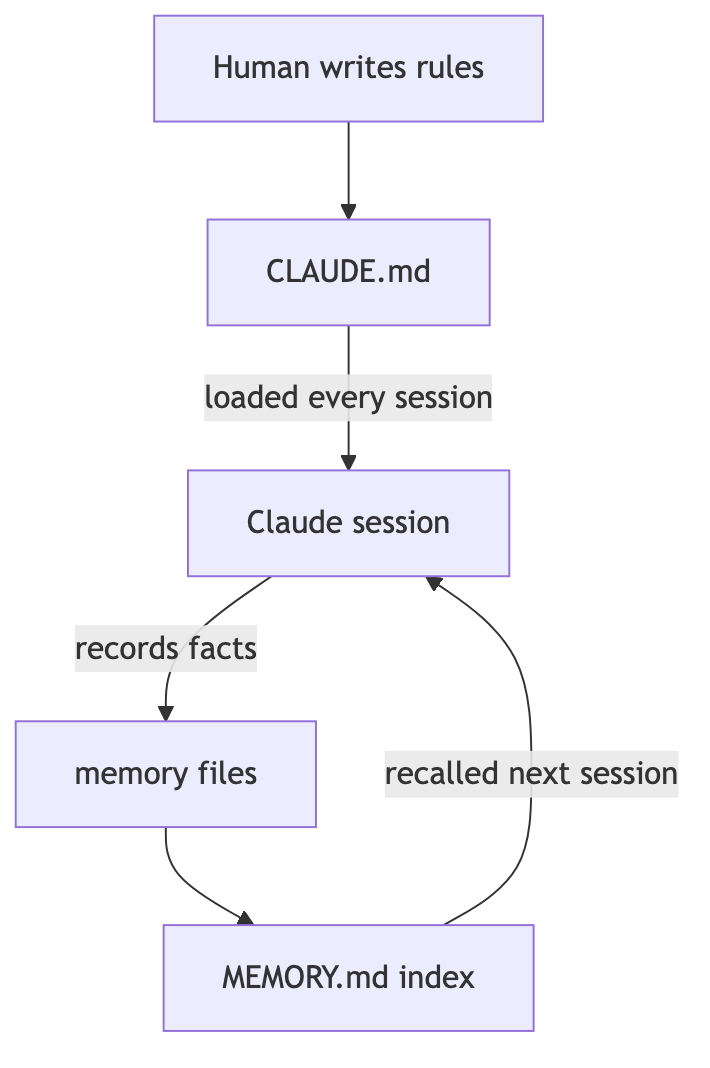
The nature of the recorded content also differs from rules. It includes facts you only learn through experience, such as “This DB needs type checking after batching” or “The dev server must be started in this worktree for changes to take effect.” It is experience-based knowledge accumulated before someone formalizes it as a rule.
During a conversation, you can also send a message beginning with # and directly say, “Remember this.” Claude may ask which file to use or classify it automatically.
How to Decide Where Information Belongs
When their roles seem to overlap, use three questions to decide.
First, who decided it? A rule set by the team or by you belongs in CLAUDE.md; a fact discovered during work belongs in memory.
Second, does violating it cause a problem? Rules whose violation immediately creates an incident, such as prohibiting secret-key commits or defining deployment procedures, must go in CLAUDE.md. Memory is closer to a reference notebook than an enforcement mechanism that guarantees retrieval.
Third, can it already be learned from the code or documentation? As a rule, do not put information in either place if it can be found by reading the repository. It only wastes context and becomes false when the code changes.

Two Practices to Maintain
First, clean them out regularly. CLAUDE.md tends to accumulate rules without removing them. Delete obsolete rules and one-off instructions as soon as you find them to avoid wasting context in every session. The same applies to memory: deleting entries invalidated by code changes is better than keeping them.
Second, make rules short and definitive. Short statements such as “Do X” or “X is prohibited” are followed more reliably than phrases like “It is preferable to do X when possible.” Adding a one-line example noticeably improves compliance.
Conclusion
CLAUDE.md is the constitution, and memory is the work log. Immutable rules defined by people flow down from above, while experience gained in the field accumulates from below.
Once you manage the two separately, you repeat the same explanations less often and avoid reliving the previous session’s dead ends.