
![Cover image for [AI User Guide #6] How to choose between ChatGPT, Claude, and Gemini](/assets/images/posts/28e0bd06-66f0-4b82-9b94-7478250e0d7e/which-ai-to-choose-1.jpg)
“So which one should I use? Do I need to pay?” Here are the answers as of mid-2026. In short, no AI is best at everything. Choose based on your use case. All three now have useful free plans, so it is fine to pay only after using them free and finding what gets in your way.
One note first: the pricing and feature information in this article is current as of July 2026. Prices and features in this space change every few months, so check the official pricing page before subscribing.
The character of each service
Here is the one-line summary.
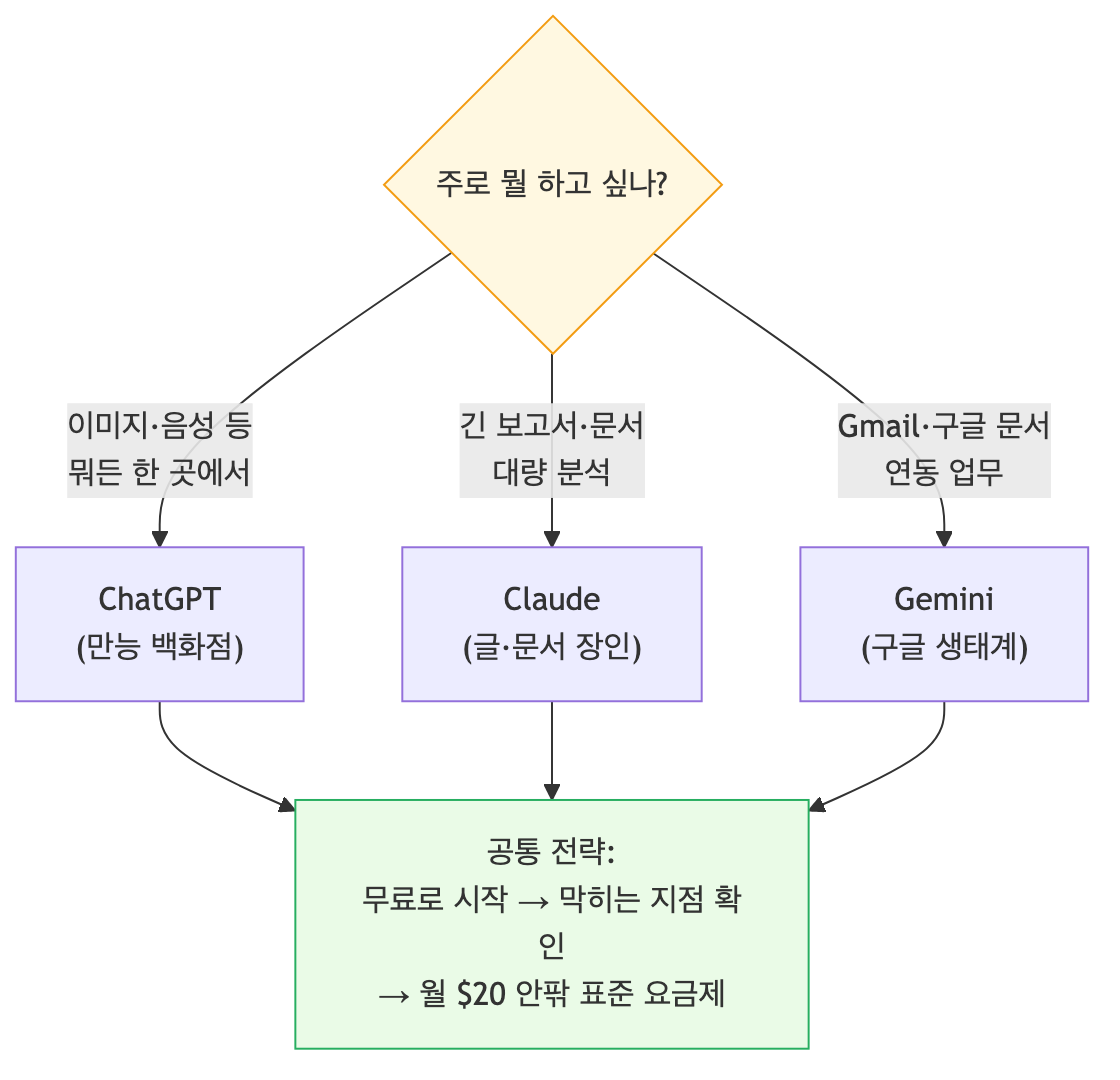
ChatGPT (OpenAI) is an all-purpose department store. Alongside chat, search, and file analysis, it offers image generation and voice conversations in one account. Image generation is widely considered the industry leader, and its voice conversations are among the most natural. If you want one AI that can do a bit of everything, it is the default choice.
Claude (Anthropic) is a craftsman for writing and documents. It is regarded as strong at long-form work that preserves structure, such as reports and lengthy drafts, as well as analyzing multiple documents provided together. However, it has no image-generation feature at all. If your work requires images, Claude alone will not be enough.
Gemini (Google) is an expansion pack for the Google ecosystem. Its distinctive strength is connecting to Gmail, Google Docs, and Calendar for tasks such as finding emails related to this week’s schedule in your inbox. NotebookLM, introduced in part 4 and recently renamed Gemini Notebook, is also part of Google. Its pricing is the most aggressive of the three.
How far can the free plans go?
All three can be started for free. Unlike in the past, free plans are no longer merely trials of outdated models.
- ChatGPT Free: Chat with a fast basic model, and use web search, file uploads, and image generation with limits. The top reasoning models are paid-only, and usage limits vary. Since June 2026, ads have also appeared on the Free and Go plans in Korea; Plus and above have no ads.
- Gemini Free: The fast basic model has generous access, and higher-tier models can be sampled free up to a certain amount. Limits refresh every five hours, with a separate weekly cap. For light use, the free plan lasts quite a while.
- Claude Free: Chat, file attachments, and web search are available with the standard model. Once the five-hour usage allowance is reached, you wait for it to reset. The top model is paid-only.
The common pattern for free plans is to limit quantity while reserving the top models for paid users. Use one free for two or three weeks and it becomes clear whether your bottleneck is the limit or a specific feature. That is your payment criterion.
Paid plans: how much, and when are they worth it?
As of July 2026, the basic personal pricing structure is as follows.
| Service | Starter plan | Standard plan | Higher-tier plan |
|---|---|---|---|
| ChatGPT | Go ₩15,000/month (US $8) | Plus $20/month | Pro $100/$200/month |
| Claude | — | Pro $20/month | Max from $100/month |
| Gemini | AI Plus ₩7,500/month | AI Pro ₩29,000/month | AI Ultra from ₩119,000/month |
The rule is simple. The standard plan (around $20/month) is where most users end up. The latest higher-tier models, generous limits, and advanced features such as deep research open up in this range. Higher-tier plans are for people who work with AI all day, so most users can ignore them.
There are two criteria for subscribing. First, when you frequently hit the limit. If the free allowance blocks you two or three times a week, you are using it as a work tool, so paying is worthwhile. Second, when you need a specific feature. Deep reasoning with top models, research sessions lasting dozens of minutes, and large-document work are paid features.
Recommendations by use case
| Primary use | Recommendation | Why |
|---|---|---|
| Images and presentation visuals | ChatGPT | Leads in image-generation quality; Claude has no such feature |
| Long reports and documents | Claude | Strong at preserving long-form structure and analyzing many documents |
| Gmail and Google Docs-centered work | Gemini | Its ecosystem integration is unmatched |
| Source-based study and research | Gemini | The NotebookLM (Gemini Notebook) combination |
| I do not know where to start | ChatGPT | The broadest feature set means the lowest chance of a poor fit |
| Best value first | Gemini | The starter plan is the cheapest |
The most common practical answer is a combination. Pay for one primary service and use the others as free supplements. For example, subscribe to ChatGPT Plus for images, search, and general tasks; use Claude Free only for long documents; and use NotebookLM Free for organizing source material. You get the strengths of all three ecosystems within $20/month.

Summary
- There is no universal number one. ChatGPT for images and general use, Claude for long-form writing and documents, and Gemini for Google integration and value.
- Start free and find out what blocks you before subscribing.
- Most users end up on a standard plan costing around $20/month.
- The best-value combination is paying for one primary service and supplementing it with the others for free.
Once you have chosen a tool, can you use it without worry? The moment you start using it for company work, a different set of questions appears. Is it okay to enter company materials? Who owns AI-generated output? The next article covers safety rules for personal data, confidential information, and copyright.