
![Cover image for [AI User Guide #5] Why AI Gets Lost in Long Chats—and When to Start a New One](/assets/images/posts/9f509556-9a46-43c9-9bb6-1f8d9ef334de/ai-context-window-1.jpg)
After working with AI for a while, something odd happens. It asks again about conditions you clearly set earlier, undoes fixes made above, and quietly ignores instructions from the start of the conversation. Even pointing out, “I already told you that,” helps only briefly. It isn’t broken. This comes from how AI itself handles conversation memory, and once you understand the principle, the solution is simple.
AI Doesn’t Remember; It Rereads Everything Each Time
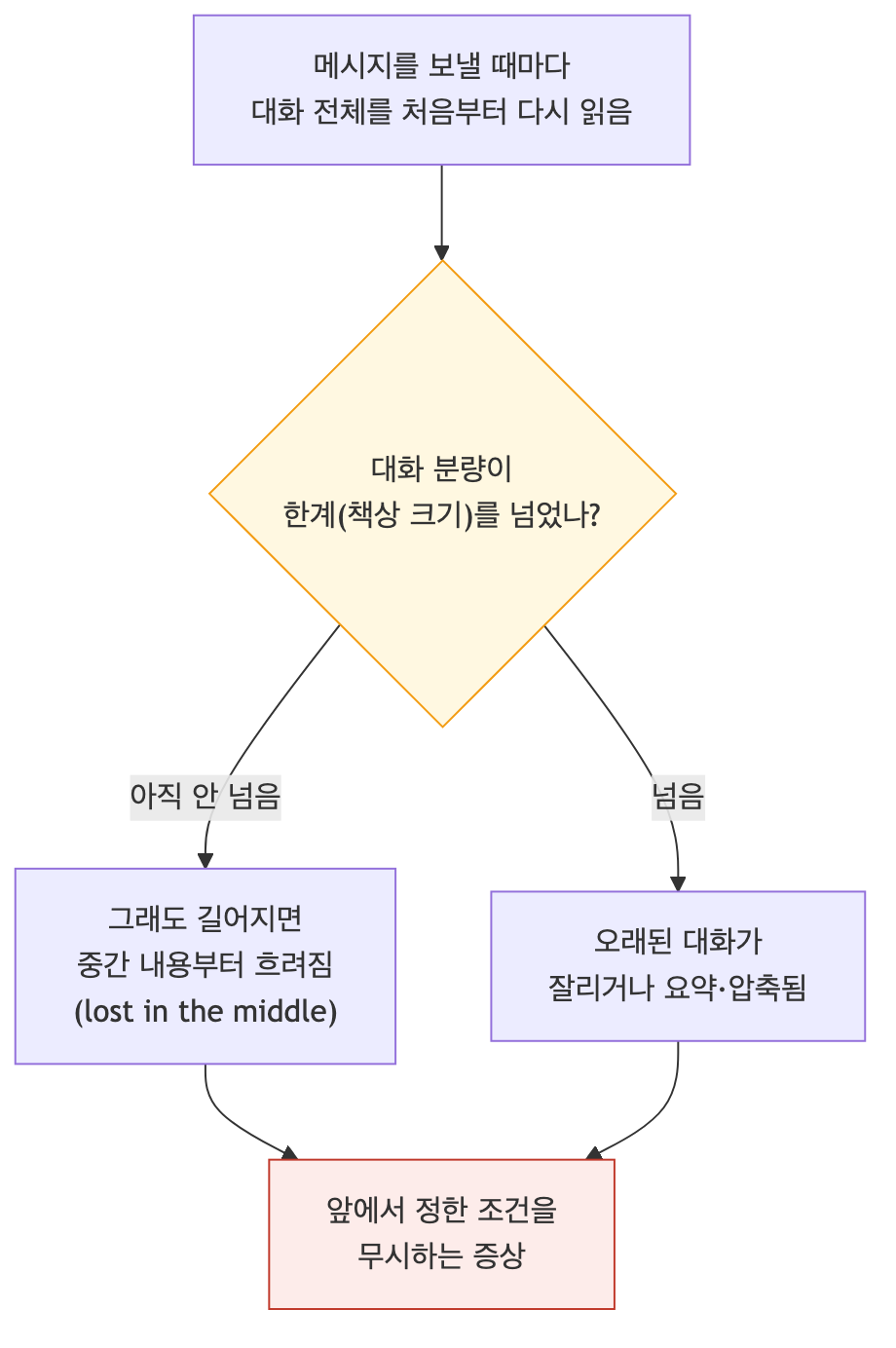
Let’s correct the biggest misconception first. AI doesn’t store the conversation in its head piece by piece. Every time you send a message, it rereads the entire conversation from the beginning and generates the next answer. Every time.
However, there is a limit to how much it can read at once. This workspace is called the context window. The desk analogy fits perfectly. Each time it answers, AI can see only what is spread across the desk. A longer conversation means more documents keep piling up, while the desk itself remains a fixed size.
Today’s models have desks large enough to hold several books at once. Even so, problems arise. There are two reasons.
It Gets Distracted Before the Desk Overflows
First, the desk can actually overflow. Once a conversation exceeds the limit, the service may cut off older messages or compress them into a summary. Conditions set at the beginning can disappear entirely in the process. “I already told you that” no longer works because that “earlier” content has already been cleared from the desk.
The second case is more common: performance drops even before the desk overflows. Multiple studies have repeatedly confirmed this. With long inputs, AI tends to use the beginning and end well while relatively overlooking the middle. It is like seeing only the documents at the very top and front of a desk buried under papers. The longer the conversation and the thicker the attached documents, the hazier instructions and information somewhere in the middle become.
That is exactly why the previous installment said that “hundreds of pages of material can get blurred.” When the material fills the desk, its middle becomes hazy.
Then What Is the “Memory” Feature?
This part is easy to confuse. A feature that remembers you, such as ChatGPT’s memory, is separate from the context window. Two mechanisms generally work together. One is a notebook that extracts and records key points from conversations (“the user is a marketer,” “the user prefers formal language”). The other is search, which looks through past conversations and retrieves relevant passages when needed. That is why “We talked about that last week” sometimes works these days.
In either case, the retrieved pieces are placed on the current desk; they do not make the desk itself larger. Memory cannot solve the problem of the current conversation becoming blurry because it has grown too long.
Three Practical Remedies
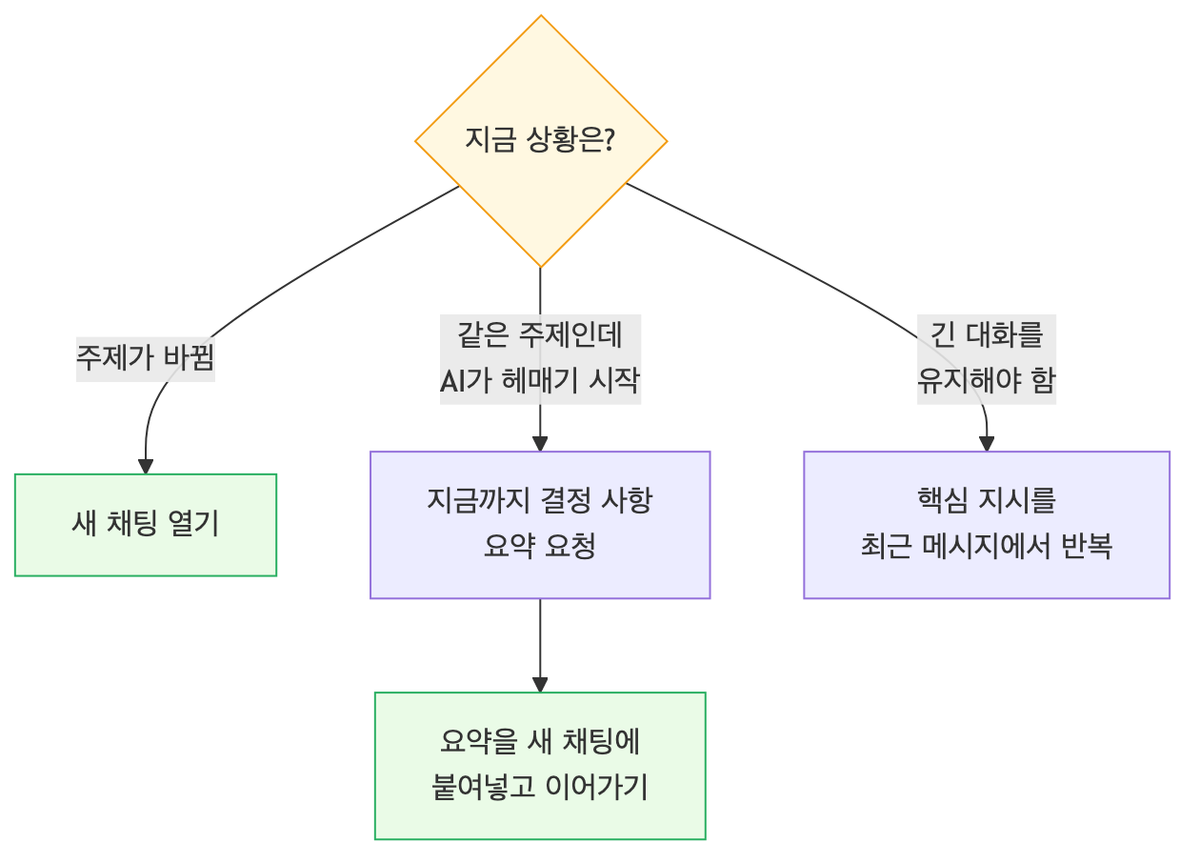
Remedy 1: Start a new chat when the topic changes. This is the most important and easiest remedy. If you continue report work in a room where you planned a trip, the travel documents on the desk take up space and blur the report answers. New topic = new chat should be the default. There is no reason to conserve chat rooms. They’re free.
Remedy 2: Move long tasks by summarizing them. When dozens of exchanges on one topic make AI start to lose its way, ask: “Summarize what we have established and decided so far.” Copy that summary into the first message of a new chat and continue there. It is like clearing a messy desk and moving only one essential document onto a new one.
Remedy 3: Repeat important instructions. If you must keep a long conversation, repeat key conditions (“use formal language,” “within 300 characters”) once in your recent messages. It is like placing them back on the top of the desk, where AI sees them best.
Summary
- AI does not remember; it rereads the entire conversation each time. That amount has a limit.
- Once the limit is exceeded, older content is cut off; even before that, the middle starts to blur.
- Memory only retrieves needed pieces from past conversations and places them on the desk; it does not enlarge the desk.
- New topic, new chat; summarize and move long tasks; repeat key instructions.
If you want to explore this topic more deeply—especially if you use AI coding tools—see this blog’s AI context series. It covers token and context management strategies in technical detail. The next installment tackles the practical question many readers have been waiting for: ChatGPT, Claude, or Gemini—which should you use and pay for? We’ll sort it out based on 2026.