
I recently revisited some sign-up logic and let out a sigh.
All I had done was tap one button, yet the view controller directly called six or seven objects for validation, a network request, token storage, notification registration, and more.
I needed to reuse this on another screen, but I did not want to copy the entire order and combination of calls.
That is exactly when the Swift Facade pattern comes in.
In short, the Facade pattern wraps a complex subsystem involving multiple objects behind a single method such as signUp(). Callers do not need to know how it works internally.
The boundaries between interface conversion, access control, and adding functionality are clear at a glance in Comparing Adapter, Facade, Proxy, and Decorator.
Today I will walk through applying this pattern in Swift, including when it helps and when it can actually do more harm than good, based on my own experience.
What Is the Facade Pattern?
Facade originally means the “front exterior” of a building.
From outside, you see only a neat facade, while inside there are pipes, wiring, and all kinds of complex equipment.
Software works the same way.
When a subsystem contains multiple classes that call one another, you place a single point of contact in front of it.
Callers only need to talk to that point of contact.
The key idea is a “simplified entry point.”
A Facade does not remove complexity. It confines that complexity to one place and opens only one easy door to the outside.
The important point is that it hides the internal implementation rather than eliminating it.
The pipes are still there; they are simply hidden behind the wall.
Here Is a Direct Swift Implementation
It is hard to get a feel for it from words alone, so let us look at the code.
Suppose the sign-up flow has three subsystems: validation, server registration, and token storage.
First, the internal objects we want to hide.
struct Validator { func check(_ email: String) -> Bool { email.contains("@") } }
struct AuthAPI { func register(_ email: String) -> String { "token_\(email)" } }
struct TokenStore { func save(_ token: String) { /* Keychain storage */ } }
If the view controller calls all three directly, the code becomes messy.
So the Facade coordinates them on its callers’ behalf.
struct SignUpFacade {
    private let validator = Validator()
    private let api = AuthAPI()
    private let store = TokenStore()

    func signUp(email: String) -> Bool {
        guard validator.check(email) else { return false }
        let token = api.register(email)   // Manage the internal order here only
        store.save(token)
        return true
    }
}
Now the calling code needs just one line.
Like this: SignUpFacade().signUp(email: "[email protected]").
Callers do not need to know that validation happens first and the token is stored afterward.
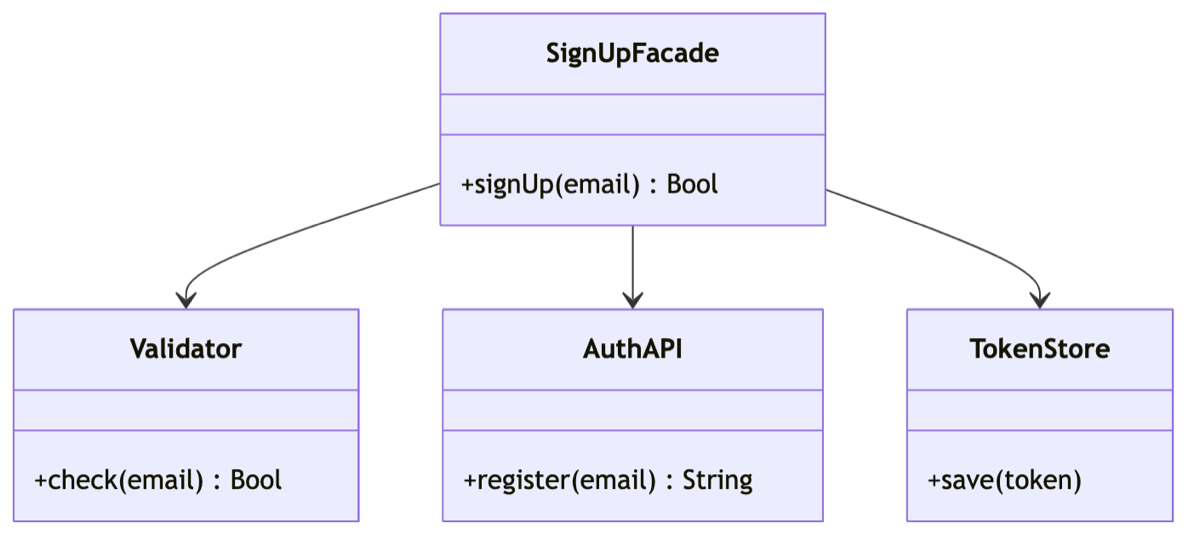
Even if the order changes later or another step is added, you only need to modify the inside of the Facade.
When Should You Use It, and When Should You Avoid It?
Here are the criteria I came up with after using it myself.
When a Facade fits
- When code repeatedly calls several objects in the same fixed order across multiple places
- When you want to wrap an external library or complex SDK and give it simpler names suited to your app
- When the view controller knows too much and you want to slim it down
When it is better to avoid one
- When the subsystem is already simple and there is little to hide (you only add an unnecessary layer)
- When fine-grained control is required every time, forcing you to bypass the Facade and call internal objects directly
There is one point I want to emphasize here.
A Facade does not “block” access to the internals.
It simply opens an easier path; you can still use internal objects directly when necessary.
That is why its nature differs from patterns intended to control all access.
A Few Common Questions
Q. How is a Facade different from an ordinary utility function?
A utility function usually contains one independent operation, whereas a Facade coordinates the collaboration and order of multiple objects.
The difference is what each one hides.
Q. Does it have to be a protocol?
Not necessarily.
However, if you want to replace the Facade with a fake object in tests, abstracting it behind a protocol makes that much easier.
Q. I confuse it with the Adapter pattern.
An Adapter fits an incompatible interface to another one, while a Facade presents something complex in a simpler form.
It is easiest to remember that their purposes differ.

Wrapping Up
Whenever you see a tangled set of calls, ask yourself, “Could I wrap this in one method?”
That one question often makes the code noticeably easier to read.
The Facade is not a flashy pattern, but it is a dependable tool you will reach for frequently in production.
I hope you will try a lightweight version starting with today’s sign-up example.