
![Cover image for [MCP·Skill #2] AI Agent Skills Explained: From Slash Commands to Automatic Triggers](/assets/images/posts/60116d30-9205-43b5-b09e-610a09bd6239/1.jpg)
When using AI coding tools, you often repeat the same instructions: “Use this format for commit messages” or “Follow this checklist before deployment.”
Explaining everything in prompts is verbose, while putting it all in always-loaded rule files such as CLAUDE.md or AGENTS.md makes each session’s context unnecessarily heavy.
Skill solves this repetition. In short, it packages the procedures and knowledge for a specific task into files and loads them only when needed.
It began as a Claude Code feature, but is no longer owned by one tool. In December 2025, Anthropic published the specification as an open standard called Agent Skills. Since then, more than 30 tools—including OpenAI Codex, Gemini CLI, Cursor, and VS Code (GitHub Copilot)—have adopted the same format. A SKILL.md created once works even when you switch tools.
This article covers Skill structure, its two invocation methods—slash commands and automatic triggers—tool support, and how its role differs from always-loaded rule files. Examples use Claude Code, the earliest adopter, but the concepts are the same across tools.
Here’s the key summary first.
- A Skill is an instruction folder that starts with a single SKILL.md file, and it is now an open standard independent of any tool.
- There are two invocation methods: slash commands called directly by the user and automatic triggers called by the model.
- The core design is progressive loading. Normally, only the name and description are loaded; the body is read at execution time.
- Put rules that always apply in always-loaded files such as CLAUDE.md or AGENTS.md, and task-specific procedures in Skills.
A Skill Is a Markdown Folder
Skill structure is simple: one folder containing one SKILL.md file is the minimum requirement.
---
name: release-note
description: Draft release notes. Used for requests mentioning “release notes” or “deployment notes”
---

# Release-note writing procedure
1. Collect commits since the previous tag
2. feat/fix/choreCategorize them
3. Write a draft, sorted by user impact
The top-level frontmatter’s name and description are registration metadata, while the body below is the actual procedure. You can also add reference documents or scripts to turn the folder into an “instruction manual plus toolbox.”
The standard defines only this format. Since each tool decides where to read files from, you only need to know the path used by your primary tool.
| Tool | Skill directory |
|---|---|
| Claude Code | ~/.claude/skills/ (global), 프로젝트/.claude/skills/ (project) |
| OpenAI Codex | .agents/skills/ |
| Gemini CLI (Antigravity) | ~/.gemini/antigravity/skills/ |
Putting a Skill in the project folder is especially useful because Git lets you share it with the team. Practical know-how becomes a repository asset rather than a personal note. Even if team members use different coding agents, they can read the same SKILL.md and share procedures without standardizing on one tool.
Two Invocation Methods: Manual and Automatic
Skills run through one of two paths.
First, slash commands. The user explicitly invokes one by entering something like /release-note. A person decides when it runs.
Second, automatic triggers. The model examines the conversation, decides “this request belongs to that Skill,” and loads it on its own. The frontmatter description provides the basis for that decision.
description is not a human-facing explanation but a model-facing routing condition. The more specifically it states when to use the Skill, including trigger phrases, the more accurately it is invoked automatically.
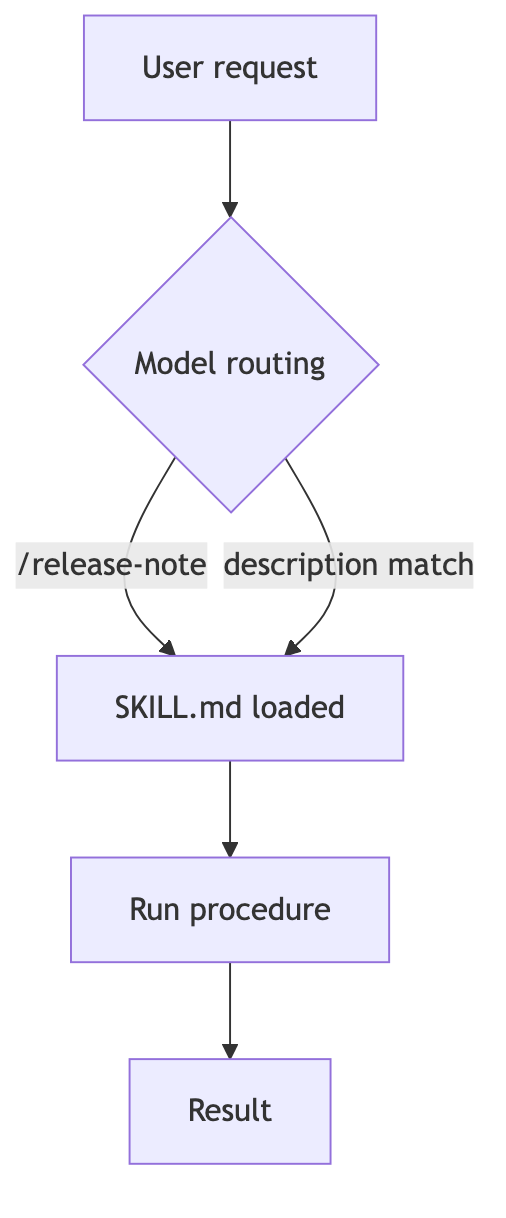
This is where progressive disclosure matters. At session start, only each Skill’s name and one-line description enter the context. The full body is read only when that Skill is actually invoked.
As a result, registering dozens of Skills adds little normal context overhead. This is the decisive difference from cramming every procedure into always-loaded rule files. It is also why many vendors adopted the format. Context windows are expensive resources for every model.
Dividing Roles with Always-Loaded Rule Files
Every tool has its own “always-read rule file,” such as Claude Code’s CLAUDE.md, Codex’s AGENTS.md, or Cursor’s rules. Because both are instructions for the model, they are easy to confuse. The key criterion is when they apply.
- Always-loaded rule files (CLAUDE.md, AGENTS.md, etc.): Rules that apply to every session and task, such as coding conventions, prohibitions, and project context
- Skill: Procedures needed only for specific tasks, such as deployment, review, or document generation
Ask, “Must this always be true?” If yes, use an always-loaded rule file; if it is true only in specific situations, use a Skill. Moving permanent rules into a Skill makes them disappear when it is not triggered. Putting every procedure in an always-loaded file wastes context.

Common Pitfalls When Creating One
Here are two issues you will often encounter in practice.
When automatic triggers fail, the description is almost always the problem. If it says something abstract like “document-writing assistant,” the model cannot tell when to use it. Listing phrases an actual user might enter works better.
When it triggers too often, add exclusion conditions to the description, such as “use only when …; do not use for simple questions.”
This technique works across tools because the standard gives them the same structure: the model ultimately decides whether to trigger the Skill, and it sees only the one-line description.
Conclusion
A Skill is essentially prompt functionalization. Instead of copying and pasting repeated instructions, you name and save them, then load them only when needed. That function is now a standard format independent of any specific tool.
If you have typed the same instruction twice, it is already a candidate for your first Skill. The SKILL.md you create today will follow you regardless of which agent you use next year.