
![Cover image for [Vibe Coder #2] What is an API, and why must API keys be hidden?](/assets/images/posts/db572cb8-3e5f-40ff-b874-7b22e30a8f9e/api-key-hide-1.jpg)
In Part 1, I compared an app to a restaurant: dining area (frontend), kitchen (backend), and storage (DB). This time, we cover the topic most likely to cause trouble in vibe coding: APIs—and API keys. Everyone has seen “Never expose your key,” but few explain what the key is, where it lives, or what happens when it leaks. This article covers it all at once.
An API is the order counter
API stands for Application Programming Interface, but you can forget the expansion. The key point is this. An API is an order counter that lets programs assign work to one another.
Returning to the restaurant analogy, customers cannot enter the kitchen. Instead, they submit an order in a prescribed format: “One kimchi stew, less spicy.” The kitchen prepares it and sends it out. An API is exactly this counter. Send a request in the prescribed format to the prescribed address, and you get a response in the prescribed format.
Apps built by vibe coders have APIs in two directions.
- My app’s API: the counter my frontend uses to assign work to my backend. The
app/api/folder from Part 1 is exactly this. - Someone else’s API: the counter my app uses to assign work to another company’s service. Asking ChatGPT to write something (OpenAI API), displaying a map (maps API), and processing payments (payments API) all mean submitting orders to someone else’s counter.
Apps made with vibe coding usually run by combining these “external APIs.” And to place an order at someone else’s counter, one thing is essential.
An API key is a corporate card
External APIs are not free counters. Every request to OpenAI incurs a cost. So every request carries an ID stating “Who should receive the bill for this order?” That is the API key—a long, random string that looks like sk-proj-....
An API key behaves exactly like a corporate card.
- Whoever swipes the card, the bill goes to the cardholder.
- Anyone who knows the card number can use it. There is no face or signature verification.
- So if you write the card number somewhere public, anyone in the world can charge purchases to your money.
That is why the warning to “hide your key” is so serious. A leaked key is not the same as a leaked password. You can simply change a password, but with a key, every charge made from the moment it was stolen until it is reissued accumulates on my bill.
What actually happens after a leak
It is easy to think, “Who would find the key to my small app?” That is the most dangerous misconception. The key is found not by people, but by bots.
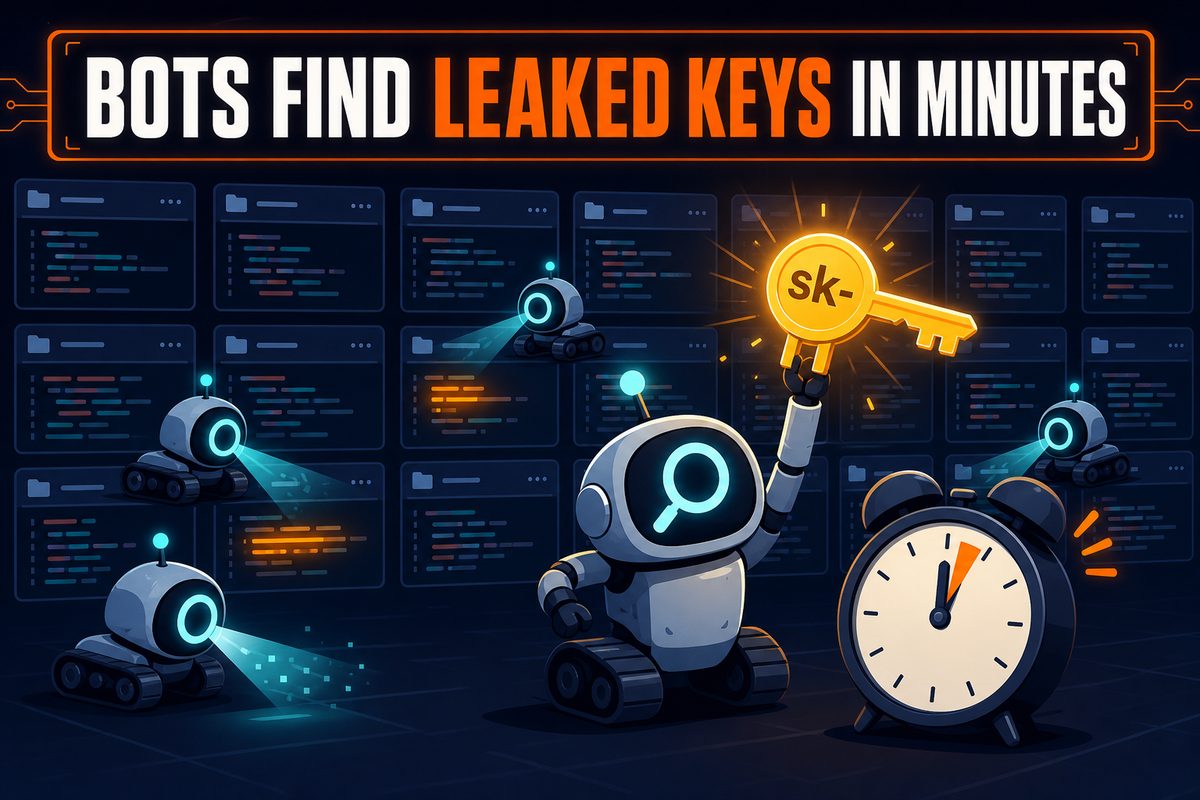
Public code repositories such as GitHub are scanned around the clock by thousands of bots. If you accidentally push code containing a key to a public repository, a bot usually collects it in a few minutes. Collected keys are immediately used for free AI calls, cryptocurrency mining charges, spam, and similar activities. That is why communities continually report incidents where bills of millions of won appear overnight.
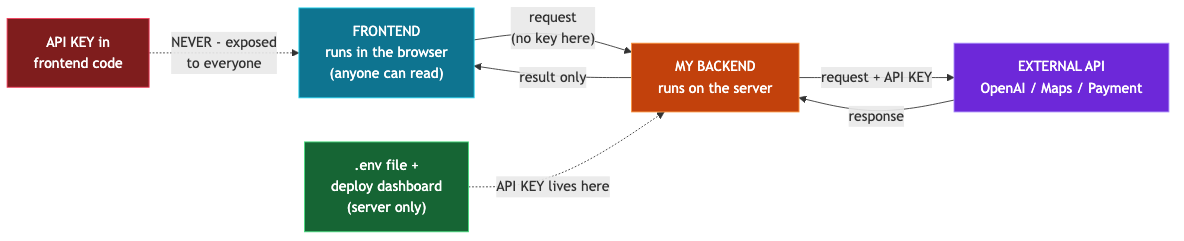
Another leak path is what we covered in Part 1: putting the key in the frontend. Since frontend code is sent to the user’s browser, anyone can extract the key with a single right-click and “Inspect.” When you ask AI to “integrate OpenAI,” it may actually hard-code the key into the frontend for convenience, so you must check it yourself.
Where the key belongs
The principle already appeared in Part 1: keep secrets in the backend. Specifically:
- Write the key in the project’s
.envfile. It is a vault for secret values readable only by the backend. - Register the
.envfile in.gitignoreso Git does not track it. Then, even if you push the code to GitHub, the key stays only on your computer. AI-generated projects usually include this entry, but it is worth checking once yourself. - A deployed app cannot read the
.envon your computer, so add the key separately under “Environment Variables” in the deployment service’s dashboard, such as Vercel. We will return to this in Part 4 (deployment).
Next.js has another trap. If an environment-variable name starts with NEXT_PUBLIC_, its value is sent to the frontend as well. As the name suggests, it becomes public. Put here only keys designed to be exposed, such as map-display keys; never add NEXT_PUBLIC_ to billable keys such as OpenAI keys. If AI added it, that alone is a danger signal.
How to self-check your app
Here are three checks you can perform right now.
- Browser inspection: On your deployed site, right-click → Inspect, then search for words such as
sk-,key, andsecretin the Network or Sources tab. If your secret key appears, it has been exposed. - GitHub inspection: If your repository is Public, search for the beginning of the key in the repository search box. It is exposed even if it remains only in an old commit.
- Ask AI to audit it: Tell it, “Find every place in this project where an API key or secret value is sent to the frontend.” AI that made a mistake during creation can still be good at finding it.
If it has already been exposed
Hiding an exposed key is useless. Assume a bot has already copied it. The order is as follows.
- In the service dashboard, delete (revoke) the key. Theft stops from this moment.
- Issue a new key and this time add it only to
.envand the deployment dashboard. - Set the service’s usage limit (spending limit). This caps the damage of the next incident. We cover this in detail in Part 7 (bill shock).
Summary
- An API is an order counter between programs, and my app runs by combining external APIs.
- An API key is a corporate card. Whoever uses it, the bill comes to me.
- Bots find keys within minutes. “My app is small” is not a defense.
- A key belongs in exactly two places:
.env(locally) and environment variables in the deployment dashboard. A billable key withNEXT_PUBLIC_is a danger signal. - If exposed, do not just hide it: revoke → reissue → set a limit.
The next part is about Git. We will cover why everyone says to use Git even when AI writes all the code, and how to roll back a perfectly working app in one minute after AI breaks it.