
![Cover image for [Vibe Coder #4] Why does deployment break my app?](/assets/images/posts/e8334add-055c-4ffc-b750-c8dca5612573/deploy-localhost-to-world-1.jpg)
The app is complete. It runs perfectly on my computer. I copy localhost:3000 from the address bar to show it off to a friend, but they reply, “It won’t open.” I finally deploy it, only to find that the app that worked locally now throws errors on the internet.
Deployment is where most people hit a wall with vibe coding. This episode explains what deployment actually does and covers the three main reasons something works locally but fails after deployment.
localhost means “my computer”
localhost is not a special address. It is a pronoun, meaning “this computer”. When AI says, “Check localhost:3000,” it means viewing the app temporarily running on my computer in my computer’s browser.
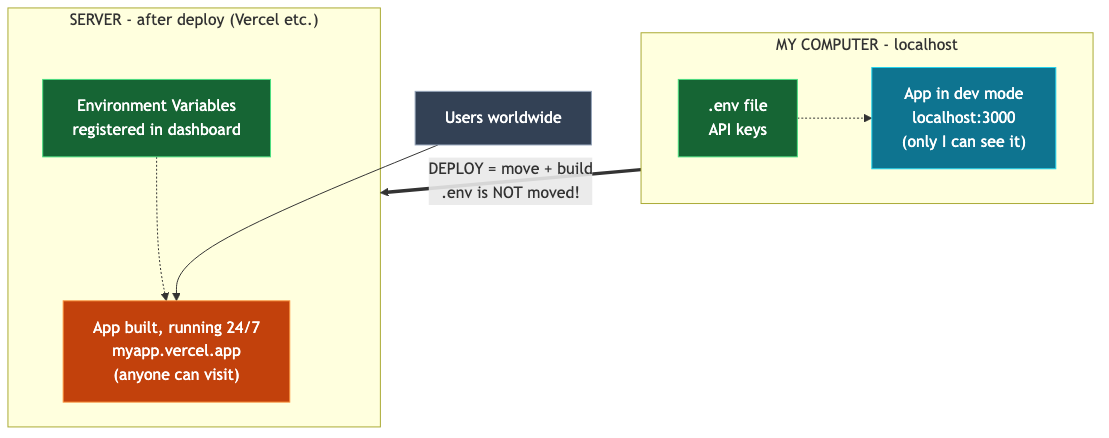
So when you send localhost:3000 to a friend, their browser looks for the app on their computer. Of course, it is not there. My app has never left my computer. Also, the app shuts down when I stop the development program or close the laptop. A service others can use needs two things: a computer that stays on 24/7 and an address anyone can reach.
Deployment is moving house
Deployment solves these two problems. In short, it is moving the app from my computer to a server. “Server” sounds grand, but it is simply someone else’s computer that stays on 24/7 and connects to the internet.
Services such as Vercel and Netlify, commonly used for vibe coding, handle this move. They do three things.
- Server rental: They lend you computers in their data centers.
- Build: They convert and compress development code for production. Think of it as packing your belongings.
- Address assignment: They give you an address such as
내앱.vercel.appthat anyone worldwide can access.
The word build is worth remembering. Development mode is forgiving and overlooks many issues, but the build is a strict inspector that flags, just before deployment, problems that stayed quiet during development. Many cases of “It works locally but deployment fails” are caught at this stage.
The three main reasons it works locally but fails after deployment
If the app behaves strangely after a successful deployment, the cause is almost certainly one of these three.
1st: Environment variables were not registered. In episode 2, we put the API key in the .env file and used .gitignore so Git would ignore that file. As a result, .env is not included in the moving boxes. The app on the server has no key, so both AI calls and database connections fail. Register the .env contents in the deployment service dashboard’s “Environment Variables” menu and redeploy. This is the first place to check when it works locally but not after deployment.
2nd: The build check failed. The deployment itself fails and produces red logs. Don’t panic: copy the entire build log shown by the deployment service and paste it into AI: “It failed with this build log. Fix it.”
3rd: The database does not recognize the new guest. Depending on the database service, you may need to configure which incoming connections are allowed. Until now, only my computer connected; now the server does, so the allowlist or connection settings may need updating. Giving the symptoms (logs) to AI can quickly narrow this down.
Domain: put the address in my name
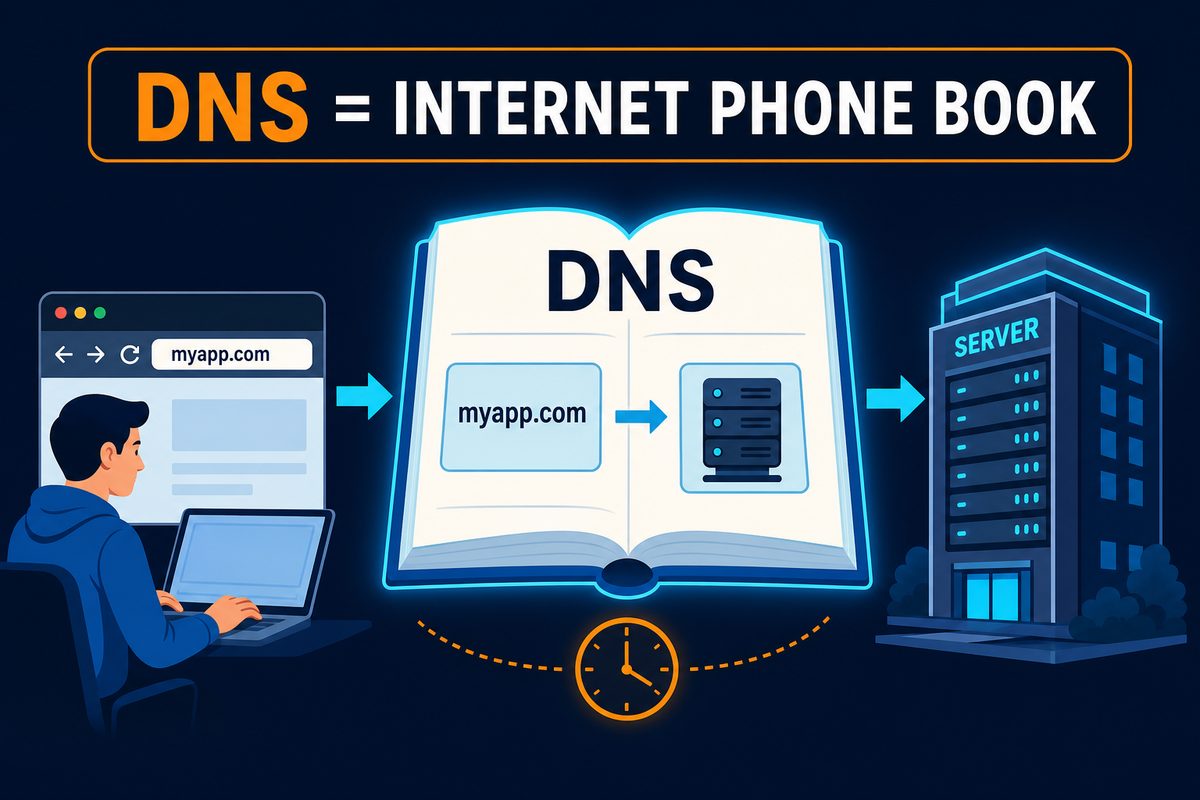
After deployment, an address such as 내앱.vercel.app appears. You can use it as is, or attach your own domain, such as myapp.com. You rent domains yearly from a domain registrar. Connecting one means registering a phone book (DNS) entry that says, “When someone looks for this name, direct them to that server.” The deployment dashboard guides you through it. Propagation through the world’s phone books can take a few minutes to a day, so there is no need to panic if it does not open immediately.
A three-minute post-deployment check
Pressing the deployment button is not the end. Check these three things every time to catch most problems early.
- Open the deployed address directly. Use the real address, not localhost from development.
- Click each core feature once. Focus on features involving the backend and environment variables, such as sign-up, saving, and AI calls.
- If something seems wrong, open the Logs menu in the deployment dashboard and copy the red lines to AI. The “server’s scream” from episode 1 appears right here.
Summary
localhostmeans “my computer,” so sending it to someone else will not open the app for them.- Deployment moves the app to a server that stays on 24/7 and gives it a public address; services such as Vercel handle the process.
- The three biggest differences between local and deployed environments: missing environment variables (อันดับ 1), a failed build check, and database connection settings. Just remembering that
.envis not included in the moving boxes solves half the problem. - Domain connections are DNS phone-book registrations, so propagation can take time.
- After deployment, follow the three-minute routine: open the real address → click core features → check the logs.
The next episode covers error messages: how to read red text without fear, provide errors to AI properly, and escape the loop when AI cannot fix the same bug.