

When building an iOS app, you eventually encounter it: one screen mixing loading, success, failure, and empty-data states.
Managing piles of Bool variables such as isLoading, hasError, and isEmpty becomes hell as their number grows.
A loading state with the error flag also true. It makes no logical sense, yet the code can create that combination easily.
Here is the conclusion first: you can organize this much more cleanly by building an FSM with one Swift enum without the State Pattern.
Today, we’ll walk through how to escape Bool hell with code.
What is a state machine (FSM)?
It’s not as difficult as it sounds.
A state machine, or FSM (Finite State Machine), means that the possible states are finite and transitions follow defined rules.
Traffic lights are an easy example.
Green → yellow → red. It changes only in this order; it never jumps straight from green to red.
App screens work the same way. They move from 로딩 → 성공 or 로딩 → 실패; a state that is 성공 and 로딩 at the same time should not exist.
But with several Bool variables, code can create states that should not exist.
That is exactly what enum prevents.
How to build a state machine with a Swift enum
Swift enums are not just lists of constants.
The key is that each case can hold a value (an associated value). This lets one enum contain both state and data.
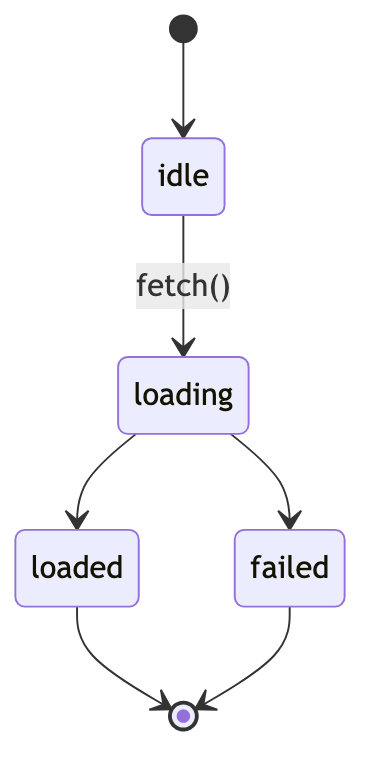
Here is how I defined the screen states.
enum LoadState {
    case idle              // Nothing done yet
    case loading           // Loading
    case loaded([Item])    // Success, with the data
    case failed(Error)     // Failure, with the error
}
As you can see, loaded carries an item array, while failed carries an error.
Success always has data, and failure always has an error. An odd state such as success without data cannot be created at all.
The view only needs to inspect this single state and render the screen.
switch state {
case .idle:    EmptyView()
case .loading: ProgressView()
case .loaded(let items): ItemList(items)
case .failed(let error): ErrorView(error)
}
Because switch forces every case to be handled, the compiler immediately flags any unhandled case when you add a new state later.
That is a major advantage: the compiler catches missing states instead of relying on people.

Is it okay to skip the State Pattern?
Object-oriented textbooks usually teach state management through the State Pattern.
You create a class for each state, group them under a protocol, and put transition logic in the individual classes.
To be honest, this is often overkill for managing screen states.
I made a quick comparison of the two approaches. (Based on my practical experience in 2026)
| Item | enum FSM | State Pattern |
|---|---|---|
| Number of files/types | One enum | One class per state |
| Preventing missing states | A forced switch lets the compiler catch them | Must be handled manually |
| Bundling data | Natural with associated values | Managed separately as properties |
| Suitable scale | Around 3–7 states | When each state has highly complex logic |
If the number of states is reasonable and their logic is not too heavy, an enum FSM is much lighter and safer.
Conversely, if each state has dozens of lines of complex behavior, consider the State Pattern or splitting the logic into separate objects.
There is no universally correct choice.
How should state transitions be managed?
You might ask whether creating an enum means states can change arbitrarily.
Good question. That is why I keep the transition rules in a single function.
mutating func fetch() {
    guard case .idle = self else { return } // idleStart only when idle
    self = .loading
}
guard caseexplicitly says, “Transition to loading only when currently idle.”
Keeping transition conditions in one place makes states flow only along defined paths, like traffic lights.
As a result, even when revisiting the code later, you can immediately see where each state can transition.
Q. What if there are more than five states?
Enum still works well. But as transition rules grow complex, I recommend splitting the transition function into smaller, state-specific functions.
Q. Does it work well with SwiftUI?
Very well. If you keep the enum state in @State or @Published and render the view with switch, state and UI move in lockstep.
A few Bools may seem sufficient at first, but once states become intertwined, you eventually return to an enum FSM.
If screen state management is causing trouble, try replacing it with the enum we saw today. It will make things easier sooner than you expect.