
![Cover image for [MCP·Skill #1] What Is an MCP Server? From Connection Methods to Security Considerations](/assets/images/posts/45e71f91-f21d-492e-a6da-e0ffc8d4af18/1.jpg)
Using ChatGPT or Claude can leave you wanting more. The models are smart, but they cannot see your database or read your internal wiki.
That is why people started connecting APIs directly. But integration methods vary by model and tool, so integration code grows exponentially as combinations increase.
MCP (Model Context Protocol) is a standard created to solve this problem. In short, it is a common specification for plugging external tools and data into AI models. It is often called “the USB-C of AI.”
This article explains exactly what MCP solves, how integration work changes before and after adoption, its internal structure and differences from function calling, and representative servers worth trying right now.
Let’s start with the key takeaways.
- MCP is an open standard protocol that connects AI with external tools (released by Anthropic in November 2024).
- Work that takes hundreds of lines with direct integration can be completed with a few configuration lines when an MCP server is available.
- It does not replace function calling; it is a layer that standardizes and enables reuse of tools on top of it.
- With OpenAI and Google adopting it, MCP has effectively become an industry standard, and its server ecosystem is growing rapidly.
The Problem MCP Solves: The M×N Integration Nightmare
Let’s first look at the situation before MCP.
If there are M AI apps and N tools to connect, M×N integrations were required. You had to build separate GitHub integrations for Claude, ChatGPT, and Cursor.
MCP inserts a standard specification between them. The tool side needs one MCP server, and the AI app side needs one MCP client. M×N becomes M+N.
Think of the days before USB-C, when you carried different charging cables for every device. MCP standardizes that cable specification.
But formulas like M+N may not make the difference feel tangible. Build the same feature both ways and the contrast becomes clear.
The Same Feature: Before and After Adoption
Suppose we are building “an AI that looks up GitHub issues and answers questions.”
Before MCP, all of this work was yours.
- Define the tool schema: write “list_issues accepts owner, repo, and state” directly as a JSON schema.
- Write the actual call code: a GitHub REST API client, token management, and pagination handling.
- Implement the execution loop: round-trip code that receives the tool result and sends it back to the model when the model calls a tool.
- Repeat all of the above for every app: one integration for Claude, another for the internal chatbot.
A single issue lookup takes hundreds of lines including boilerplate, and the process repeats 1–3 times whenever tools are added.
With MCP, it ends like this.
{
  "mcpServers": {
    "github": {
      "command": "npx",
      "args": ["-y", "@modelcontextprotocol/server-github"]
    }
  }
}
The schema, API calls, authentication, and error handling are already inside the server. You only register the server and say, “Summarize the latest bug issues in this repository.”
| Item | Direct integration | Using an MCP server |
|---|---|---|
| Code written | Hundreds of lines for schema, calls, and loops | 5 configuration lines |
| Authentication and error handling | Implemented manually | Built into the server |
| Add another AI app | Start over | Reuse the same server |
| Add a tool | Modify and redeploy code | Only update the server |
The last row is especially important. Even when functionality is added to the server, your code does not change at all. That is the power of standardization.
Internal Structure: Host, Client, and Server
MCP has three participants.
| Component | Role | Example |
|---|---|---|
| Host | The AI app used by the user | Claude Desktop, Cursor |
| Client | One-to-one communication with servers inside the host | Built into the host |
| Server | A program that exposes tools and data | GitHub server, database server |
A host launches multiple clients, and each client connects to one server. Communication uses JSON-RPC 2.0; local processes use stdio, while remote connections use HTTP streaming.
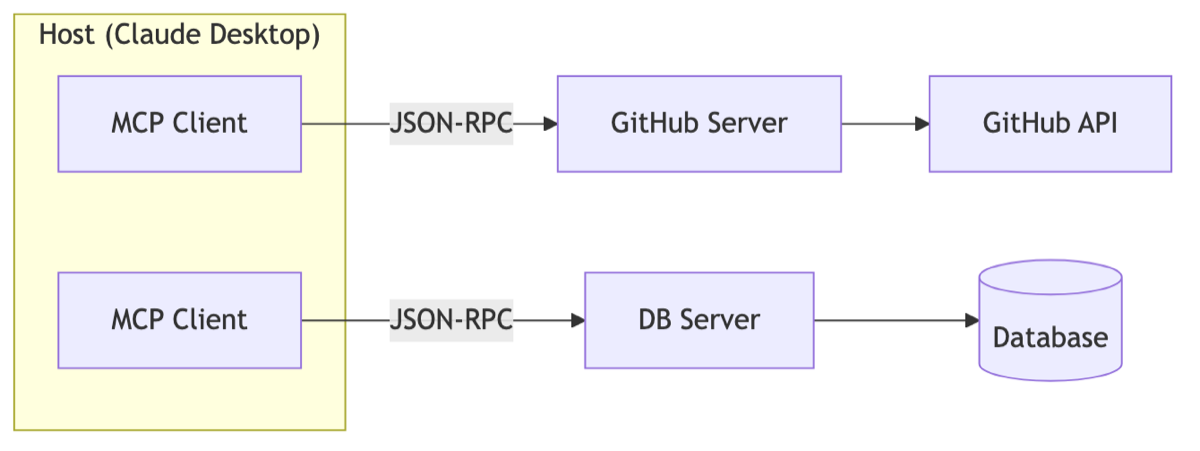
The functions exposed by a server fall into three categories.
- Tools: Functions called by the model, such as “create an issue” and “run a query.”
- Resources: Data read by the model, such as file contents and database schemas.
- Prompts: Prompt templates prepared in advance by the server.
The key is that the tool list is requested at runtime. When the client connects, it asks, “What can you do?” and the server returns the tools and schemas. That is why your code can remain unchanged when the server is updated.
How Is It Different from function calling?
At this point, you may wonder: “Couldn’t function calling already do that?”
They operate at different layers. function calling is a protocol for conversing with a model: “Model, these functions are available, so respond in the calling format when needed.” How functions are implemented and where they come from is entirely the developer’s responsibility.
MCP is a protocol for distributing and reusing those functions. It bundles tool implementations, authentication, and documentation into a server package that any AI app can use.
If function calling is “function-call syntax,” MCP is “an ecosystem of libraries containing functions.” MCP clients actually use function calling internally. They are not alternatives but layers above and below each other.
So “Which should I use, function calling or MCP?” is not really a valid question. For a couple of functions used only in one app, implementing function calling directly is enough. For reuse across apps or tools created by others, MCP is the right choice.
Representative Servers Worth Connecting Right Now
The ecosystem is growing quickly, and servers already exist for most common tools. Here are five well-received options.
| Server | What it can do |
|---|---|
| Playwright | AI directly controls the browser: clicking, typing, and taking screenshots |
| Figma | Reads design mockups and converts them into frontend code |
| Notion | Searches and organizes documents and meeting notes, and creates pages |
| GitHub | Looks up and creates issues and PRs, and searches code |
| Supabase(Postgres) | Queries databases in natural language and understands schemas |
If I had to choose one, it would be Playwright. Connect it and say, “Open this site, fill out the signup form, and take a screenshot.” Once you see AI open a browser and actually click and type, no further explanation is needed for why connecting tools changes the game. It is immediately useful for E2E test automation and repetitive web tasks.
Figma is also transformative for frontend developers. Work that once meant manually translating a design into markup becomes telling an AI that can read the design directly, “Turn this frame into a React component.”
Caveats and Limitations
It is not a silver bullet. Here are the practical issues to keep in mind.
First, security. An MCP server is a channel that gives the model execution permissions, so connecting an untrusted server can leak data through prompt injection. It is safest to use only official registries or verified servers.
There is also a context cost. The more servers you connect, the more tool definitions consume the context window, creating the paradox that model performance may decline. As the table suggests, connect only what you currently need.
Conclusion
MCP does not make models “smarter”; it standardizes “the range to which a model can reach.” Turning hundreds of lines of direct integration into a few configuration lines, and creating an ecosystem where you can plug in tools built by others: those are the essentials.
In the next article, I’ll explain the roles of Claude Code’s Skill and subagents, which are often compared with MCP.