
![Cover image for [Vibe Coder #7] Avoiding AI, DB, and hosting bill shocks](/assets/images/posts/0d58c5aa-a507-4618-873b-884467859592/cloud-bill-shock-limits-1.jpg)
“I woke up to a cloud bill of several million won.” Posts like this appear regularly in vibe-coding communities, and they are enough to make anyone’s stomach drop. A hobby app has returned a month’s salary as an invoice. The scary part is that this is not an accident limited to unusually careless people. If you do not understand the billing model, it can happen to anyone.
Fortunately, runaway bills have only a few common causes, so installing safety measures in advance blocks most of them at the source. Setup takes five minutes per service. This installment covers where invoices come from, how bill shocks happen, and how to configure those five-minute safeguards.
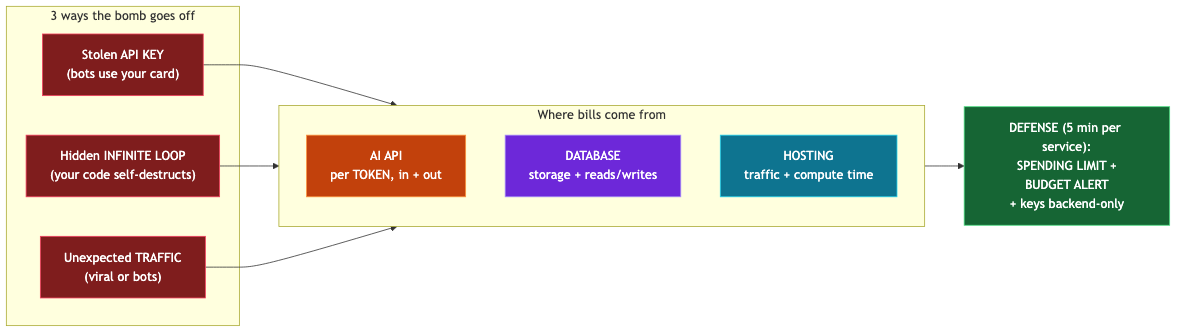
The Three Main Sources of Your Bill
Apps built with vibe coding are usually billed in three places.
1. AI API — billed by the token. AI services such as OpenAI charge by a unit called tokens. Think of a token as roughly a fragment of text. One easy detail to miss is that both the question you send (input) and the answer the AI returns (output) are both billed. Higher-performance models also cost several times more per token. Features that process entire long documents and chatbots that resend the full conversation every time can accumulate charges surprisingly quickly.
2. DB — storage capacity and read/write operations. A warehouse (DB) charges for the amount of cargo stored (capacity) and the number of times its doors open and close (reads/writes). Capacity grows gradually, but read/write counts can explode in an instant when the code is wrong.
3. Hosting — traffic and execution time. Servers such as Vercel charge for the amount of data delivered to visitors and the time backend code actually runs. Large images uploaded at their original size and slow-running tasks drive up costs here.
Three Ways the Bill Shock Happens
Path 1: Key theft. This is the incident covered in Part 2: a bot picks up an exposed API key and spends freely on your corporate card. It is the most destructive and the most common.
Path 2: An infinite loop in your code. This is self-destruction without an external thief. If AI-generated code hides a cycle where “every screen refresh reads the DB again, and that read triggers another refresh,” one idle user can call the DB and AI dozens of times per second. The app looks fine while the dashboard’s call count climbs insanely fast. Before deployment, ask the AI to “check whether any code repeatedly calls the API or DB.”
Path 3: Unexpected traffic. The app suddenly takes off (a good problem), or bots swarm it (a bad problem). Either way, an unprotected service means a bigger bill.
Five-Minute Safeguards: Limits and Alerts
This is the core of this installment. All three sources provide spending limit and budget alert features in their dashboards. Open each account now and configure exactly two things.
- Monthly spending limit: “Stop the service when this amount is exceeded.” For a hobby project, set it low enough to afford (for example, 10,000–50,000 won). The app may stop when it hits the limit, but there is no real comparison between a hobby app being down for a day and receiving a bill for several million won.
- Budget alert: “Send an email when this amount is reached.” Set it around 50% of the limit so you can notice the bill shock while it is still growing.
Menu names vary by service, but they are usually called Billing, Usage, Budget, or Spending limit. If you cannot find them, ask the AI, “Where do I set a monthly spending limit in OpenAI?” and it will guide you. Alerts are worth enabling even on a free plan. As we saw in Part 6, exhausting a free quota can quietly cause the familiar “it worked yesterday but not today” problem.
The principle from Part 2 provides another line of defense here: keys belong only on the backend. If a key does not leak, Path 1 is blocked completely.

If It Has Already Happened
If your heart sinks when you receive the bill, follow this order.
- Stop the bleeding first. If theft is suspected, revoke and reissue the key immediately (Part 2). If an infinite loop is suspected, pause the deployment or take the problematic feature offline.
- Find the cause. The Usage graphs in each service’s dashboard show when the spike began and which calls surged.
- Contact support. Especially for a first incident caused by theft or a mistake, providers often reduce the charge when you explain the situation. You have nothing to lose, so always ask.
- Prevent a recurrence. This time, be sure to configure the limits and alerts above.
Summary
- Bills come from three places: AI API (tokens), DB (capacity and reads/writes), and hosting (traffic and execution time).
- The three paths to a bill shock are key theft, infinite loops in your code, and unexpected traffic.
- The best defense takes five minutes per service: a monthly spending limit plus a budget alert.
- Before deployment, ask the AI to “check for code that makes repeated calls,” and keep keys on the backend only.
- If it has already happened: stop the bleeding → find the cause → contact support → install safeguards.
The next installment is the series finale. It brings together the minimum security checklist to complete before accepting users and the map built since Part 1, all on one page.