
![Cover image for [Vibe Coder #8] 6 security checks before accepting users](/assets/images/posts/88a2c686-f9c2-4047-8809-30b6118aec87/launch-security-checklist-1.jpg)
The app is complete, deployed, and all that remains is publishing its link to the world. The final installment is the last inspection before that moment: six security checks to complete before accepting users, plus a full summary of the map built since Part 1.
First, let’s clear up a common misconception: “My app is small and unknown—who would attack it?” As we saw in Part 2, attackers are bots, not people. Bots do not choose targets; they cast a net. They automatically scan every publicly exposed address on the internet for open doors. A small app is not safe; it simply has no one watching over it. Fortunately, the doors breached in vibe-coding apps are usually predictable, and the following six are those doors.
6 checks before going public
1. Are any secrets exposed? This is the check from Part 2: make sure API keys are not exposed in the frontend or a public GitHub repository. Ask AI: “Find every instance in this project where an API key or secret is sent to the frontend or has been committed to Git.”
2. Are authorization checks enforced on the backend? This is the principle from Part 1. Hiding a delete button is merely decorative; anyone can send the request. For deleting, editing, and viewing posts, the backend must verify, “Is this user authorized to do this?” Ask AI: “Audit every backend API to confirm it checks login status and ownership, and list anything missing.”
3. Can anyone enter the database? The warehouse (DB) has its own access rules. In Supabase, this is RLS (Row Level Security)—rules posted on the warehouse door specifying who can read and write each row. If it is disabled, a route opens for breaking into the warehouse directly without going through the backend. In real vibe-coding app incidents, this is the issue most often flagged. Ask AI: “Check whether any of my DB tables can be read or written by anyone, and tell me how to lock them down.”
4. Are you prepared for malicious input? Users enter anything into input fields: a 100,000-character post, strange code fragments, or empty values. If the backend does not validate input length and format, the app can break or be breached. Ask AI: “Check every place that accepts user input for length limits and format validation.”
5. Is a billing safety net in place? This is the five-minute setup from Part 7: spending limits and budget alerts. Once users arrive, usage is no longer in my hands, so this is the last opportunity to configure it before going public.
6. Do you have a way back? This is Part 3’s save point. Commit and push the state immediately before publication, and confirm that DB backups are enabled. When the first incident occurs after launch, the ability to return to “the point when it worked” determines recovery speed.
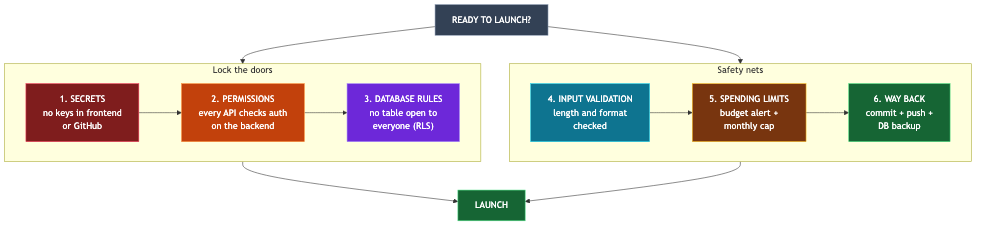
If checking all six feels burdensome, at least run this final prompt: “You are a security auditor. Before this project goes public, find every risky area involving exposed secrets, missing authorization checks, DB access rules, and input validation, and report them in order of severity.” Even an AI that made mistakes while building can find them when asked to audit. However, do not blindly trust AI’s “It is safe now.” Comparing the results against this checklist and verifying each item is part of the inspection.
Series summary: One-page map
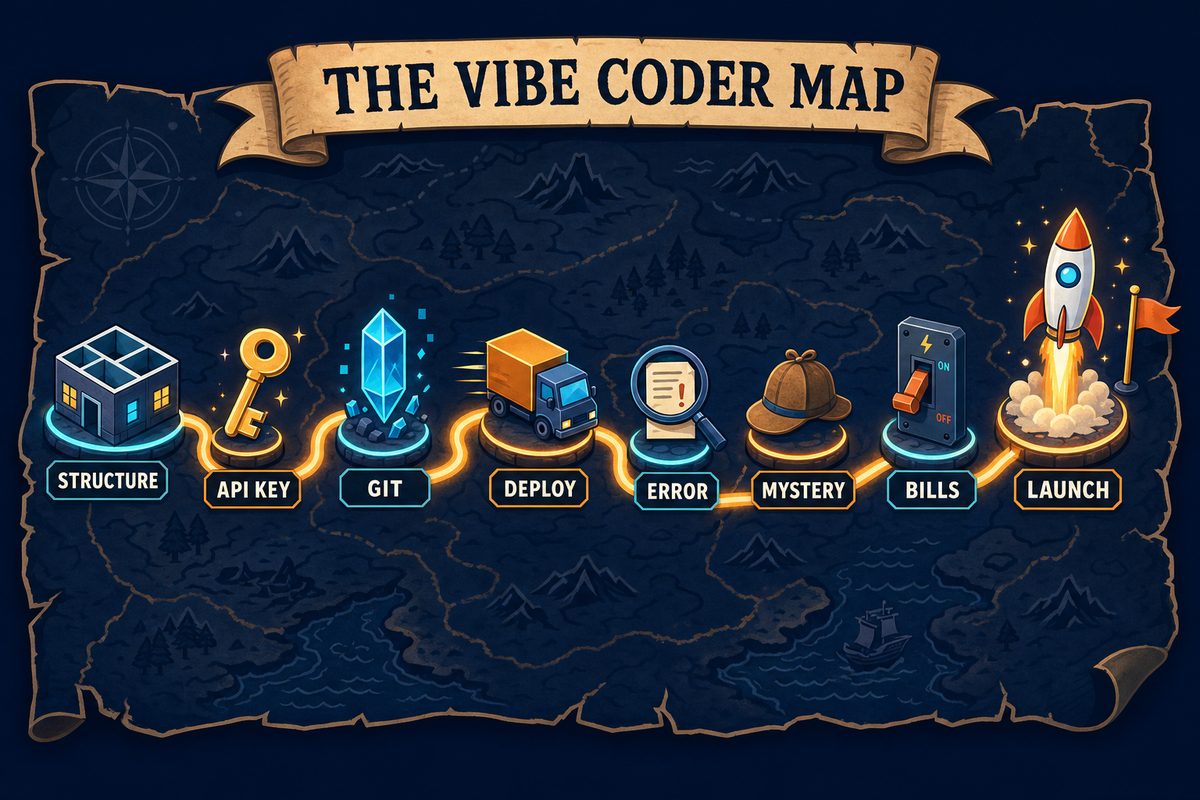
Fold the eight installments onto one page, and it looks like this.
- Part 1 — Architecture: An app consists of a hall (frontend), kitchen (backend), and warehouse (DB). The frontend is a public space, so keep secrets out of it.
- Part 2 — API keys: A key is a corporate card. It belongs in exactly two places:
.envand the deployment dashboard. - Part 3 — Git: A commit is a save point. Save whenever things work and before every major change.
- Part 4 — Deployment: Deployment is moving to a server.
.envdoes not travel with the moving boxes, so register it separately in the dashboard. - Part 5 — Errors: An error message is a confession. Give it to AI in full, together with the context. If AI keeps going in circles, change the approach.
- Part 6 — Mysteries: The culprits behind “I changed nothing” are cache, dependencies, external services, and yesterday’s self. Check the cheapest possibilities first.
- Part 7 — Billing: Bills come from tokens, reads and writes, and traffic. Spending limits and alerts are five-minute insurance.
- Part 8 — Pre-publication checks: Lock the six doors above before heading out.
Conclusion
This series did not teach coding. Instead, it drew a map: what components make up my app, where each can cause trouble, and where to look and what to ask AI when something goes wrong. The real skill in vibe coding is not the ability to read code, but the ability to carry this map and ask AI precise questions.
The map is now in your hands. Build something good and show it to the world.