
![Cover image for [Advanced Swift #1] How async/await works: it’s not the thread that stops](/assets/images/posts/17c93232-c3fd-4d3b-867a-e93af7bc893f/swift-async-await-suspension-1.jpg)
In the error-handling and closure articles, I repeatedly added the caveat “since async/await.” This is the main article.
This is the first installment of the Swift Concurrency series that opens the advanced series. We’ll start with what async/await actually solves and how it works.
The syntax itself takes a day to learn: add async to the function and await to the call.
The hard part comes next. Questions like “Does the thread stop at await?” and “Which thread runs an async function?”
Unless these questions are answered clearly, concurrency code remains a matter of memorizing incantations.
This article aims to answer both questions precisely.
The real problem with callbacks—not indentation, but the compiler’s blindness
Before async/await, asynchronous code used completion handlers, as discussed in the closure article.
“Callback hell” is often blamed on indentation, but that is only the symptom. The root problem is that the compiler cannot see the flow.
func loadProfile(completion: @escaping (Result<Profile, Error>) -> Void) {
    fetchUser { result in
        switch result {
        case .success(let user):
            fetchAvatar(user.avatarURL) { avatarResult in
                // completion What if you forget to call it?
            }
        case .failure(let error):
            completion(.failure(error))
        }
    }
}
Even if completion is omitted on some path, called twice, or invoked on the wrong thread, the compiler says nothing.
The result is that the language’s basic concept of returning was replaced with the convention of calling a closure. Guarantees once provided by the language—all paths return a value and errors propagate—were handed over to developer discipline.
async/await brings asynchronous code back under the language’s jurisdiction.
func loadProfile() async throws -> Profile {
    let user = try await fetchUser()
    let avatar = try await fetchAvatar(user.avatarURL)
    return Profile(user: user, avatar: avatar)
}
Return is return, and errors are throws. The compiler once again checks that every path either produces a value or throws.
The do-catch and propagation rules covered in the error-handling article work unchanged in asynchronous code. This is not syntactic sugar; it restores the compiler’s lost vision.
What suspension really means—the function pauses, not the thread
First question: does the thread stop at await?
No. The function pauses, while the thread is released to do other work.
This distinction is the most important sentence in Swift Concurrency.
At await, the function stores its progress state—local variables and its execution point—on the heap instead of the stack, then returns the thread it was using.
This is called suspension. When the awaited work finishes, execution resumes with the saved state.
There is no guarantee that resumption uses the same thread. The lines before and after await in one function may run on different threads.
Thanks to this design, Swift’s concurrency runtime uses a cooperative thread pool. It creates roughly as many threads as CPU cores, and functions yield them to one another at each await.
This contrasts with the GCD (Grand Central Dispatch) era of creating and putting hundreds of threads to sleep (blocking). Since threads do not sleep, thread explosions and wasted context switches are reduced by design.
One practical rule follows directly: never block a thread in the cooperative pool.
Waiting on a semaphore or calling sleep puts an entire pool thread designed around yielding to sleep. With four cores and roughly four threads, putting one to sleep effectively stops a quarter of the system.
“await yields; blocking is forbidden” is the cooperative pool’s first rule.

Which thread runs it? Ask about isolation, not threads
Second question: which thread runs an async function?
Swift Concurrency’s answer is “discard that question.” Threads are runtime-managed resources; developers specify isolation—“which serial execution context does this code belong to?”
MainActor is the representative isolation domain. Functions and types marked @MainActor are guaranteed to run on the main thread.
This is different from scattering DispatchQueue.main.async around UI-update code by intuition. The requirement “main only” is declared in the type system and checked by the compiler.
UIViewController and SwiftUI View are already declared with @MainActor. Code inside a view automatically receives main isolation.
By contrast, an async function without an isolation marker belongs to no particular actor (nonisolated) and runs somewhere in the cooperative pool.
To move heavy computation off the main thread, you do not write code that “sends it to a background thread.” In Swift, declare that the work does not belong to MainActor isolation.
When needed, open a new asynchronous context with Task. (Task’s structured usage is covered in part 4 of this series.)
The language also provides a bridge to existing callback APIs. withCheckedThrowingContinuation can wrap a callback API as an async function.
Calling continuation’s resume exactly once is the contract, and the “Checked” version detects violations at runtime. It is the first bridging tool to master when working with legacy SDKs.
The trap of sequential await—concurrency is not free
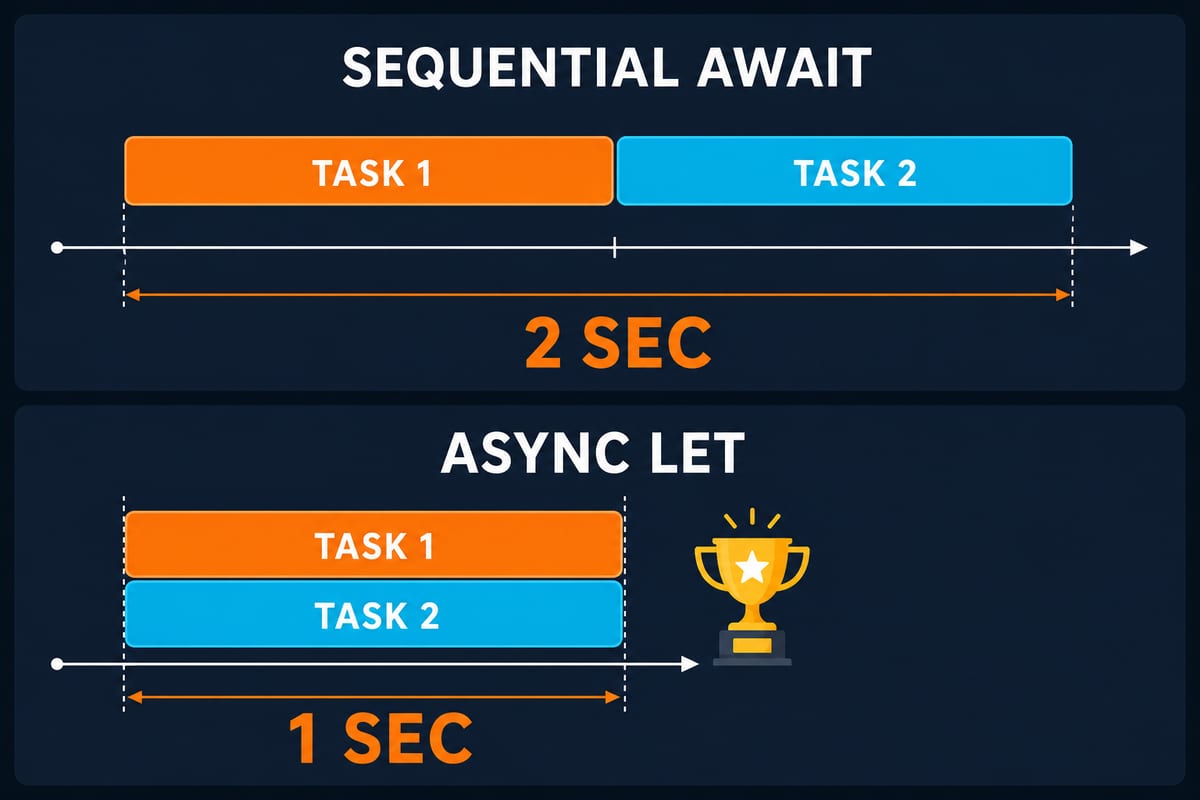
The loadProfile code above contains a performance trap. What if the other request is unrelated to fetchUser?
// Sequential: the avatar starts only after the banner finishes (total  2s)
let avatar = try await fetchAvatar()   // 1s
let banner = try await fetchBanner()   // 1s
await means “wait here,” so written this way the two requests line up serially. If the tasks are independent, async let should start them concurrently.
// Concurrent: both requests run together (total  1s)
async let avatar = fetchAvatar()
async let banner = fetchBanner()
let profile = try await Profile(avatar: avatar, banner: banner)
async/await does not automatically parallelize work. Choosing sequential or concurrent execution is still the designer’s responsibility.
The improvement is that the choice is now a one-line syntax difference instead of callback composition. Structured usage of async let and TaskGroup is covered in detail in the structured concurrency article.
Summary
- The real problem with callbacks was not indentation but the compiler’s blindness. async/await returns returns and error propagation to the language, restoring compiler checks.
- At await, the function pauses, not the thread. The function state is stored on the heap, the thread is returned, and resumption is not guaranteed to use the same thread.
- The runtime is a cooperative thread pool. Therefore, blocking inside it—semaphores or sleep—is forbidden.
- The question is not “which thread?” but “which isolation?” UI code is guaranteed by @MainActor declarations, and callback APIs are wrapped with continuations.
- await does not automatically parallelize. Start independent tasks concurrently with async let.
The next article covers the core of this series: actor. It explains exactly what a data race is, how actor elevates it into a compile-time concept, and the notorious reentrancy trap.