
![Cover image for [Modularization #4] Start iOS Modularization with SPM](/assets/images/posts/2dfa8b93-209b-47ab-8ad8-2745ec0ab314/1.jpg)
The previous modularization articles covered the principles of boundaries, dependency direction, and layer structure. Now it is time to apply them to an iOS project.
There are essentially two tools for splitting modules in iOS: Xcode framework targets and Swift Package (SPM, Swift Package Manager).
In short, as of 2026, SPM is the default choice for new modularization projects. Modules can be created with only folders and Package.swift, without project-file (pbxproj) conflicts.
This article covers creating local modules with SPM, how they differ from framework targets, and how to choose between static and dynamic linking.
Why SPM instead of framework targets?
You can also create a module in Xcode through File → New → Target → Framework. That was the standard approach for a long time.
The problem is the footprint it leaves. Adding each target changes project.pbxproj by dozens of lines, and simultaneous target changes by two team members cause merge conflicts.
Local SPM packages are different.
| Comparison | Framework target | Local SPM package |
|---|---|---|
| Module definition location | project.pbxproj | Package.swift (declarative code) |
| Merge conflicts | Frequent | Rare (the file contains human-readable code) |
| Cost of adding a module | Xcode GUI operation | Folder + a few lines |
| Fine-grained build settings | Flexible | Limited |
As modules multiply, the cost of adding one determines the architecture. If adding a module feels intimidating, no one will split things up.
Unless you need highly granular control over build settings, local SPM packages have lower maintenance costs.
How do you create a local SPM package?
Create a folder beside the app project and place Package.swift in it. Let’s move the layer structure from the previous article across as-is.
// Modules/Package.swift
let package = Package(
    name: "Modules",
    products: [
        .library(name: "FeatureSearch", targets: ["FeatureSearch"]),
        .library(name: "CoreNetwork", targets: ["CoreNetwork"]),
    ],
    targets: [
        .target(name: "FeatureSearch", dependencies: ["CoreNetwork"]),
        .target(name: "CoreNetwork"),
        .testTarget(name: "FeatureSearchTests", dependencies: ["FeatureSearch"]),
    ]
)
Drag this package into the Xcode project, connect the library to the app target, and import FeatureSearch works.
The key point is that dependencies are declared as code in the dependencies array. If FeatureSearch should not use CoreNetwork, remove it from the array; a hidden import then produces a compile error.
This is how the “compiler-enforced boundaries” discussed in the previous article are created.
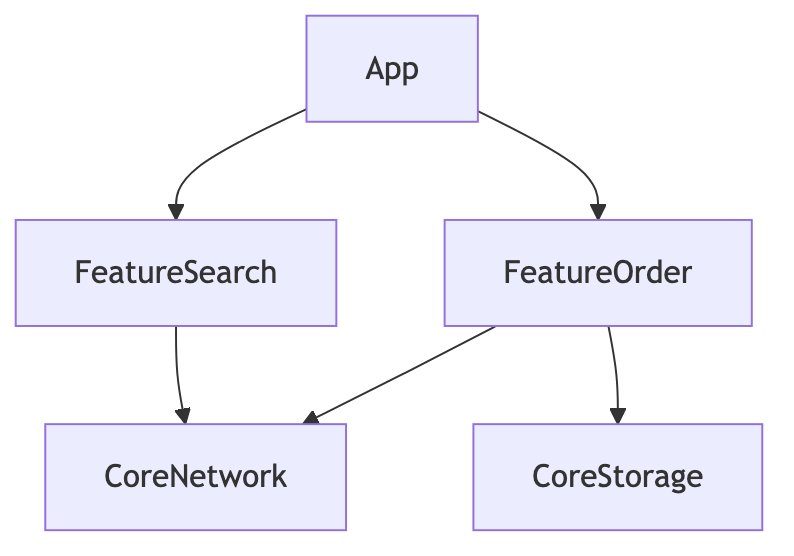
Instead of placing multiple targets in one package as above, you can create one package per module. With few modules, a single package with multiple targets is easier to manage; at the scale of dozens, many teams split packages by domain.
Static or dynamic: which should you choose?
You can choose the linking mode when declaring .library. The default is automatic, which Xcode selects for you and usually processes as static.
- static: Module code is copied into and merged with the app binary. No additional loading occurs at launch.
- dynamic: The module exists as a separate framework file and is loaded at runtime.
Here are the selection criteria.
| Situation | Choice |
|---|---|
| Typical feature or core module | static (keep the default) |
| The app, widget, and extension share the same module | dynamic (remove binary duplication) |
| Launch time is sensitive, but there are dozens of dynamic modules | Consider consolidating as static |
More dynamic frameworks increase launch-time loading costs. Apple has consistently recommended this in WWDC sessions, so unless there is a specific reason, keeping automatic (effectively static) is a sensible choice.
When is SPM alone no longer enough?
You can start with SPM modularization and use it successfully, but larger teams eventually encounter limitations.
- Settings belonging to the app target itself (signing, schemes, and build settings) still remain in pbxproj, leaving room for conflicts.
- With dozens of modules, managing Package.swift and standardizing module templates becomes tedious.
- You want to share build caching across the organization.
The tool that appears at this point is Tuist. That is the topic of the final article in this series.
This is how it comes up in interviews
Q. Why use local SPM packages for iOS modularization?
Module definitions are managed as declarative code in Package.swift rather than pbxproj, reducing merge conflicts and the cost of adding modules. Dependencies between targets are also explicit in dependencies, so unauthorized imports are blocked with compile errors and the compiler enforces module boundaries.
Q. Explain the difference between static libraries and dynamic frameworks and when to choose each.
static is copied into the app binary at link time, so it has no runtime loading cost; dynamic exists as a separate file and loads at runtime. Use static by default, but choose dynamic when the app, extensions, and widgets share code and binary duplication must be reduced.
The next article covers the real reason many teams begin modularizing: Xcode build speed.
We’ll cover why builds slow down, where and how much modularization improves them, and how to measure the improvement numerically.