

Have you ever gotten stuck trying to build an undo feature yourself?
It is a common feature that ends with one Ctrl+Z, but translating it into code can be surprisingly tricky. Even in a simple paint-like toy project, it is easy to spend days on it.
Here is the conclusion first: undo implementation broadly takes two approaches.
One is the Command pattern, which reverses actions that were performed. The other is the Memento pattern, which saves the entire state from before an action.
Both are valid. The choice depends on when and why you use each one. Today, we will compare them with code.
Command Pattern — Wrapping Actions as Objects
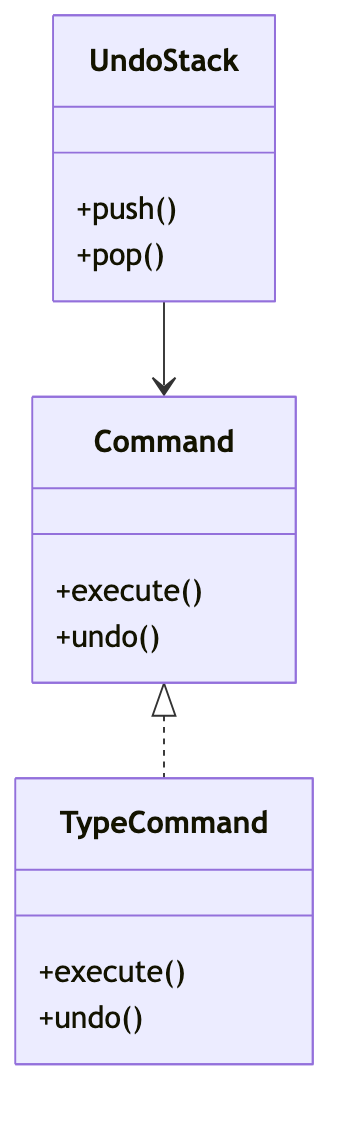
The Command pattern puts what was done into a single object.
Think of it as an object that pairs execute and undo.
For example, if the action is entering text, define its opposite—deleting exactly what was entered—in the same object ahead of time.
protocol Command {
    func execute()
    func undo()
}

struct TypeCommand: Command {
    let text: String
    let editor: Editor
    func execute() { editor.content += text }
    func undo() { editor.content.removeLast(text.count) }
}
These Command objects are added to a stack one by one.
Then Ctrl+Z arrives. Pop the top item and call undo(). That is all.
The Command pattern stores actions, not state.
Memento Pattern — Saving State as Snapshots
Memento takes a completely different approach.
Instead of figuring out how to reverse each action, you simply capture the entire state just before it changes—like taking a photograph.
struct Memento { let content: String }

class Editor {
    var content = ""
    func save() -> Memento { Memento(content: content) }
    func restore(_ m: Memento) { content = m.content }
}

let editor = Editor()
editor.content = "Hello"
let snapshot = editor.save()   // Save snapshot here
editor.content = "Hello"
editor.restore(snapshot)
print(editor.content)
// Output: Hello
When undo is needed, replace the current state with the saved snapshot. That is all.
It is reassuring not to write reversal logic for every action.
There is a clear downside, though. Large states consume considerable memory because the entire state is copied each time.
So Which One Should You Use?
I summarized the differences I noticed after using both in a table.
| Criteria | Command pattern | Memento pattern |
|---|---|---|
| What is stored | Action (execute/undo) | State snapshot |
| Memory | Lightweight | Heavy when state is large |
| Undo logic | Implemented manually for each action | Just restore the state |
| redo | Natural with stack popping | Possible with a snapshot array |
| Best suited for | Editors, graphics tools | Game saves, form state |
Here is the one-line summary.
If you can clearly define the reversal action, use Command; if capturing the entire state feels simpler, use Memento.

When to Use It—and When to Avoid It
I use these criteria when choosing in practice.
- The action boundaries are clear and redo is also required → Command. Editors and drawing tools are typical examples.
- The state is small and copying snapshots is affordable → Memento. For example, form input or reverting configuration values.
- The state is huge but changes are localized → Avoid Memento. Copying everything each time can exhaust memory. Command is better.
- You cannot come up with the reversal logic → Do not force Command; saving snapshots with Memento is cleaner.
In production, the two are sometimes combined. Actions are managed with Command, while only the parts that are difficult to reverse are saved as Memento snapshots.
This Is How It Comes Up in Interviews
Q. What is the difference between the Command and Memento patterns?
Command encapsulates an action in an object and pairs execute with undo. Memento stores an object’s state as a snapshot and restores it later. In other words, the difference is whether undo uses an inverse action or state restoration.
Q. If you were implementing an undo stack, which would you choose?
If action boundaries are clear and you want natural redo support, choose Command. If the state is small and reversal logic is cumbersome, stacking Memento snapshots is simpler and safer.
I recommend implementing both patterns yourself at least once. Reading about the concepts and watching objects stack up and the state roll back on Ctrl+Z lead to completely different levels of understanding. I hope this article helps you take that first step.