

“Why do we still use @autoreleasepool in the ARC era?”
It’s a question I often get from junior developers. It’s a keyword they’ve clearly seen somewhere, yet it’s surprisingly hard to explain exactly when and why to use it.
Today, I’ll explain what @autoreleasepool is and when to use it in practice.
Here’s the conclusion first.
@autoreleasepoolis a block that releases objects scheduled for later disposal at a time you choose. Its main use is preventing memory spikes when temporary objects accumulate inside a loop.
Let’s walk through it step by step.
What Is an Autorelease Pool?
Let’s start with the background concepts.
Objective-C has long provided autorelease. It lets you schedule an object to be released “a little later, not right now.”
The waiting list where these scheduled objects line up is the autorelease pool.
When the pool is drained, all the objects on that list receive release at once.
So when is this pool drained?
In iOS apps, the main run loop manages it automatically. After each cycle—processing touch events, then updating the screen—it drains the pool completely.
That’s why we normally don’t need to think about it.
The Problem Appears in Loops
However, there are situations where the rule “at the end of each cycle” becomes a problem.
That happens when a huge number of temporary objects accumulate during a single run-loop iteration.
For example, suppose we process thousands of photos in one loop.
for (int i = 0; i < 5000; i++) {
    // A large image object is created temporarily on every iteration
    UIImage *image = [self loadAndResizeImage:i];
    [self saveThumbnail:image];
}
The run loop has no chance to drain the pool while the loop is running.
As a result, temporary objects merely scheduled for release accumulate in memory—5,000 photos’ worth.
The memory graph rises like a mountain, and in severe cases the system force-quits the app.

How to Flatten the Mountain with @autoreleasepool
The solution is simple: create a private pool inside the loop and drain it yourself after every iteration.
for (int i = 0; i < 5000; i++) {
    @autoreleasepool {
        UIImage *image = [self loadAndResizeImage:i];
        [self saveThumbnail:image];
    } // Temporary objects are released as soon as the block ends
}
As soon as the @autoreleasepool block closes, the temporary objects created inside it are cleaned up immediately.
Instead of accumulating 5,000 photos’ worth of memory and releasing it all at once, memory rises and falls one photo at a time.
The mountain-shaped memory graph becomes a gentle sawtooth pattern.
How to Use It in Swift
You might say, “I only use Swift.” Swift has the same tool too.
It’s the autoreleasepool function.
for i in 0..<5000 {
    autoreleasepool {
        let image = loadAndResizeImage(i)
        saveThumbnail(image)
    }
}
There’s one important point to note.
Most pure Swift objects don’t pass through an autorelease pool; they’re released as soon as their scope ends.
This tool really shines when repeatedly calling Objective-C-based Foundation and UIKit APIs such as UIImage, Data(contentsOf:), and NSData.
There are still many APIs that internally create and return autoreleased objects.

When Should You Use It?
In summary, the situations that call for @autoreleasepool include these:
- When a loop creates many large temporary objects such as images, files, or strings
- When a long-running task executes on a background thread without a run loop
- When using Objective-C objects in an environment without a run loop, such as a command-line tool
Conversely, you usually don’t need it in ordinary UI code or business logic. The main run loop already manages things well.
I also don’t recommend wrapping code with it out of habit without measurement. Use it after you see an actual spike in Instruments or the Xcode memory graph.
Frequently Asked Questions (Q&A)
Q. If ARC handles it automatically, why should I manage the pool?
ARC (Automatic Reference Counting) only inserts retain and release calls for you; it doesn’t change when the autorelease pool is drained. Advancing the time when the pool is drained is still the developer’s responsibility.
Q. What is the @autoreleasepool in the main function?
Open main.m in an Objective-C project and you’ll see the entire app wrapped in @autoreleasepool. This is the app’s top-level pool. The run loop runs inside it and drains child pools on each cycle.
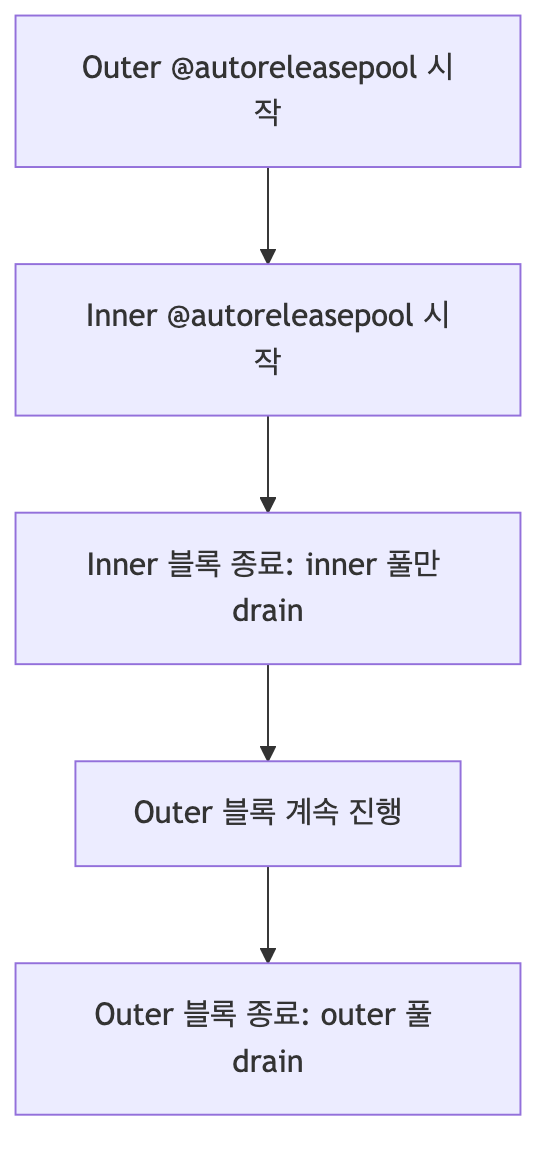
Q. Can I nest the blocks?
Yes. Pools stack up like a stack. When the inner block closes, only the inner pool is drained; the outer pool remains intact.
In short, @autoreleasepool is a block that drains temporary objects scheduled for release at a time you choose.
If Instruments shows memory rising like a mountain in a loop, try wrapping the loop’s inner work in this block. You’ll be able to see the graph calm down.
If you’re curious about the history of moving from MRC (Manual Reference Counting) to ARC, I recommend also reading the earlier article, “The History of Objective-C Memory Management.” Happy coding!