
![Cover image for [Vibe Coder #1] Anatomy of an AI-built app: frontend, backend, and DB](/assets/images/posts/14b48a7c-3fa2-40d1-95f5-730394844104/vibe-coding-app-structure-1.jpg)
More people are building apps by describing them to AI. Tell tools like Cursor, Claude Code, or v0, “Build this service,” and a working app appears. But after building it, many hit the same wall: the app runs, yet they do not know what AI actually created. When errors occur, they do not know where to look or what to ask AI.
The first step past this wall is not learning to read code. It is knowing what parts make up your app and what each does—in other words, having a map of its structure. Developers call these three parts the frontend, backend, and DB. This article explains all three from a non-developer’s perspective. With this map, the API keys, Git, deployment, and billing issues covered next will all fall into place.
An app has the same structure as a restaurant
Whether web or mobile, most user-facing services consist of three parts. A restaurant analogy fits perfectly.
Dining room (frontend) is where guests sit: the menu, tables, and interior—everything they see and touch. In an app, this includes visible elements such as buttons, input fields, and screen transitions.
Kitchen (backend) is hidden from guests. It is where orders become dishes, and where trade secrets such as recipes and ingredient management live. In an app, it handles important tasks such as login, payments, and authorization.
Storage room (database, DB) is where ingredients are kept. Even if the kitchen burns down, the ingredients remain. In an app, this is where data such as member information, posts, and order history is actually stored.
When a guest (user) orders from the menu (frontend), the order goes to the kitchen (backend), which retrieves ingredients from storage (DB query), cooks, and sends the result to the dining room. This round trip happens every time you refresh Instagram.
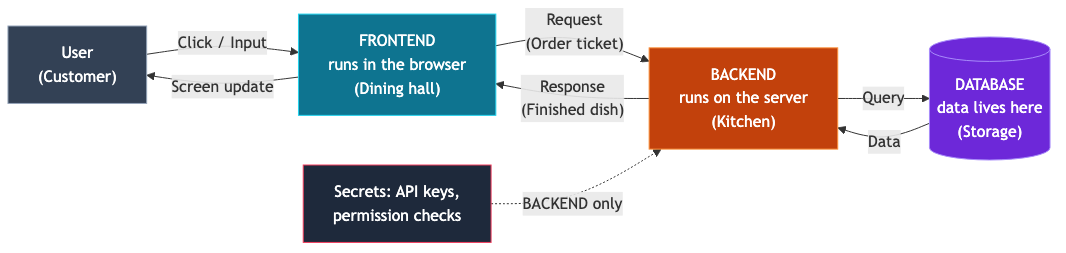
The frontend runs on the user’s device
The frontend’s most important characteristic is where it runs. Frontend code runs on the user’s browser (or phone), not your server. When users visit a site, the code is sent to their device, which executes it and renders the screen.
Here is one conclusion every vibe coder must understand: frontend code is visible to everyone. Right-click in a browser and choose “Inspect” to see the site’s frontend code. Naver and Toss are no exceptions. It is designed this way, and cannot be prevented.
Therefore, frontend code cannot contain secrets. Putting API keys, admin passwords, or payment-verification logic there is equivalent to publishing them worldwide. AI may place such values in the frontend for convenience; deploying without noticing can expose an API key and produce a huge bill. This is covered in Part 2.
The backend runs on my server
The backend, by contrast, runs on a server I manage. Users cannot see its code; they can only send it “requests” and receive “responses.” It is like restaurant guests who cannot enter the kitchen and can only submit an order.
All important work must therefore happen in the backend.
- Secret storage: Keep secrets such as API keys and DB credentials only in the backend.
- Authorization: The check “Is this user allowed to delete this post?” must happen in the backend. Hiding a delete button in the frontend is merely decoration. Anyone can send the request even if the button is invisible.
- Payments and calculations: If the frontend calculates the price and you trust it, users can manipulate the request and pay 1 won.
In short: the frontend shows; the backend decides. Frontend checks guide user convenience; actual security and judgment belong entirely to the backend.
The DB is where data actually lives
If you have deleted and redeployed an app only to find member data intact, it is because data lives in the DB, not the app. The app (frontend + backend) is the worker; the DB is the vault. Replace every worker and the vault’s contents remain.
Supabase and Firebase, popular in vibe coding, are services that operate this DB for you. That creates this distinction:
- No matter how much you change and redeploy code → data is safe.
- But reset the DB → all data disappears even if the code is fine.
This is why rolling back code and restoring data are completely separate when you want to undo something. Roll back code with Git (covered in Part 3), and restore data from a DB backup. Reverting one does not revert the other.
Which part is where in my project?
Now apply the concepts to your project folder. AI-generated projects contain many folders, but their names reveal the rough structure. For the Next.js projects most common in vibe coding:
app/orpages/,components/→ the frontend that renders screens. Look here to change button text.app/api/folder, or a file whose top says"use server"→ the backend. It is in the same project but runs on the server..envfile → the secret store used by the backend. API keys and DB credentials go here.- The DB is usually not in the project folder. It is a separate space visible after logging in to the Supabase or Firebase website (dashboard).
One caveat: modern tools such as Next.js mix frontend and backend in one project folder. One folder does not mean everything runs in one place. Some files go to the browser; others stay on the server. If confused, ask AI: “Does this file run in the user’s browser or on the server?” That single question determines where secrets belong.
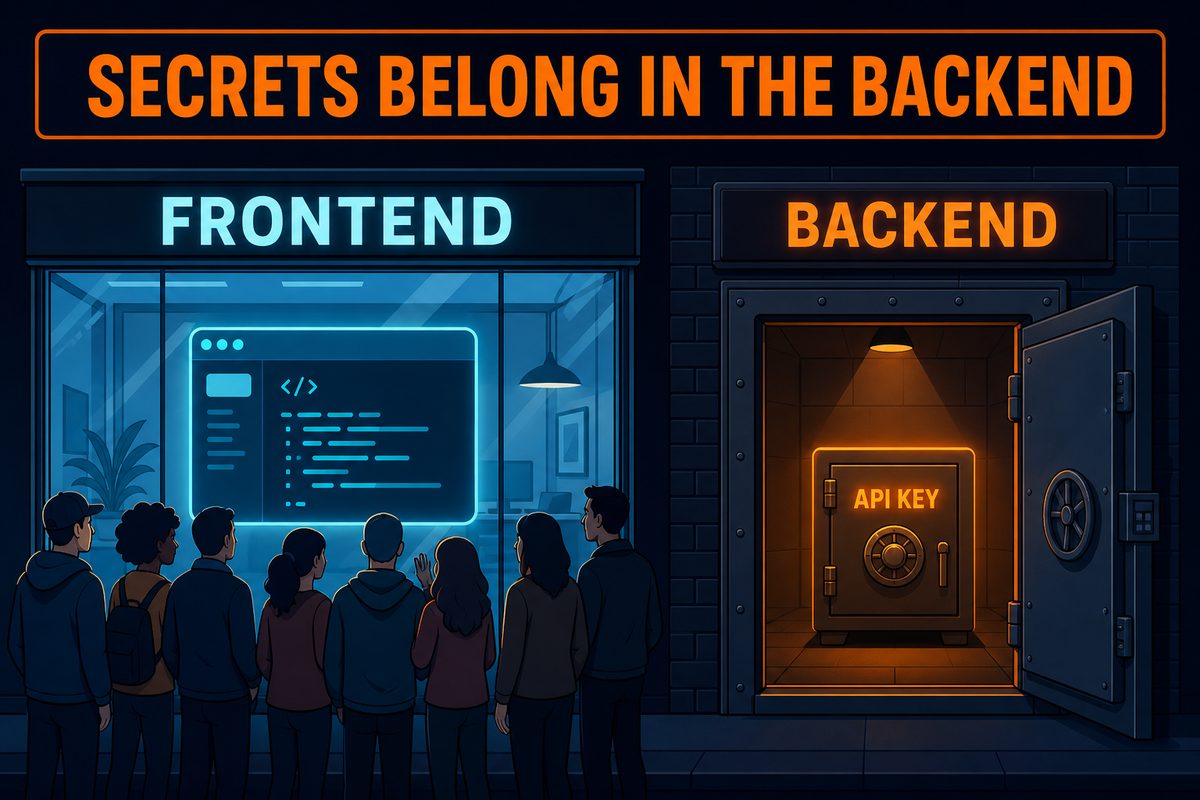
What changes once you have this map
Understanding the structure changes three things immediately.
First, you know where to look when errors occur. If the screen looks wrong, check the browser developer-tools console (the frontend’s scream); if saving or login fails, check server logs (the backend’s scream). Telling AI “this error appears in the browser console” versus “in the server logs” provides entirely different clues and greatly improves diagnosis.
Second, it prevents half of security incidents. Keep secrets in the backend and perform authorization checks there. Following just these rules avoids many security incidents caused by vibe coding.
Third, you can give AI more precise instructions. “It errors when I press Save” is much less useful than “Pressing the button seems to fail when calling the backend API. Check the server-side code.” Questions from someone with a map are different.
Summary
- An app is a restaurant made of a dining room (frontend), kitchen (backend), and storage room (DB).
- The frontend runs on the user’s device and is visible to everyone, so it must not contain secrets.
- The backend runs on my server, where all decisions—secret storage, authorization, and payments—are made.
- The DB is separate from the app: data survives a complete code replacement, but disappears if the DB is deleted.
- When confused, ask AI: “Does this code run in the browser or on the server?”
The next article covers APIs and API keys, the topic that causes the most trouble in this architecture. I will explain why everyone says to hide keys, what actually happens when one is exposed, and how to verify that your project’s keys are safe.