
![Cover image for [AI Context #3] /clear vs /compact: How to Choose](/assets/images/posts/dbbbbbf4-c659-46d5-8a59-05ef8e331a0d/1.jpg)
The previous two posts completed the diagnosis. The context window is finite (Part 1), and filling it does not mean everything is used; performance actually declines as it grows (Part 2). The prescription is clear: manage context. The most basic tools coding agents, including Claude Code, provide for this are /clear and /compact.
Both commands reduce context. That is why many people use either one arbitrarily, or wait until the low-context warning appears before using either. But their mechanisms are completely different: using the wrong one can wipe out the entire task context, or leave you dragging a messy context along. This post first examines exactly what each command does internally, then establishes when to use which.
/clear: Delete the history and start fresh
/clear is simple. It discards the entire conversation history so far. The model on the next turn starts with the system prompt, always-loaded files such as CLAUDE.md, and only the new message you just entered. The meaning is clear if you recall the structure from Part 1: because the conversation is effectively the full history resent on every turn, deleting the history means resetting the package sent to the model.
What you lose is the entire conversation context; what you gain is a clean context. The lost in the middle effect from Part 2 and the confusion caused by outdated file versions and failed logs disappear with the history. Token headroom is fully restored, and less input is resent each turn, so responses get faster and costs go down.
That makes /clear a task boundary. Once you have fixed a bug and completed the commit, the next feature does not need the previous bug’s stack trace or trial and error. Mixing them in only causes harm. Simply breaking with /clear whenever a task ends prevents much of the quality degradation in the latter half of a session.
/compact: Replace the history with a summary
/compact takes a different approach. Instead of discarding the history, it asks the model to summarize the conversation so far and replaces the original history with that summary. A history of tens of thousands of tokens shrinks to a summary of a few thousand, restoring headroom while preserving the task’s main thread.
The key point is that this is lossy compression. Summarization means the model chooses what seems important, and the user cannot control what survives. Concrete details such as file paths, abandoned approaches, and the exact wording of error messages are easily blurred during summarization. An agent rereads files immediately after compact because the summary alone does not reveal their exact current state.
Fortunately, there is some control. Claude Code’s /compact accepts instructions afterward. For example, “/compact Focus on the schema changes confirmed in this migration and the remaining file list” directs the summary’s focus. The user knows best what matters, so even when delegating compression, provide its direction.
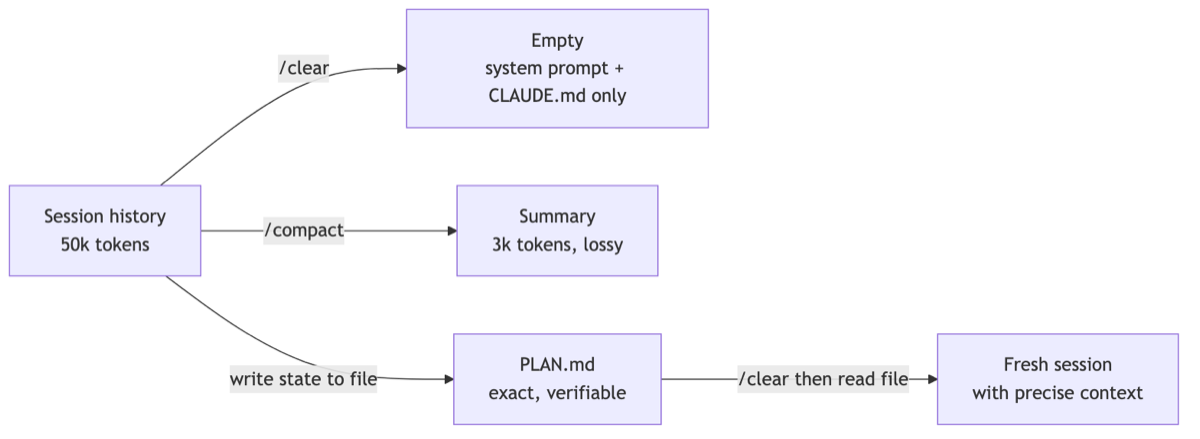
How to choose: Is there context worth carrying forward?
The decision comes down to one question: does the agent on the next turn need to know the context so far?
- The task is finished and the next task is separate → /clear. This is the default, without hesitation.
- The same task continues but headroom is low → /compact. Specify what to retain in the instruction.
- It is the same task, but the agent has started spinning its wheels → surprisingly, /clear is better. Summarizing a context polluted by trial and error only concentrates the pollution. Have the agent organize the current state and next steps in a file, then restart with /clear and that file.
The third case offers a clue. There is a third path between clear and compact: write the content worth preserving out of the context to a file. Ask, “Organize the decisions made so far and the remaining work in PLAN.md,” then run /clear and have the new session read PLAN.md. This transfers exactly the needed context without summary uncertainty. Unlike /compact, which delegates retention to the model, the retained content exists in a visible file that can be reviewed and edited. This “externalization” pattern is explored further when we cover memory in Part 6.
Why you should not wait for auto-compact
Claude Code automatically runs compact when headroom reaches a threshold. It is an excellent safeguard, but relying on it is another matter.
The token balance determines when auto-compact triggers, regardless of workflow. It may compress at the worst possible moment: halfway through a refactoring, with five files being modified and tests broken. The summary at that point lumps together an awkward intermediate state, and the agent continues with a subtly misaligned understanding. The context poisoning from Part 2 is happening through the summary.
That is why experienced users manage the remaining balance like a gauge. At each logical milestone—commit, passing tests, or a confirmed decision—they record the state in a file, then close the loop and choose their own /clear or /compact timing when 20–30% remains. Compression may be unavoidable, but you control when and how it happens.

Summary
- /clear deletes the history; /compact replaces it with a summary. The former discards context and maximizes available headroom, while the latter preserves the main thread at the cost of lost detail.
- The default is /clear at every task boundary. Use /compact only when context must carry forward, and specify what to retain in the instruction.
- When an agent spins its wheels, have it record the state in a file and restart with /clear instead of summarizing.
- auto-compact is only a safeguard; it is better to choose compression timing at task milestones.
That covers conversation-history management. But some context does not disappear with /clear and is carried on every turn: always-loaded areas such as the system prompt, CLAUDE.md, and tool definitions. The next post covers how to design this fixed cost. The key question is what to include in CLAUDE.md—and what to leave out.