
If deinit is not called after closing a screen, put one suspect at the top of the list: NSTimer (Timer in Swift).
Let’s start with the conclusion.
A repeating timer strongly retains its target.
The view controller is never released until
invalidate()is called.
The final, 52nd item of Effective Objective-C 2.0 covers this classic pitfall in full, and it remains just as relevant in the Swift era.
Key summary first (3 points)
Timer.scheduledTimer(target:)holds its target with a strong reference.- When the view controller keeps the timer as a property, the retain cycle is complete.
- There are three solutions — block-based API + weak, invalidate somewhere other than deinit, and the weak proxy pattern.
How the retain cycle is formed
The problematic code looks like this.
class PollingViewController: UIViewController {
    var timer: Timer?

    override func viewDidLoad() {
        super.viewDidLoad()
        timer = Timer.scheduledTimer(
            timeInterval: 5.0,
            target: self,          // The timer self strongly retains it
            selector: #selector(refresh),
            userInfo: nil,
            repeats: true
        )
    }

    deinit {
        timer?.invalidate()        // Never called
    }
}
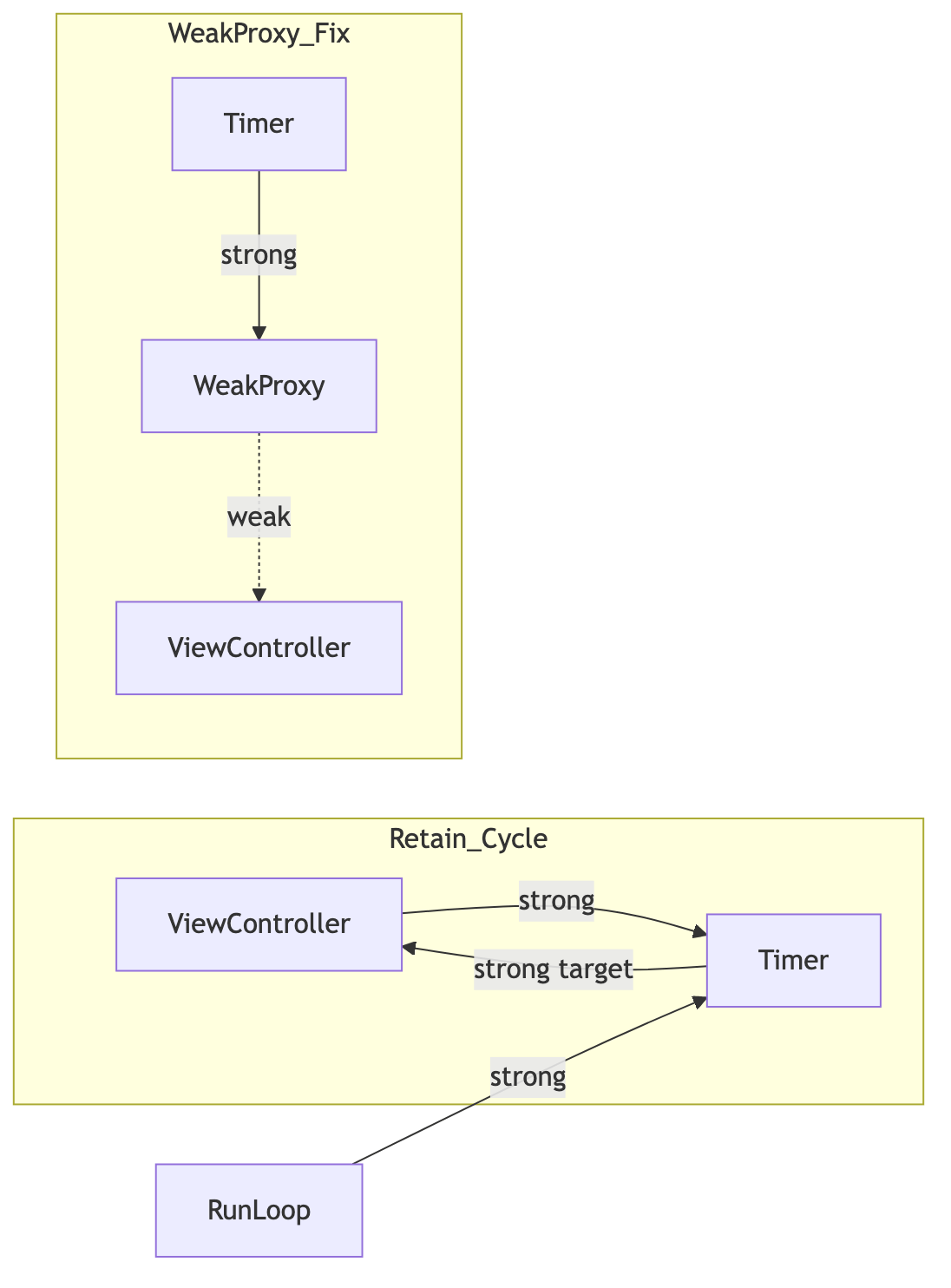
Following the references, we get this:
- View controller → strongly retains the timer through its timer property
- Timer → strongly retains self, the target view controller
- Additionally, RunLoop → strongly retains the timer
“Can’t we invalidate it in deinit?” That is the heart of the trap. Because the timer retains the view controller, its reference count can never reach zero, so deinit never runs. Even after the screen is popped, refresh keeps running every five seconds in the background—causing both a memory leak and battery drain.
Solution 1: Block-based API (iOS 10+)
This is the cleanest modern solution. Instead of a target, accept a closure and make its captures weak.
timer = Timer.scheduledTimer(withTimeInterval: 5.0, repeats: true) { [weak self] _ in
    self?.refresh()
}
The timer is still retained by RunLoop, but there is no cycle strongly retaining the view controller. Once the view controller is released, deinit can call invalidate normally.
The category solution proposed by Effective Objective-C has the same essence. Before iOS 10, block-based APIs were unavailable, so it recommended creating a category that passes a block to NSTimer through userInfo.
Solution 2: Invalidate with the lifecycle
Clean up at the point when the screen disappears, rather than in deinit.
override func viewWillDisappear(_ animated: Bool) {
    super.viewWillDisappear(animated)
    timer?.invalidate()
    timer = nil
}
Calling invalidate makes the timer release its strong reference to the target, breaking the cycle. However, matching code is needed to recreate it in viewWillAppear, and cases where another screen briefly covers and then leaves the current one must also be handled, increasing maintenance points.
Solution 3: Weak proxy pattern
This classic pattern is for cases that require passing a target, such as iOS 9 support and CADisplayLink. Insert a delegate with only a weak reference between the timer and view controller.
final class WeakProxy: NSObject {
    weak var target: NSObjectProtocol?

    init(target: NSObjectProtocol) {
        self.target = target
        super.init()
    }

    override func forwardingTarget(for aSelector: Selector!) -> Any? {
        target
    }
}

timer = Timer.scheduledTimer(
    timeInterval: 5.0,
    target: WeakProxy(target: self),   // The timer strongly retains only the proxy
    selector: #selector(refresh),
    userInfo: nil,
    repeats: true
)
The timer strongly retains only the proxy, and the proxy sees the view controller only weakly. Once the view controller is released, messages sent to the proxy flow to nil through forwardingTarget and quietly disappear. This applies Objective-C runtime message forwarding to solving retain cycles.
Because CADisplayLink still provides only the target-based form, this pattern remains useful today.

Wrap-up
- Repeating timer + target: self + stored as a property = the three-part retain-cycle combination
- Planning to invalidate in deinit is structurally impossible
- By default, use block-based API +
[weak self]; for APIs that require a target, such as CADisplayLink, use a weak proxy - Make it a habit to close the screen and check whether the deinit log appears; it is the cheapest way to catch this problem
When the final item of a book over ten years old is still raised in modern code reviews, it reminds me that frameworks change, but the principles of reference relationships remain the same.