
![Cover image for [Modularization #6] Easier iOS modularization with Tuist](/assets/images/posts/2461e64e-988b-43c4-a75f-59b167bfa642/1.jpg)
Teams that have grown their modules into the dozens through this series eventually encounter a new kind of fatigue.
Repeated setup for every module, persistent project-file conflicts, and subtly different module configurations across team members.
Tuist targets exactly this problem. In short, it removes Xcode project files from the repository and generates them from declarative Swift code.
This article covers the problems Tuist solves, basic Project.swift usage, and binary caching for large teams. Based on Tuist 4 as of July 2026.
What problems does Tuist solve?
The key is shifting ownership of the pbxproj from people to a tool.
In a typical iOS project, project.pbxproj is committed to the repository. Adding files and changing target settings both modify it, and its format is hard to read, making merge conflicts painful to resolve.
Tuist projects do not commit this file. Instead, they commit a declaration called Project.swift.
| Comparison | Typical project | Tuist project |
|---|---|---|
| Stored in the repository | project.pbxproj | Project.swift (Swift code) |
| Project file | Managed manually | Generated each time with tuist generate |
| Merge conflicts | Frequent in pbxproj | Rare with Swift-code diffs |
| Adding a module | GUI operations + repeated setup | One function call |
Once the project file becomes a generated artifact, it is no longer a merge-conflict target. Add it to .gitignore and you are done.
What does Project.swift look like?
The highlight is that module definitions are Swift code, so repeated configurations can be factored into functions.
// Project.swift
let project = Project(
    name: "MyApp",
    targets: [
        .target(
            name: "MyApp",
            destinations: .iOS,
            product: .app,
            bundleId: "com.example.myapp",
            sources: ["Sources/**"],
            dependencies: [
                .target(name: "FeatureSearch"),
                .target(name: "CoreNetwork"),
            ]
        ),
    ]
)
So far, it may look similar to SPM’s (Swift Package Manager) Package.swift. The difference is extensibility.
Define the team’s standard module shape in a helper function, and adding a new feature module truly becomes one line.
// Team standard: feature module = source + tests + demo app set
let searchModule = Target.featureModule(name: "Search")
let orderModule = Target.featureModule(name: "Order")
// targets per module, configuration unified inside the helper 3
With 30 modules, the pbxproj approach requires repeating the settings screen 30 times; with Tuist, it becomes adding a name to an array. The risk of team members’ configurations drifting also disappears.
Dependency-graph visualization is built in. A single tuist graph command renders module dependencies, making it easy to spot cycles or the “oversized module everyone depends on” warned about in the previous article.
Binary caching: the next step in build speed
The previous article explained that modularization reduces the recompilation scope; Tuist caching takes this one step further.
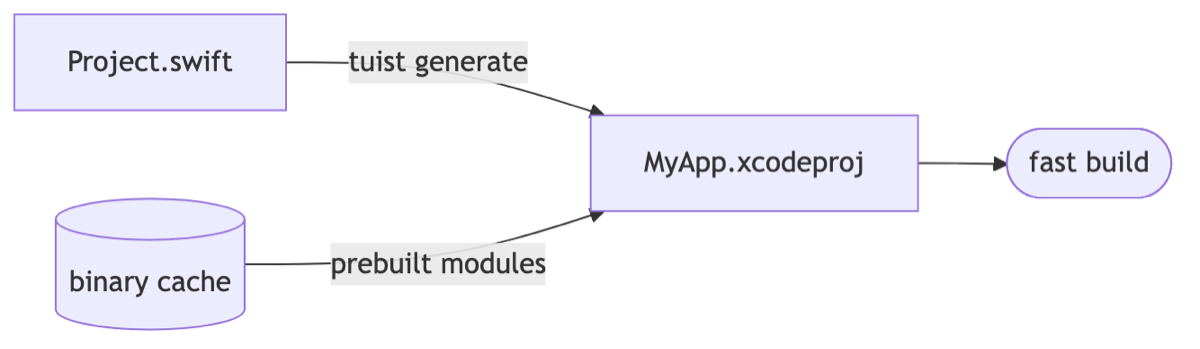
tuist cache prebuilds each module and stores it as a binary (framework). During tuist generate, unchanged modules are replaced with cached binaries instead of source.
- If I am developing only the search feature: open the search module as source and receive the other dozens of modules as built binaries.
- Even a clean build effectively leaves only “my module + linking.”
With a remote cache, the team and CI share these binaries. My machine does not rebuild a module a colleague has already built. That is why large teams report clean-build times dropping from minutes to seconds.
When should you adopt it, and when is it overkill?
Tuist is powerful, but adopting it also makes another tool a required team dependency.
| Situation | Assessment |
|---|---|
| Fewer than 10 modules, small team | Local SPM packages are sufficient |
| Dozens of modules, weekly pbxproj conflicts | High adoption value |
| CI and team build times become a cost issue | Caching alone is sufficient justification |
| No capacity at all for a build-system owner | Consider the learning curve and update-following costs |
If you adopt it, start by managing new modules with Tuist and migrate existing targets gradually rather than switching everything at once. XcodeGen is a lighter alternative that handles only project generation, so consider it too if you do not need caching.
This is how it comes up in interviews
Q. Why introduce a project-generation tool such as Tuist?
Because removing pbxproj from the repository eliminates merge conflicts, while declaring project configuration in Swift code lets you standardize module templates. Binary caching also skips rebuilding unchanged modules, reducing modularization’s management cost while increasing its build-speed benefits.
Q. How would you reduce build times across a team as the number of modules grows?
Introduce module-level binary caching to replace unchanged modules with prebuilt artifacts, then share them across the team and CI through a remote cache. Developers open only their working module as source, so clean-build cost scales with the scope of their work.

This concludes the modularization series. We started with boundaries and cohesion, then covered dependency direction, layer structure, SPM, build speed, and finally Tuist.
Apply these steps in order, and you will gain more than “faster builds”: a codebase where making changes is no longer intimidating.