

In the previous article, we covered the final letter of SOLID, DIP (the Dependency Inversion Principle). Once you understand the principle, the next question naturally follows: “So, who assembles these dependencies in a real app, and how?”
For small projects, manual DI (Dependency Injection) through initializers is enough. But as the number of screens grows into the dozens and the dependency graph deepens, assembly code itself becomes a burden. Today, we’ll look at Factory, a Swift DI library that fits this point well. This guide is based on the latest version as of July 2026: 3.3.1.
How Far Can Manual DI Go?
Code that follows DIP looked roughly like this.
protocol NetworkProviding {
    func fetch(_ url: URL) async throws -> Data
}

final class OrderViewModel {
    private let network: NetworkProviding

    init(network: NetworkProviding) {
        self.network = network
    }
}
The code depends on protocols, while implementations are injected from outside. No library is needed so far. The problem is the assembly layer.
// an assembly point somewhere(Composition Root)
let network = NetworkProvider()
let repository = OrderRepository(network: network)
let analytics = AnalyticsService(network: network)
let viewModel = OrderViewModel(repository: repository, analytics: analytics)
When dependencies reach three or four layers deep, initialization code like this gets repeated across screens. Add one dependency to an intermediate layer, and every initialization path through it must be modified. That’s when the temptation to escape into a singleton grows—but you already know how singletons get in the way of testing. A DI container takes over this assembly problem.
What Makes Factory Different: Compile-Time Safety
For a long time, Swinject was treated as the standard Swift DI library. It registers dependencies by string or type and retrieves them with resolve(), so a missed registration still compiles and fails with nil at runtime. You have to run the app to discover the mistake.
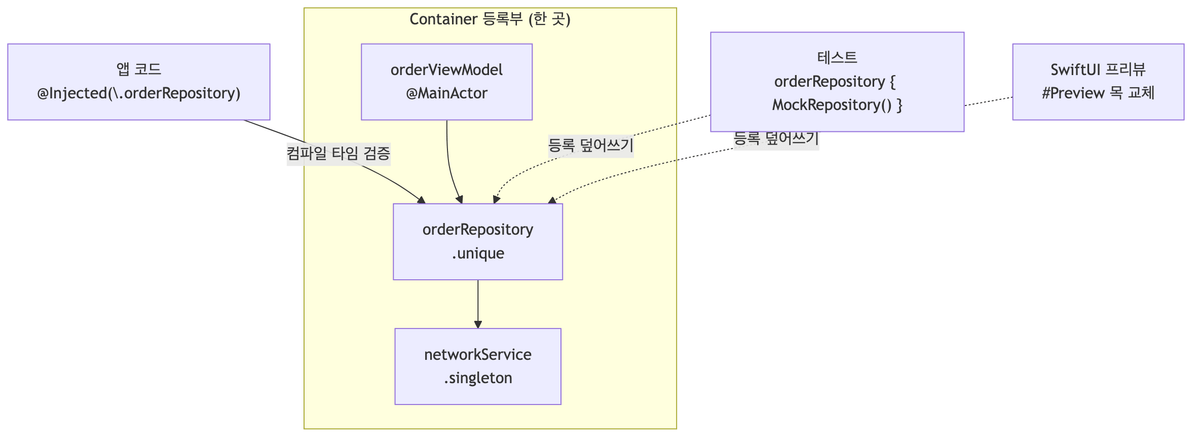
Factory turns this model around. Because dependencies are defined as computed properties on Container, referencing a nonexistent dependency simply fails to compile. Typos and missing registrations are caught during the build.
It is also a lightweight library with fewer than 1,000 lines of executable code, and it runs using pure Swift without a compile-time code-generation script. Unlike Needle, it requires no extra tool in the build pipeline.
Factory Basics in 3 Minutes
Install it with SPM (Swift Package Manager). The package URL is https://github.com/hmlongco/Factory, and from 3.x onward, import it with FactoryKit.
Register dependencies by adding computed properties in a Container extension.
import FactoryKit

extension Container {
    var networkService: Factory<NetworkProviding> {
        self { NetworkProvider() }
    }
    var orderRepository: Factory<OrderRepositoryType> {
        self { OrderRepository(network: self.networkService()) }
    }
}
There are three ways to retrieve them.
// 1. Property-wrapper injection
final class OrderViewModel {
    @Injected(\.orderRepository) private var repository
}

// 2. Direct call
let repository = Container.shared.orderRepository()

// 3. Initializer injection — leave only assembly to the container
extension Container {
    var orderViewModel: Factory<OrderViewModel> {
        self { OrderViewModel(repository: self.orderRepository()) }
    }
}
The third approach is worth noting. The class itself remains pure initializer injection and knows nothing about the library, while the container handles only assembly. It aligns exactly with the principle from the DIP article: “Assembling implementations is the outside’s responsibility.”
In SwiftUI, you can receive an Observable view model directly with @InjectedObservable.
struct OrderView: View {
    @InjectedObservable(\.orderViewModel) var viewModel
}
Scopes: Declare Instance Lifetimes
Another reason to use a DI container is instance-lifetime management. With Factory, you only need to add one modifier to the registry.
extension Container {
    var networkService: Factory<NetworkProviding> {
        self { NetworkProvider() }.singleton
    }
    var imageCache: Factory<ImageCaching> {
        self { ImageCache() }.cached
    }
}- unique — The default. Creates a new instance on every request.
- singleton — Shares one instance across the entire app.
- cached — Returns the same instance until the cache is reset.
- shared — Keeps the instance only while someone holds a strong reference; it is released when nobody uses it.
The difference from creating a global singleton directly is that the lifetime is declared in one registry instead of being scattered throughout the code as static let. To change singleton to cached later, you only change one modifier.
Where Testing and Previews Show Their Value
The most practical reason to introduce DI is testing. Factory lets you override a registration in place.
import FactoryTesting

@Suite(.container)  // Isolate the container for each test
struct OrderViewModelTests {
    @Test func loadsOrders() async {
        Container.shared.orderRepository { MockOrderRepository() }
        let viewModel = Container.shared.orderViewModel()
        await viewModel.load()
        #expect(viewModel.orders.count == 3)
    }
}
In Swift Testing, adding the .container trait to the FactoryTesting target keeps container state from leaking between tests. You can inject mocks the same way in SwiftUI previews.
#Preview {
    Container.shared.orderRepository { MockOrderRepository() }
    return OrderView()
}
There is also a context modifier that automatically swaps implementations only in a specific execution environment. For example, if you want stub analytics only in debug builds:
container.analytics.onDebug { StubAnalyticsEngine() }Using the same technique, you can declare overrides for tests, previews, and simulator environments in the registry.

What Changed in Factory 3.x
Here are the key changes for those upgrading from 2.x.
- Import name change —
import Factorychanged toimport FactoryKit. Most of the migration is this replacement. - Full Swift 6 Strict Concurrency support — When registering an
@MainActorview model, 2.x required repeating@MainActor ininside the closure, but 3.x handles it with only the annotation on the factory declaration. - SPM-only — CocoaPods support has been discontinued. CocoaPods projects must stay on Factory 2.5.3 or embed the source directly.
- Swift Testing support — Official test-isolation support, including the
.containertrait shown above, has been added.
Summary
DIP tells us to depend on abstractions rather than concrete types; Factory reduces the cost of maintaining that direction in a real codebase. Compile-time safety turns missing registrations into build errors, while scopes and mock replacement take only a few declarations.
There is no need to rewrite a project already working well with Swinject, but for a new project, Factory is worth considering as the default choice. It is lightweight and easy to adopt, and if you later dislike it, you can remove only the container while keeping the initializer-injection structure.
If manual DI has started to hold you back with assembly code, give it a try.