
In the “Categories vs. extensions” article, we established that “categories cannot add stored properties.” Because a class’s memory layout is fixed at compile time, a category loaded later has nowhere to insert an ivar.
Yet in production code, you may find properties living quite happily in categories. The secret is Associated Objects. They are a runtime feature for attaching values to objects without ivars.
They are the official workaround for category stored properties—and the auxiliary storage that the Objective-C runtime keeps hidden outside the object.
How it works: a side table attached beside the object
Associated Objects revolve around two core functions.
objc_setAssociatedObject(Target object, key, value, memory policy);
objc_getAssociatedObject(Target object, key);
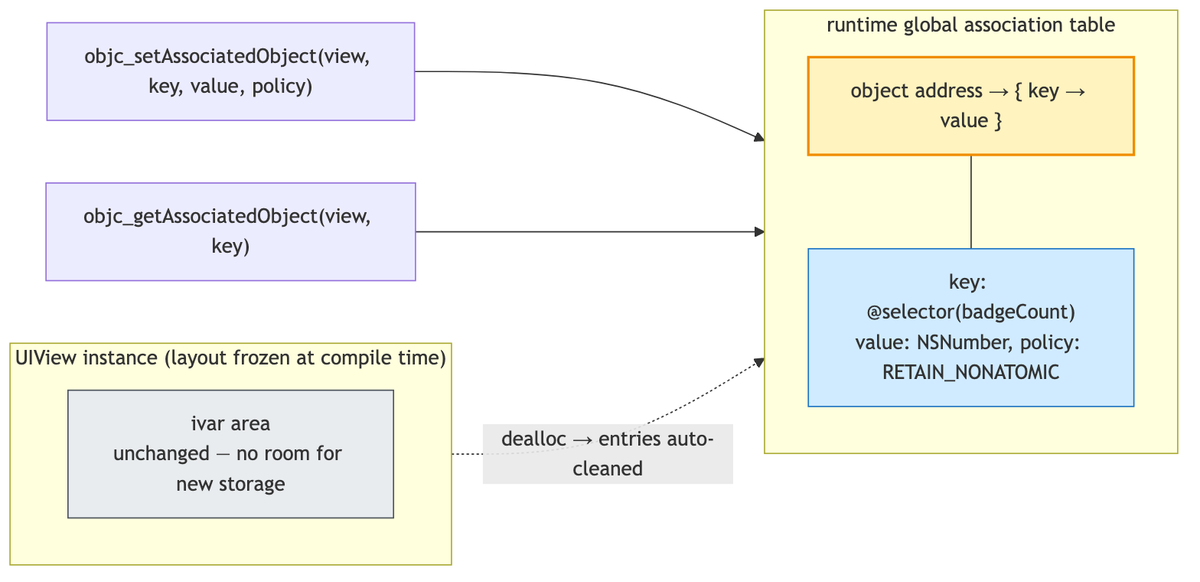
The value is not stored in the object’s ivar area. The runtime records it in a globally managed association table (side table) as “object address → {key: value}”.
The object’s own memory layout does not change by even one byte, so there is no conflict with the layout constraints fixed at compile time.
When the target object is deallocated, the runtime finds its entry in the association table and cleans it up according to the policy. Automatic lifetime management makes this useful in production.
A complete category-property implementation
When you declare a property in a category, the compiler generates only getter/setter declarations, not storage. Associated Objects fill that gap.
#import <objc/runtime.h>

@interface UIView (BadgeCount)
@property (nonatomic, strong) NSNumber *badgeCount;
@end

@implementation UIView (BadgeCount)

- (NSNumber *)badgeCount {
    return objc_getAssociatedObject(self, @selector(badgeCount));
}

- (void)setBadgeCount:(NSNumber *)badgeCount {
    objc_setAssociatedObject(self, @selector(badgeCount),
                             badgeCount,
                             OBJC_ASSOCIATION_RETAIN_NONATOMIC);
}

@end
Using @selector(badgeCount) as the key is conventional. Because keys are compared by pointer address, any address unique across the app will work.
Selectors are guaranteed to be unique at runtime, and they require no separate static variable, making them the cleanest option. The classic approach, such as static void *kBadgeKey = &kBadgeKey;, is still valid.
Using a string literal as the key is a trap. Even identical contents can have different addresses when they come from different compilation units.
That is where the mystery of “I definitely stored it, but I’m getting nil” begins.
Memory policies: only assign requires special care
The fourth argument corresponds to the property attribute.
| Policy | Matching attribute |
|---|---|
OBJC_ASSOCIATION_RETAIN_NONATOMIC |
strong, nonatomic |
OBJC_ASSOCIATION_COPY_NONATOMIC |
copy, nonatomic |
OBJC_ASSOCIATION_RETAIN / COPY |
Same as above, but atomic |
OBJC_ASSOCIATION_ASSIGN |
assign — not weak |
There is exactly one point to watch: ASSIGN. Despite its name, it is unsafe and does not automatically become nil_unretained, like weak does.
If the associated object is deallocated first, a dangling pointer remains. Accessing it causes a crash.
If you need weak semantics, wrap the value in an object with a weak property and associate that wrapper using RETAIN.
To remove a specific associated value, set it to nil. objc_removeAssociatedObjects wipes every associated value from the object and should almost never be needed.
Practical uses and boundaries
A combination commonly seen in production looks like this.
- UIKit class extensions: attach a badge count to UIView, a closure-based action handler to UIButton, or an analytics screen name to UIViewController
- Delegate-to-block wrapper: associate the delegate object with the original object to bind their lifetimes (networking categories from the generation before Alamofire used this often)
- Swizzling and friends: use it when logic injected through swizzling needs somewhere to store state. That is why these two runtime techniques often appear together in production
There are limits, though. Associated Objects are only a channel for auxiliary data.
When an object’s core state is scattered across the association table, readers have trouble seeing the full picture. If you can create a subclass, an ivar is the right answer.
Use this card only when you need to attach supplementary information to a class you do not own.
The same functions can bypass Swift extension stored-property constraints, but only for NSObject-based types. In Swift, combining a protocol with a dedicated storage type, or using composition, is usually more natural.

Summary
- Associated Objects store values in the runtime’s side table, not in the object itself. That is why they work in categories.
- Keys are compared by pointer address. Reusing
@selectoris conventional; string literals are a trap. - Among memory policies,
ASSIGNis not weak but unsafe_unretained. Watch for dangling-pointer crashes. - When the target object is deallocated, its associated values are cleaned up automatically.
- The boundary is attaching auxiliary data to a class you do not own. Putting core state here is a red design signal.
The next article in the runtime series is NSProxy. We will dissect how another root class—not NSObject—operates as a “pure proxy,” as previewed in the message-forwarding article.